
Manage goals: targets, switches, and what the engine does with them
How goals work in Autron: one target and one ad-engine switch per product, what each Status means, and how to change, pause or stop them on the Goals page or by asking the agent.
TL;DR: A goal is a pair: what you want more of and the limit you will accept, like Grow sales, ACoS ≤ 30%. Every product has its own goal and switch on Goals, and the account-wide goal is the default. Change a target on its row or ask the agent. Switching a product off pauses most of its campaigns; Stop ad engine pauses every campaign the engine built, and never your own. Goals come with Autron Pro.

Goals tell the ad engine what to do. Each one is a pair, what you want more of and the limit you will accept getting it, and Grow sales, ACoS ≤ 30% reads as one instruction. Goals and the ad engine come with Autron Pro; see Autron plans.
How goals work
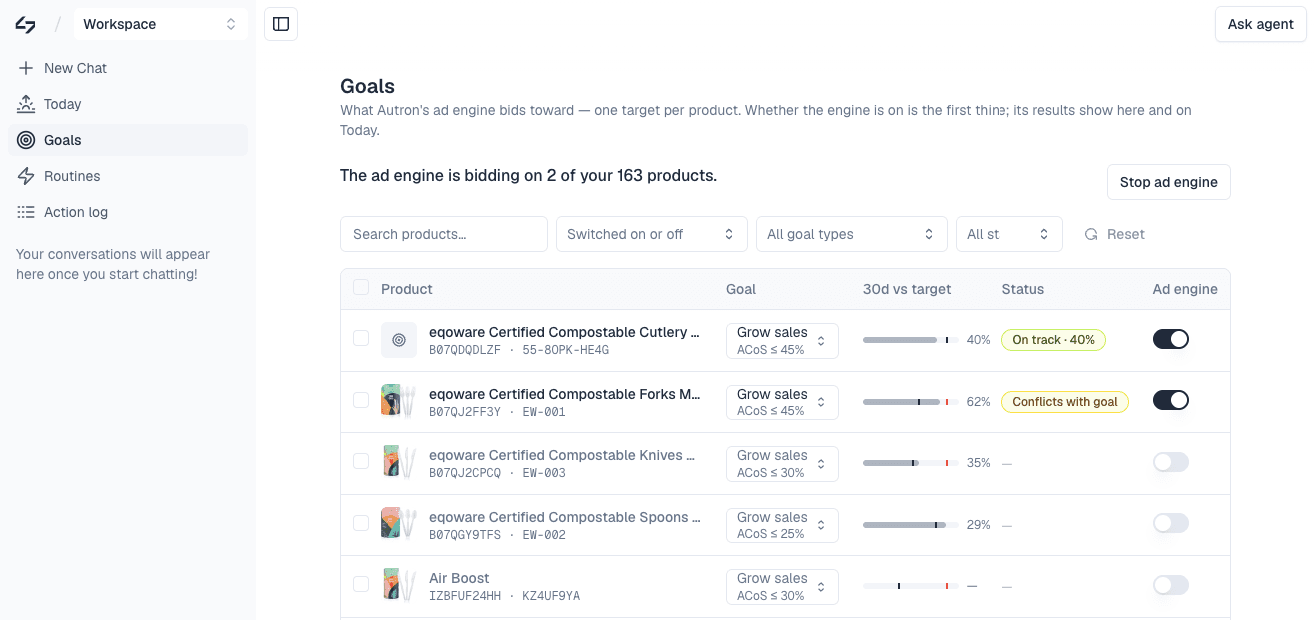
- Every product has its own goal and its own switch. The Goals page lists them with each product's goal, a 30d vs target bar (the 30-day actual, your cap, and the estimated break-even in red), Sales (30d), a Status, its Exceptions and its Ad engine switch.
- The account-wide goal is the default. A product with no goal of its own inherits it. A product goal overrides it for that ASIN.
- Start ad engine / Stop ad engine at the top of the page works on the whole account. The switch on each row works on one product.
Targets
- Grow sales with a Max ACoS cap: keep advertising cost of sales at your number and buy what that allows. The usual starting point.
- Grow sales with a Max TACoS cap: the same, measured against your total sales, organic included. Needs a Selling Partner connection.
- Max profit: optimise on margin rather than revenue, with no percent target. Needs your product costs. See Profitability and product costs.
The target on the Goals list edits a percent cap only. To move a product to TACoS or Max profit, open it from Goals, press Change goal, choose Max ACoS, Max TACoS or Max profit, and press Save goal. The agent can make the same change.
The product's page also shows Profit / unit over 30 days, after product costs, Amazon fees and ad spend. Without costs it reads needs product costs, and Add costs opens the agent to add them.
What the Status means
A Status shows only while a product is switched on. A product that is off shows a dash.
- On track · N%: the 30-day ACoS or TACoS is at or under your cap.
- Above target · N%: the 30-day figure is over your cap. The engine works it down; ask the agent why if it stays there.
- Conflicts with goal: a Grow sales cap 10 or more points under the product's estimated break-even, so the engine mostly cuts bids. Click it for a −/+ stepper and Save target. The product's page offers Raise to the smallest cap that clears the rule, still under break-even, or It's intentional.
- Below break-even · by choice: you chose It's intentional. It stays quiet unless your target or costs change.
- Margin-first: a Max profit goal, which has no percent to compare.
- No data yet: no advertising data for the product has arrived yet.
- No ad sales · 30d or No sales · 30d: no ad sales (on an ACoS goal) or no sales at all (on a TACoS goal) in 30 days, so there is nothing to divide by. On a product that's on, that's worth a look.
- No target: the goal has no percent cap. Set one.
Change a target
On Goals, click the product's goal, type a new percent and press Enter. Or select several rows and use the bar that appears: Turn on, Turn off, Change cap (one ACoS or TACoS cap across them) or Ask agent. Save a goal on a product's page and it reads Saved · waiting for the engine, then Saved · Engine applied once an optimisation cycle has run with it. There is nothing to clear or reset first.
Or ask the agent:
- "Lower my ACoS target on the garlic press to 20%"
- "Switch B07ABC1234 from ACoS to TACoS targeting"
- "Set my new product to maximize profit"
The agent shows the change on an approval card, and nothing changes until you allow it, unless you've chosen to always allow goal changes in Agent permissions.
Pause a product, or stop everything
- One product. Switch it off on its row, or select several and press Turn off. The engine pauses its campaigns for that product and keeps its target. Campaigns on your own brand name cover more than one product, so they can keep running; to stop one, ask the agent to pause it. A campaign you've paused, changed or put hands-off on through the agent is left as it is; an exception on a keyword inside it doesn't count. Switching the product back on restarts the engine's campaigns, but not those in the Autron Strategic portfolio.
- Everything. Stop ad engine at the top of the page. It pauses the campaigns the ad engine built, brand-name ones included, and Autron stops changing anything. Your own campaigns aren't touched, and neither are those in the Autron Strategic portfolio. Starting again turns the engine's campaigns back on.
A campaign paused by hand in Amazon Ads does not stick while its product is on: the engine switches it back on at its next check. Pause it through the agent and it stays paused.
- "Pause Autron on B07ABC1234 and B07XYZ5678 while they're out of stock"
- "Re-enable Autron on all my products"
Where you've stepped in
Open a product from Goals and Where you've stepped in lists every change the agent made on Amazon for you that Autron is standing back from, with Keep and Hand back on each. See Exceptions for what each kind does and when to use it.
Ask what is going on
- "What are my current goals?"
- "Is Autron running on my garlic press?"
- "What has the engine changed on B07ABC1234 this week?"
- "What have I stepped in on for the garlic press?"