
Start the ad engine
Turn on Autron's ad engine for the products you choose, pick a target, and know what to expect in the first days.
TL;DR: On Goals, press Start ad engine, tick the products it should run, set a target and press Start. The engine then builds its own campaigns for those products; allow up to a day for the first to show in Amazon Ads, and longer for a large catalogue. It does not edit campaigns you built. A product added to your catalogue later appears on Goals switched off; switch it on for the engine to build for it.

The ad engine is the part of Autron that runs your campaigns for you — bids, budgets, keywords and negatives, adjusted continuously against a target you set. This article covers turning it on.
Where it lives
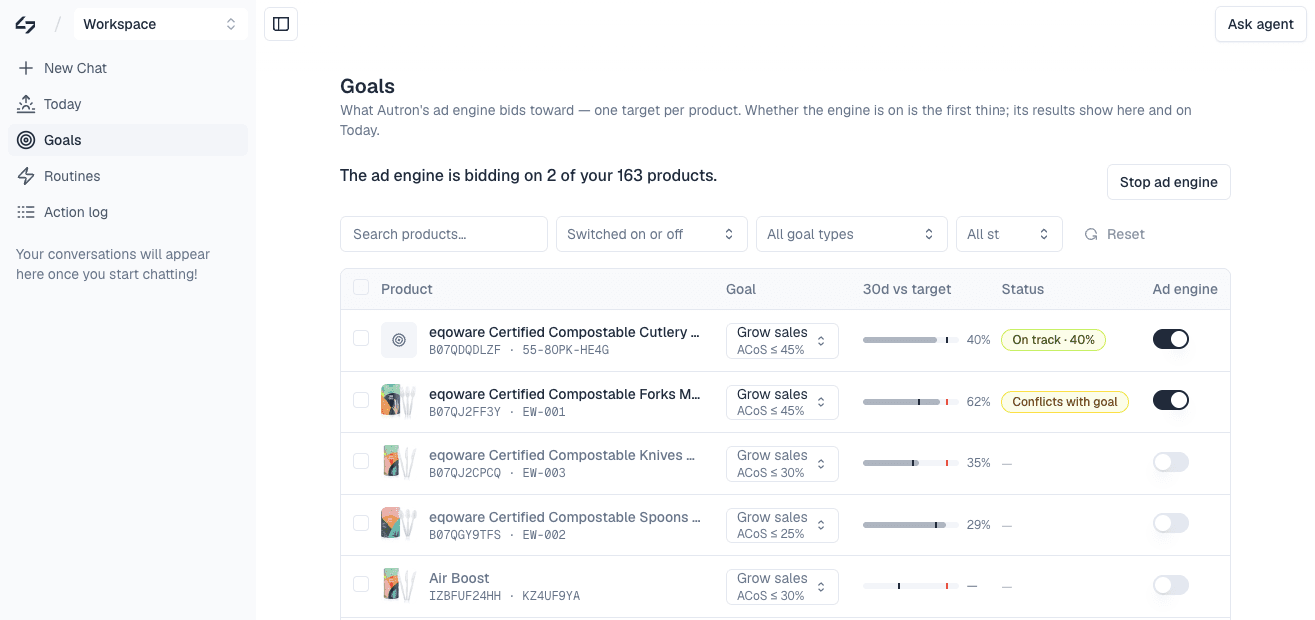
Open Goals. Every product you sell is listed with its own goal and its own switch, and the line above the table tells you how many products the engine is bidding on right now.
Choose a target
Each product's goal is two things: what you want more of, and the limit you will accept getting it — Grow sales, ACoS ≤ 30% reads as one instruction. Everything the engine does is in service of it.
- Grow sales, Max ACoS — keep ad cost of sales at your number and buy the volume that allows. The usual starting point.
- Grow sales, Max TACoS — the same idea measured against your total sales, not just ad-attributed ones. Needs a Selling Partner connection.
- Max profit — optimise on margin rather than revenue. Needs your product costs.
Starting the engine puts the products you pick on one ACoS cap; a product that already has its own target keeps it. Move a product to TACoS or Max profit afterwards from its own page. See Manage goals.
Start it
Press Start ad engine. Autron suggests a set of products to start with; tick the ones the engine should run, set the Target for every product, and press Start on your chosen number of products. Products you leave unticked stay off.
Once it is running the same button reads Stop ad engine, and the Status column starts reporting, for example On track, or Conflicts with goal where a target cannot be met as set. Manage goals explains each status. You can start with one product and add more later with the switch on its row, so nothing forces an all-or-nothing decision.
What to expect
- The first day is quiet. The engine studies your history before it changes much. It starts building campaigns shortly after a product is switched on, and a daily pass picks up anything still to build, so allow up to a day for the first to show in the Amazon console. It builds up to 100 new campaigns a day in each workspace, so a large catalogue fills in over several days.
- New products start switched off. A product added to your Amazon catalogue later shows up on Goals with its switch off, and the engine builds nothing for it until you switch it on. It then starts on your account-wide target.
- Make changes through the agent, not by hand. A bid edited by hand in Amazon Ads is moved back toward your target on the next pass, and a campaign paused by hand is switched back on at the engine's next check while its product is on. Made through the agent, the same change is an exception and Autron stands back. See Exceptions. To stop a whole product's campaigns, switch the product off.
- Your existing campaigns keep running. The engine never edits campaigns you built, and on the same product they can compete with its campaigns in the same auctions. Already running Amazon Ads? covers the transition.
Stopping
Stop ad engine halts it across every product and pauses the campaigns the ad engine built, brand-name ones included. Your own campaigns aren't touched, and nothing is deleted. Starting again turns them back on. Switching a single product off is different: the engine pauses its campaigns for that product, apart from those on your own brand name, and the rest keep running.