Most sellers who want to automate Amazon advertising already do the work by hand every week: pull the search term report, add negatives, move winners into exact match, nudge bids, raise budgets that ran out. None of it is hard. It just never ends, and it slips in exactly the weeks that matter. Black Friday is eleven days away.
This guide breaks Amazon PPC automation down task by task: which loops to hand to software, what Amazon's built-in automation actually does, where it stops, the guardrails to set first, and the decisions you should keep.
What you can automate in Amazon advertising
Amazon ads management is a handful of loops that repeat on different clocks.
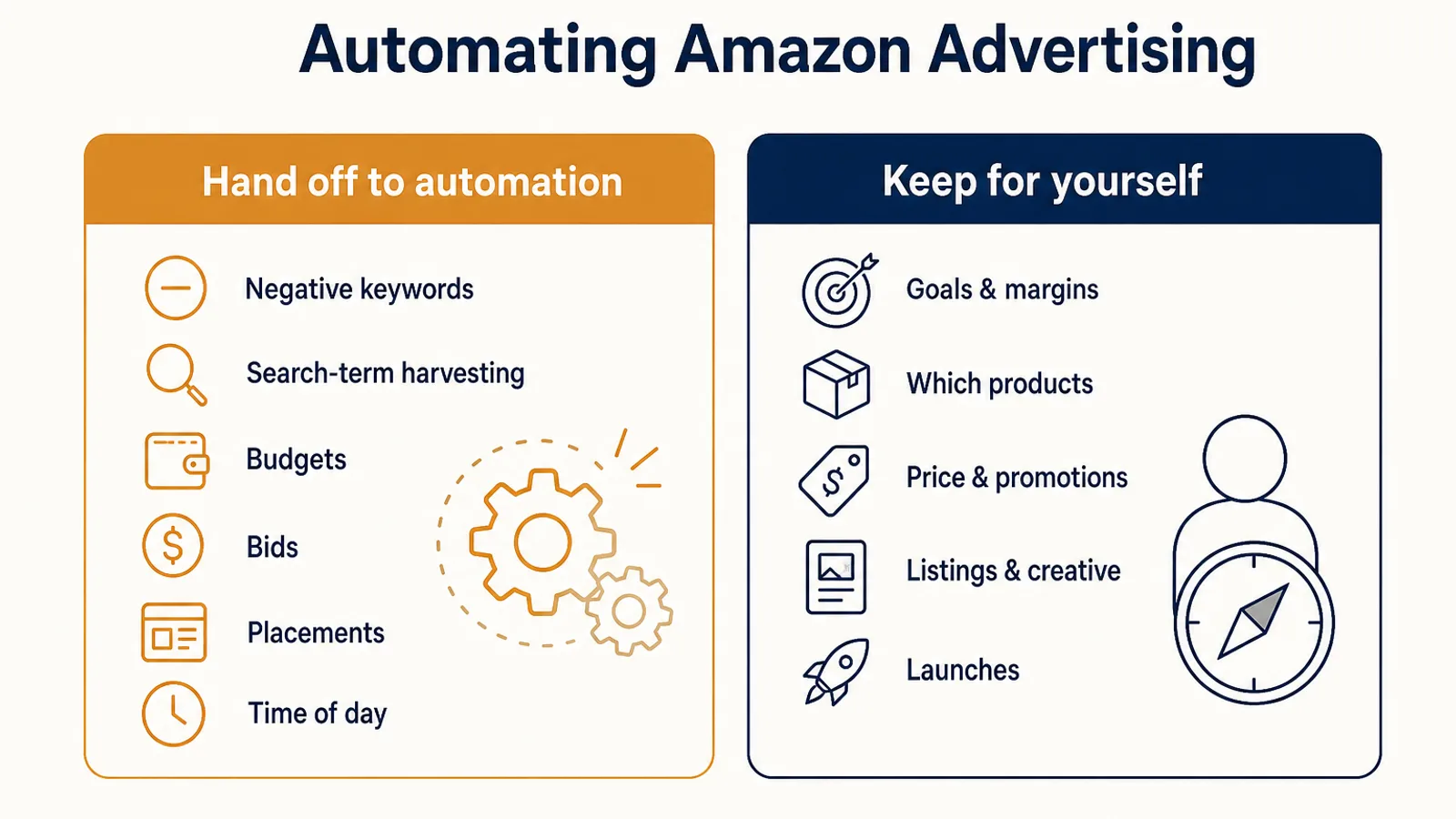
| Task | How often it needs doing | Amazon's built-in option | What still needs judgment |
|---|---|---|---|
| Negative keywords | Weekly | None that adds them for you | Which terms are truly irrelevant |
| Search-term harvesting | Weekly | Keyword suggestions only | Which winners deserve their own budget |
| Budgets | Daily, more around events | Budget rules | Your total monthly spend |
| Bids | Daily or hourly | Dynamic bidding, schedule bid rules | What a sale may cost you |
| Placements | Weekly | Placement adjustments, set by hand | Whether top of search pays for itself |
| Time of day | Hourly | Schedule bid and budget rules | When your buyers convert |
| Reporting and alerts | Daily | Scheduled reports | What counts as a problem |
The right-hand column is the part no tool, Amazon's included, can do for you.
Amazon's built-in automation, and where it stops
Amazon gives you more automation than most sellers use, at no extra cost.
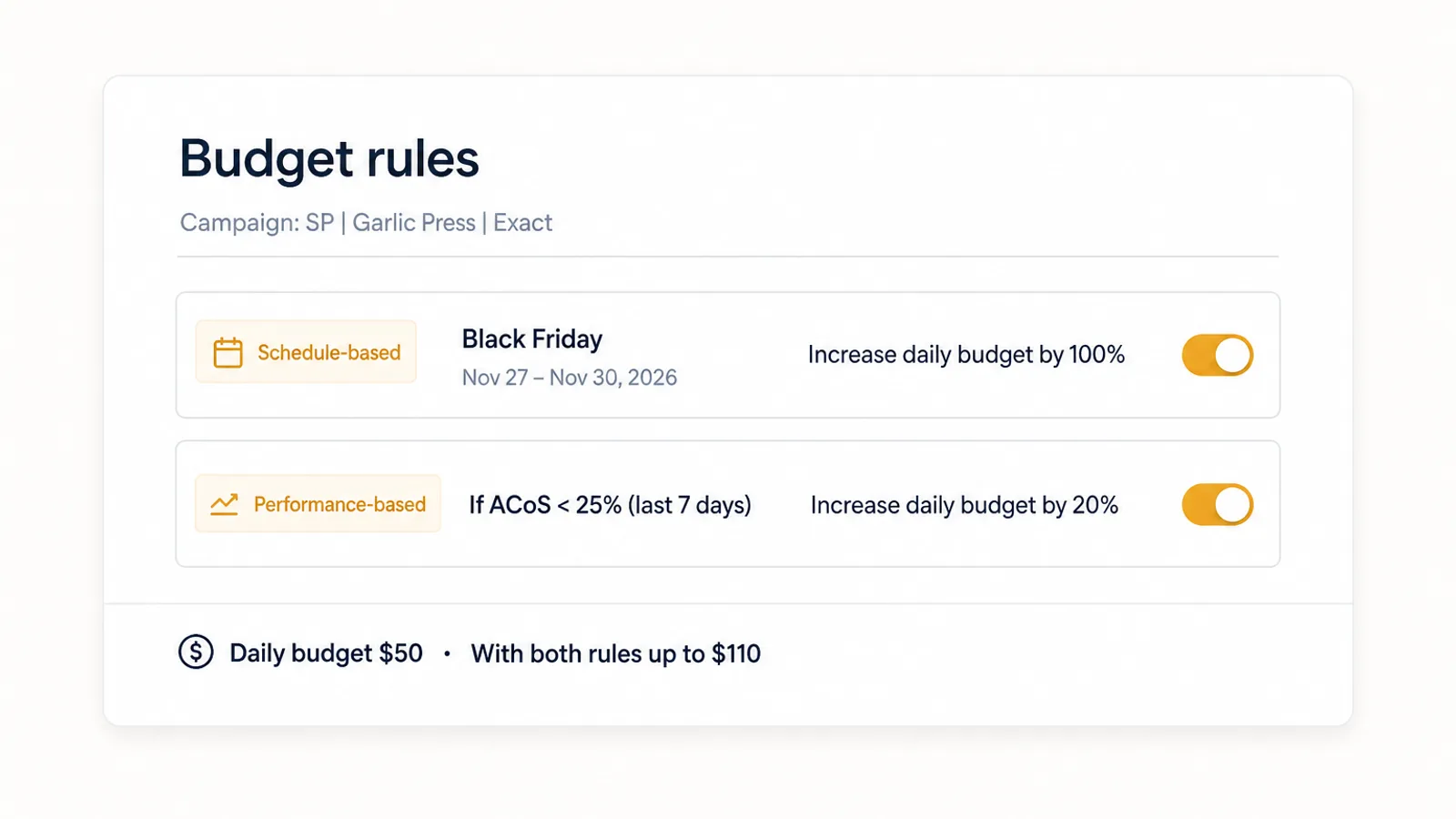
- Budget rules. Since 2021, Sponsored Products campaigns can raise their own budgets with two kinds of rule. A schedule-based rule raises the budget for a shopping event Amazon recommends or a date range you pick. A performance-based rule raises it only when the campaign's ACoS, click-through rate or conversion rate over the prior seven days meets your threshold, and needs a daily budget of at least $10. Amazon's own example is a rule that increases the budget by 100% on Black Friday. In the US, Canada, UK, India and Japan you can also schedule budget increases by hour of day.
- Schedule bid rules. Since November 2023, Sponsored Products can increase bids at set times of day, days of the week and date ranges.
- Dynamic bidding. With "up and down", Amazon raises your bid in real time when a click looks likely to convert, by up to 100% for top of search and up to 50% for other placements, and lowers it when a click looks unlikely to.
- Recommended budgets. Amazon works out the recommended budget as estimated missed clicks times estimated CPC. It tells you how much more Amazon could spend, which is not the same as how much more you should.
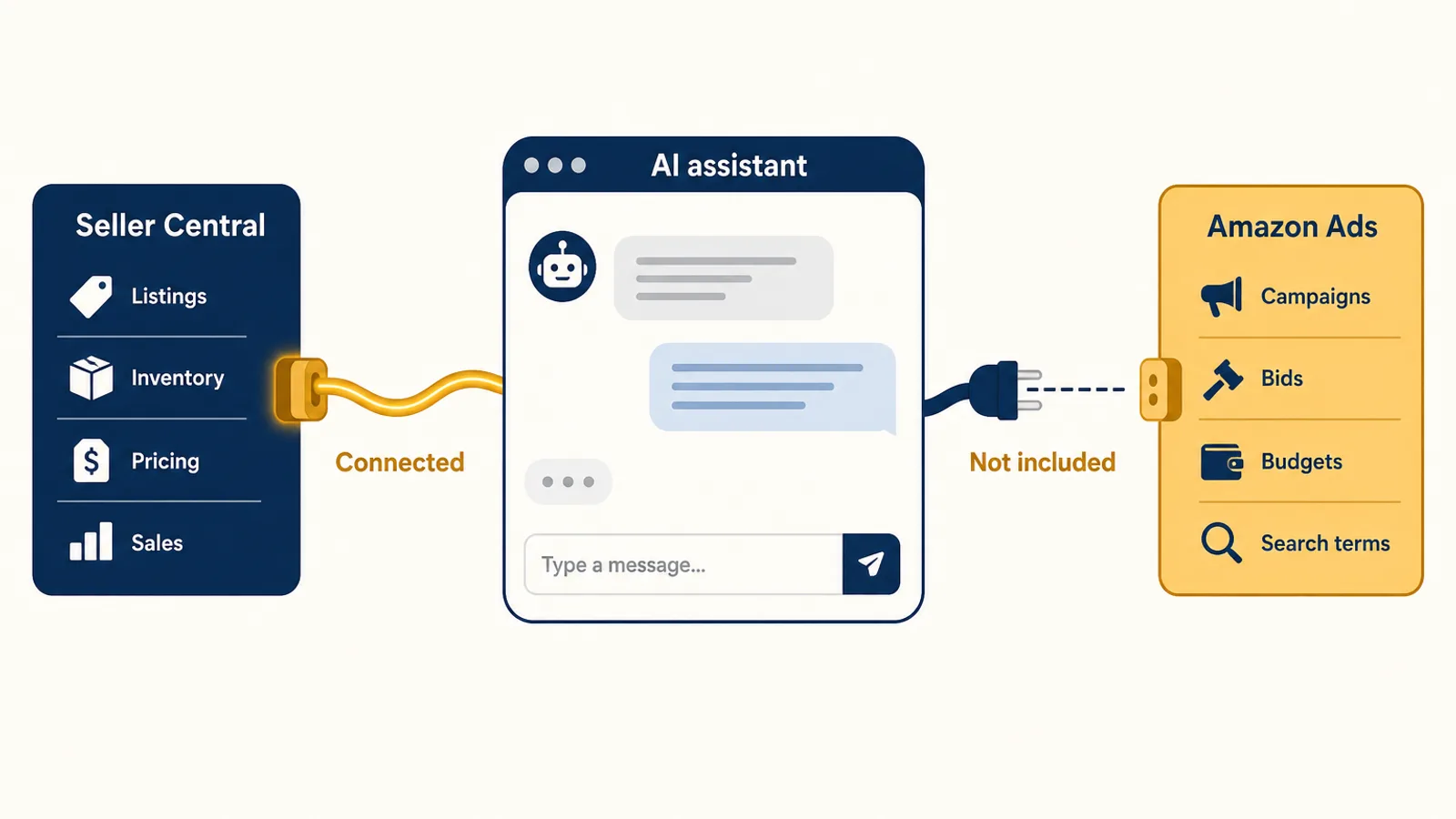
- Automatic targeting and Amazon Ads Agent. Auto campaigns find search terms for you, and Amazon's new agent can build campaigns from a prompt. We covered what that agent is good at, and whose side it is on, in Amazon Ads Agent vs your own AI agent.
Three gaps run through all of it.
The rules raise, they don't trim. Amazon describes both budget rules and schedule bid rules as ways to increase spend. Cutting a keyword that has had 30 clicks and no orders is still your job.
Nothing harvests or negates for you. Auto campaigns surface new search terms, but promoting the converting ones into exact match and blocking the wasteful ones is left to you or a tool. That is most of the weekly work.
Nothing knows your margin or your stock. Amazon's bidding optimises for conversions in its auction. It doesn't know a product costs you $14 to land, or that you have nine days of inventory left. As the April 2026 dynamic bidding change showed, your CPCs can move without you changing a thing.
Rules or goals: two ways to automate bids
Third-party Amazon advertising automation comes in two styles, and the difference matters more than the feature list.
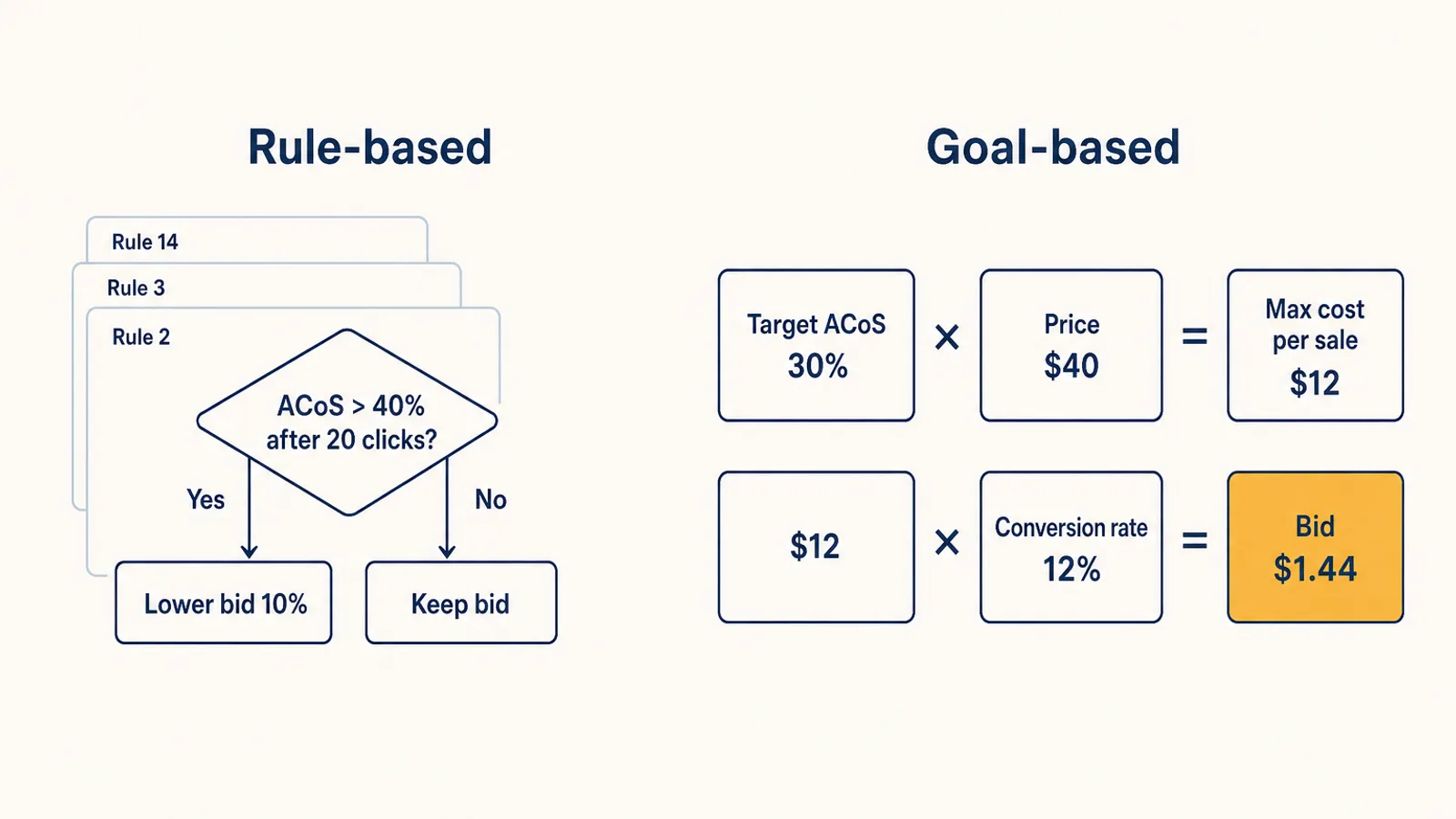
Rule-based automation runs if-then statements you write: "if ACoS is above 40% after 20 clicks, lower the bid 10%". Rules are transparent and easy to start with. They also multiply. Every edge case needs another rule, the thresholds you picked in March are wrong by November, and nobody remembers why rule 14 exists.
Goal-based automation starts from what a sale may cost you and works the bid out from there. At a 30% target ACoS on a $40 product, a sale may cost $12 in ads. If a keyword converts 12% of its clicks, it can afford about $1.44 a click ($12 × 12%). When its conversion rate drops, the bid drops with it. You change one number, the target, instead of maintaining a rulebook.
Rules are fine for a few campaigns. Past a few hundred keywords, goals hold up better, because the logic doesn't need rewriting each time the market moves. If you are comparing tools, our guide to choosing Amazon PPC software covers the questions to ask.
How to automate Amazon advertising, in the right order
Hand over the loops where a mistake is cheap first, and the ones where a mistake is expensive last.
- Set a goal for every product. A target ACoS or TACoS per product, worked out from its margin, not one number for the account. If you haven't done the maths, start with your break-even ACoS, and read ACoS vs TACoS to decide which one to steer by.
- Automate negative keywords. Search terms that keep getting clicks without orders, or that are plainly irrelevant, get blocked every week. This is where most wasted ad spend hides, and an over-eager negative is easy to reverse.
- Automate search-term harvesting. Terms that convert in auto and broad campaigns move into their own exact-match targeting, so they get their own bid. Our search term report guide shows what the software is reading.
- Automate budgets, inside a total. Let budgets move to the campaigns that are earning, but cap the account. Amazon's account-level daily budget cap or a monthly spend plan is the backstop, because adding up campaign budgets says little about what you will actually spend.
- Hand over bids last. Once goals, negatives and budgets are in place, bid automation has clean signals to work with. Give it a ceiling and a floor, and give it a couple of weeks before judging it.
- Keep a review rhythm. A weekly look at which products are over target, and why, is enough most of the year.
Guardrails to set before you hand over the keys
Automation fails in predictable ways, most of them prevented on day one.
- A spend limit that holds. A monthly or daily limit for the whole account, not just per campaign.
- Bid ceilings. A maximum CPC tied to what the product can afford, so a thin-data keyword can't run away.
- Stock awareness. Ads on a product about to go out of stock burn money and rank. Bids should drop before the stock runs out, not after.
- Exceptions for launches and events. A new product or a sale week needs different rules for a while. Set the exception with an end date, so it doesn't outlive the reason.
- One owner per lever. If a tool manages bids and you also edit them in the console, the two will undo each other. Make changes through the tool, or take the lever back from it.
- A log you can read. Every change, with a reason.
Automating for Black Friday and Cyber Monday
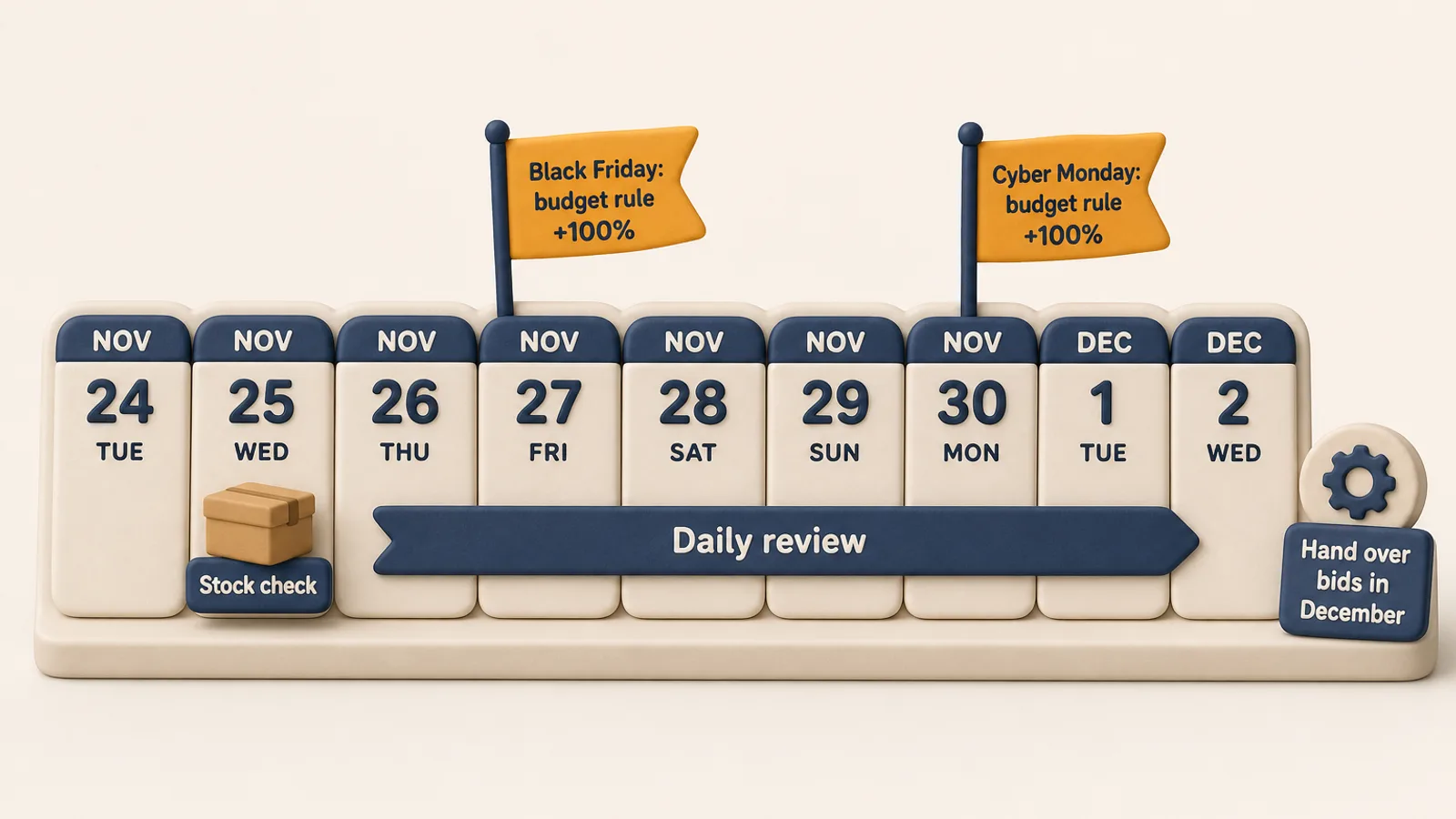
Eleven days out, the useful moves are the ones that don't need a learning period.
- Schedule budget rules for November 27 to 30. Campaigns that run out of budget can't show again until the next day, which on Black Friday means losing the evening. Pair the rule with an account-level cap so the total stays where you want it.
- Clear the negatives backlog now. Cyber Week clicks are expensive. Blocking last month's wasted search terms before traffic peaks is the cheapest saving available.
- Check stock against the forecast. If a product will sell out on Saturday, plan its bids around that, not around its ACoS.
- Don't switch on new bid automation this week. It would still be learning when the peak hits. Hand bids over in December, when traffic settles and the data is cleaner.
- Review daily from Thanksgiving to Cyber Monday, then go back to weekly.
What to keep for yourself
Keep the decisions that need context no ad tool has:
- Goals and trade-offs. Whether a product should grow at a loss, hold its margin or wind down.
- Which products to advertise. Stock plans, new launches, products you are about to discontinue.
- Price, promotions and coupons. These move conversion rate more than any bid.
- Listings and creative. The page the click lands on.
How Autron automates Amazon advertising
Autron Pro runs the loops above on your account against the goal you set for each product, a target ACoS or TACoS, or maximum profit. The engine:
- Sets bids every hour from the last 90 days of data, working out what each keyword can afford from the product's price, your target and its conversion rate, with a ceiling tied to the product's price and a floor. Bids scale down overnight and drop to a token amount when FBA stock runs out.
- Adds targets and negatives from your search-term reports, promoting converting terms into their own campaigns and blocking what wastes spend.
- Adjusts placement bids twice a week, by where your ads convert.
- Paces budgets to a monthly spend plan on the accounts it paces, and you can ask the agent for a hard limit by day, month or date range. See budget caps for how that works.
- Steps aside for exceptions. Ask the agent to hold bids through a sale event or push a launch for a set window, and the engine takes over again when it ends.
How Autron creates and manages campaigns has the detail. Pro costs $150 a month plus a commission on the ad sales it drives, paid from day one. If you would rather keep making the changes yourself, the Agent plan (from $50/mo) runs routines, like a weekly wasted-spend sweep, that propose changes for you to approve.
FAQ
Can you automate Amazon advertising without a third-party tool? Partly. Amazon gives you budget rules, schedule bid rules, dynamic bidding and automatic-targeting campaigns, and they cost nothing extra. They raise budgets or bids on a schedule or a performance threshold. They don't turn converting search terms into keywords, add negatives for you, or bid against your margin and stock. That part needs a tool or your own time.
What should you automate first in Amazon PPC? Negative keywords and search-term harvesting. They repeat every week, the rules are clear, and a mistake is cheap to undo. Budgets come next, then bids, once you have set a target ACoS or TACoS for each product.
Do Amazon budget rules lower budgets? No. Amazon describes both kinds of budget rule as ways to increase a campaign's budget, on a schedule or when performance meets a threshold. Schedule bid rules work the same way for bids. To cut spend you still lower bids or budgets yourself, or use a tool that does.
Should I switch on PPC automation right before Black Friday? Not for bids. Bid automation needs a couple of weeks of data to settle, so switched on now it would still be learning on Black Friday. Schedule a budget rule for the event, automate negatives, and hand over bids in December when traffic is steadier.
Is automated Amazon PPC better than managing it by hand? For repetitive work, usually yes, because software checks every keyword every day and a person can't. It is only as good as the goal you give it. Strategy, pricing, promotions and which products to push still need you.
Start with what your account is wasting
The quickest way to see what automation would change is to look at your own numbers first. Autron Agent is free to start, no card, and can show you which search terms are spending without selling and which products are over their target. When you want the engine running bids, budgets and negatives for you, that is Autron Pro, from $150 a month.