
Amazon Put Seller Central in Claude. Here Is What the Seller Assistant Plugin Means for Your PPC
Amazon's new Seller Assistant plugin for Claude reads your listings, inventory and sales, but not your ads. What it does, what it leaves out, and how to close the gap.
TL;DR: On September 23, 2026, Amazon launched a Selling Partner plugin that brings Seller Central into Claude, in beta for US sellers. It handles listings, inventory, pricing, sales and customer messages, with your approval on each action. It does not manage your ad campaigns, so questions that connect stock, price and ad spend still need an ads connection alongside it.

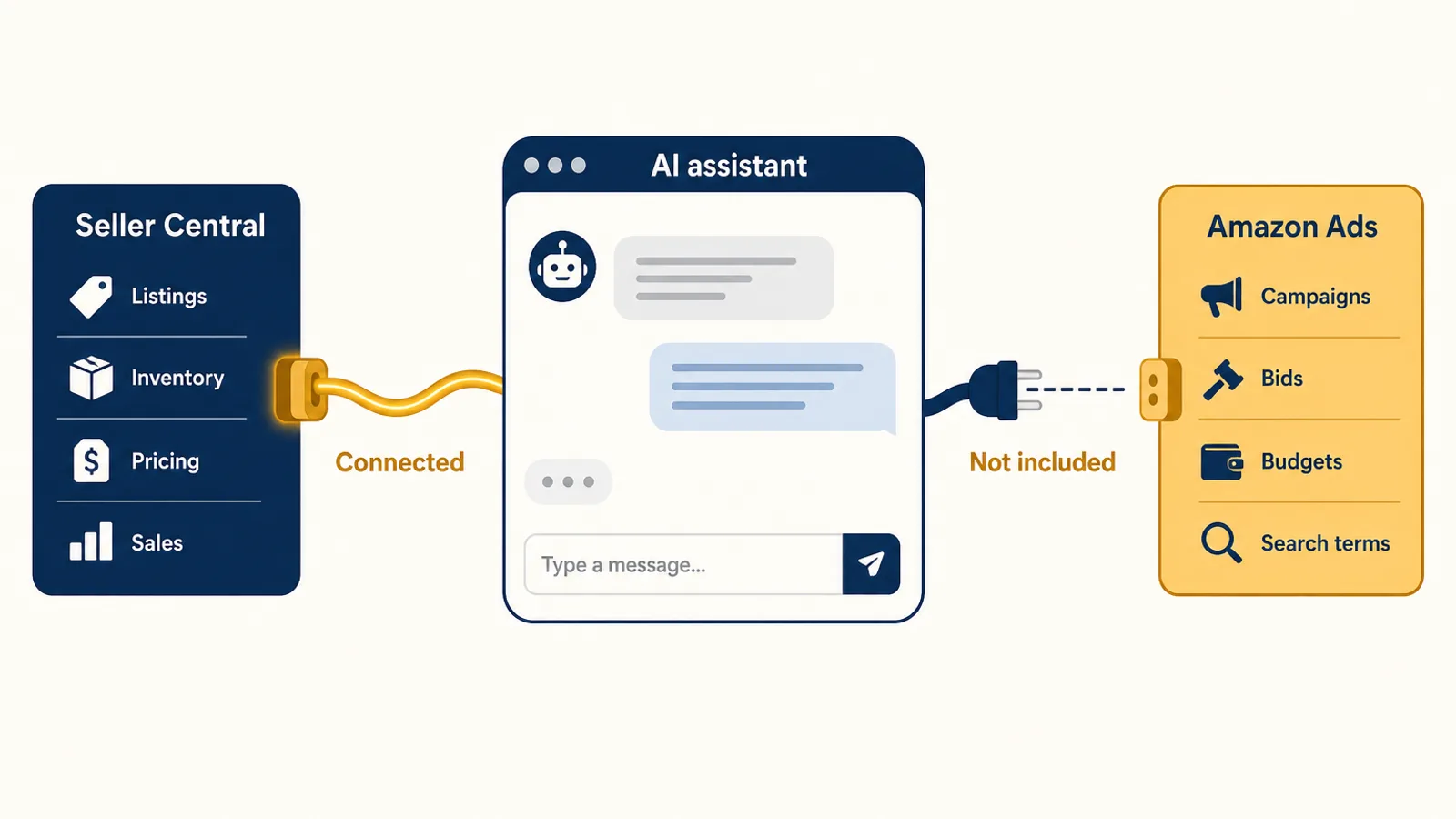
If you sell on Amazon and use Claude, last week changed your setup. At Accelerate 2026 on September 23, Amazon launched a Selling Partner plugin that brings Seller Central and its AI companion, Seller Assistant, into Amazon Quick and, in beta, into Anthropic's Claude. The Amazon Seller Assistant Claude plugin can read your catalogue, inventory and sales, and act on them once you approve.
For anyone who runs PPC, one detail matters more than the headline: your campaigns are not part of it. The plugin covers the Seller Central half of your business. Your Sponsored Products, Sponsored Brands and Sponsored Display accounts still live somewhere else. Here is what Amazon actually shipped, where the edge of it sits, and how to set Claude up so the questions that cross that edge still get answered.
What Amazon announced at Accelerate 2026
Three things landed together, and they are easy to blur.
A smarter Seller Assistant. Amazon says Seller Assistant has now rolled out to more than 90% of its selling partners worldwide, and that sellers accept its recommendations more than 90% of the time. The update adds persistent memory of your pricing patterns, inventory cycles and goals, plus workflows that run in the background.
The Selling Partner plugin. This is the part that reaches outside Amazon. It links your selling account to an outside AI tool, launching with Amazon Quick and, in beta, Claude. According to GeekWire's launch coverage, it pulls listings, inventory levels, sales analytics and performance metrics into the assistant, and lets you check stock, adjust prices and update listings without opening Seller Central. Amazon's Mary Beth Westmoreland put the intent plainly: "Our vision was that they would never have to log into Seller Central. We would just bring it to them where they work."
A free year of Amazon Quick Plus. Primary account holders, plus two co-workers, can get 12 months of Quick Plus at no cost if they sign up by December 31, 2026.
Amazon says the plugin connects in about 60 seconds with no coding, and it is in beta for sellers in Amazon's US stores, with other marketplaces to follow.
What the plugin can and cannot do
Read the launch material closely and a clear line appears.
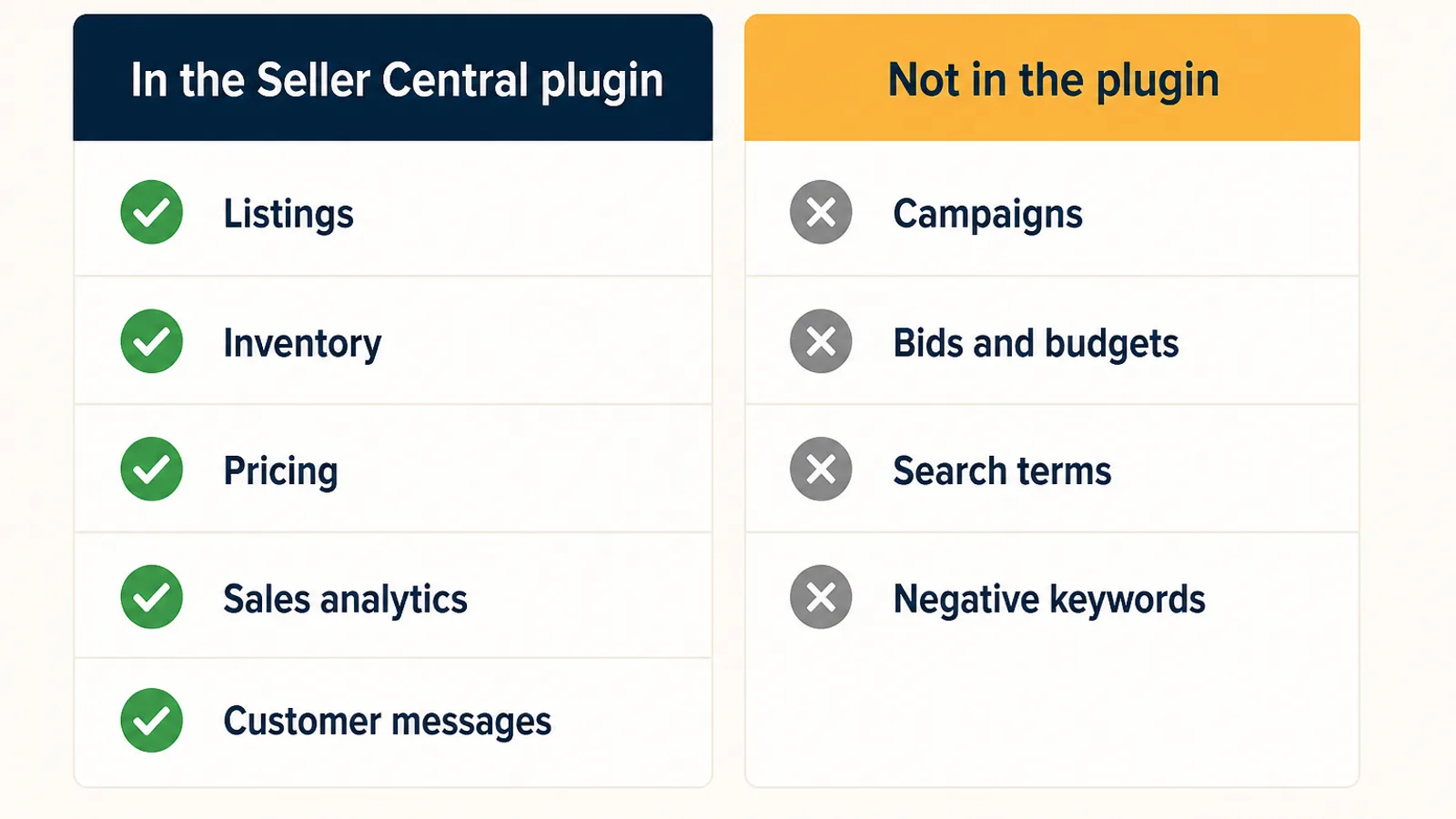
Inside the plugin:
- Listings and listing updates
- Inventory levels
- Pricing changes
- Sales analytics and performance metrics
- Customer messages
- Seller Assistant's recommendations and memory
Outside the plugin:
- Campaign, ad group and keyword management
- Bids, budgets and placement adjustments
- Search-term reports and negative keywords
- Any Sponsored Products, Sponsored Brands or Sponsored Display change
Amazon's own post mentions Seller Assistant spotting an "advertising or cross-promotion opportunity" as part of a workflow, but none of the launch coverage describes the plugin reading your ad reports or changing a bid. That is not an oversight you should expect to be patched next week. It follows from how Amazon's data is built.
Why your ads are not in it
Seller Central and Amazon Ads are two separate systems with two separate APIs. The Selling Partner API covers orders, listings, inventory and sales. The Amazon Ads API covers campaigns, targeting and ad reporting, with its own authorisation. A tool connected to one does not automatically see the other.
Amazon has an AI door on the ads side too. The Amazon Ads MCP server opened in beta on February 2, 2026 and works with Claude, ChatGPT and other MCP-compatible tools. But it is aimed at Amazon Ads partners with active API credentials, not at a seller clicking "connect" in a minute. We covered what that layer can and cannot do in our honest breakdown of running PPC through ChatGPT or Claude.
So the practical picture today is this: Amazon gave sellers a one-minute, approval-gated path from Claude into Seller Central, and a developer-grade path into Amazon Ads. If you want Claude to talk about both, you have to wire the ads side yourself or use a connector that already has.
It is also worth watching this week. Amazon Ads' unBoxed conference runs September 28 to 30, and an advertising-side announcement could change this picture. Until one ships, plan around what exists.
The PPC questions that need both halves
This is where the gap stops being theoretical. The most expensive mistakes in Amazon PPC usually happen at the join between Seller Central data and ad data, which is exactly where the new plugin stops.
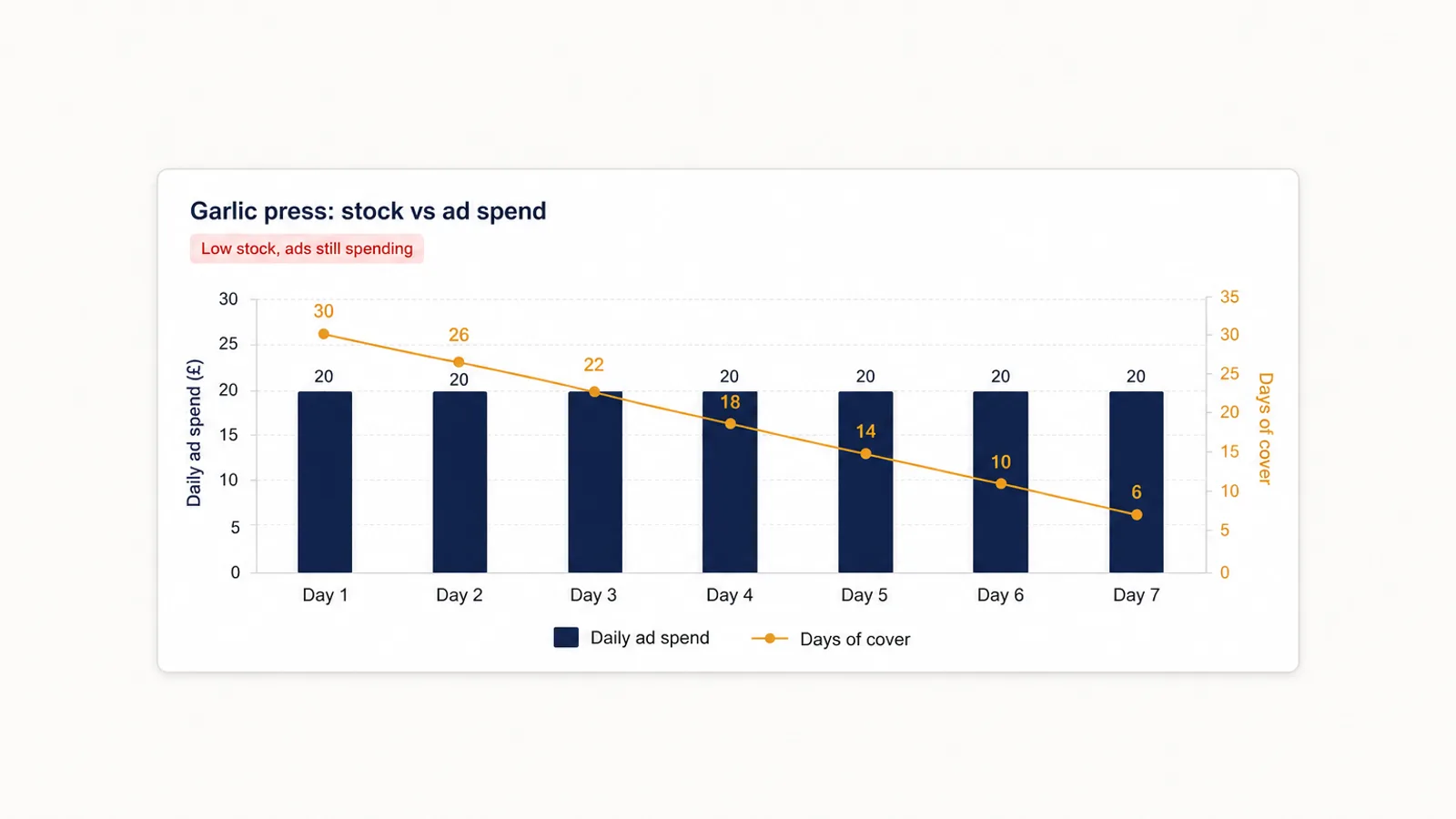
Stock running out while ads keep spending. The plugin can tell you an ASIN has nine days of cover. It cannot tell you that the same ASIN is your biggest spender this week, or turn its bids down so you stop buying clicks for units you are about to stop shipping.
A price change that moves break-even ACoS. Use the plugin to cut a price by 10% and your margin per unit drops, which lowers the ACoS you can afford. Your bids do not know that. The target that was profitable on Monday can lose money on Tuesday. We walked through the maths in our Q4 break-even ACoS post.
A suppressed listing with live campaigns. Listing health is on the Seller Central side. The campaigns pointing at that listing are on the ads side. One without the other gives you half an answer.
TACoS, the metric that is literally both halves. Total ACoS divides ad spend by total sales. Ad spend lives in Amazon Ads, total sales in Seller Central. If your assistant can see only one, it cannot tell you whether ads are growing the business or cannibalising organic sales.
Each of these is a question you would naturally type into Claude now that Seller Central is there. Each one gets a confident, partial answer unless ad data is in the same conversation.
How to set up Claude for both
The good news is that Claude does not limit you to one connector. You can enable several in the same conversation and let Claude pull from each.
- Connect Amazon's Selling Partner plugin for Seller Central: listings, inventory, pricing and sales.
- Connect an advertising connector for campaigns, bids, budgets and search terms. Autron is listed in Claude's connector directory; our help article on using Autron with Claude shows the steps.
- Turn both on in the same chat and ask the cross-over questions directly: "Which ASINs have under 14 days of cover but are still in my top 20 by ad spend?"
One difference is worth knowing before you rely on it. Autron's connector reads both your Amazon Ads account and your Selling Partner data, including sales and traffic, Search Query Performance and FBA inventory, so many of the questions above can be answered from a single connection. The Amazon plugin adds Seller Assistant's own recommendations and direct listing and pricing actions on top.
Keep approvals on for anything that spends money
Amazon built the plugin so that sellers approve each action before it runs. That is the right default, and it matters even more on the ads side, where one misread instruction can change a thousand bids.
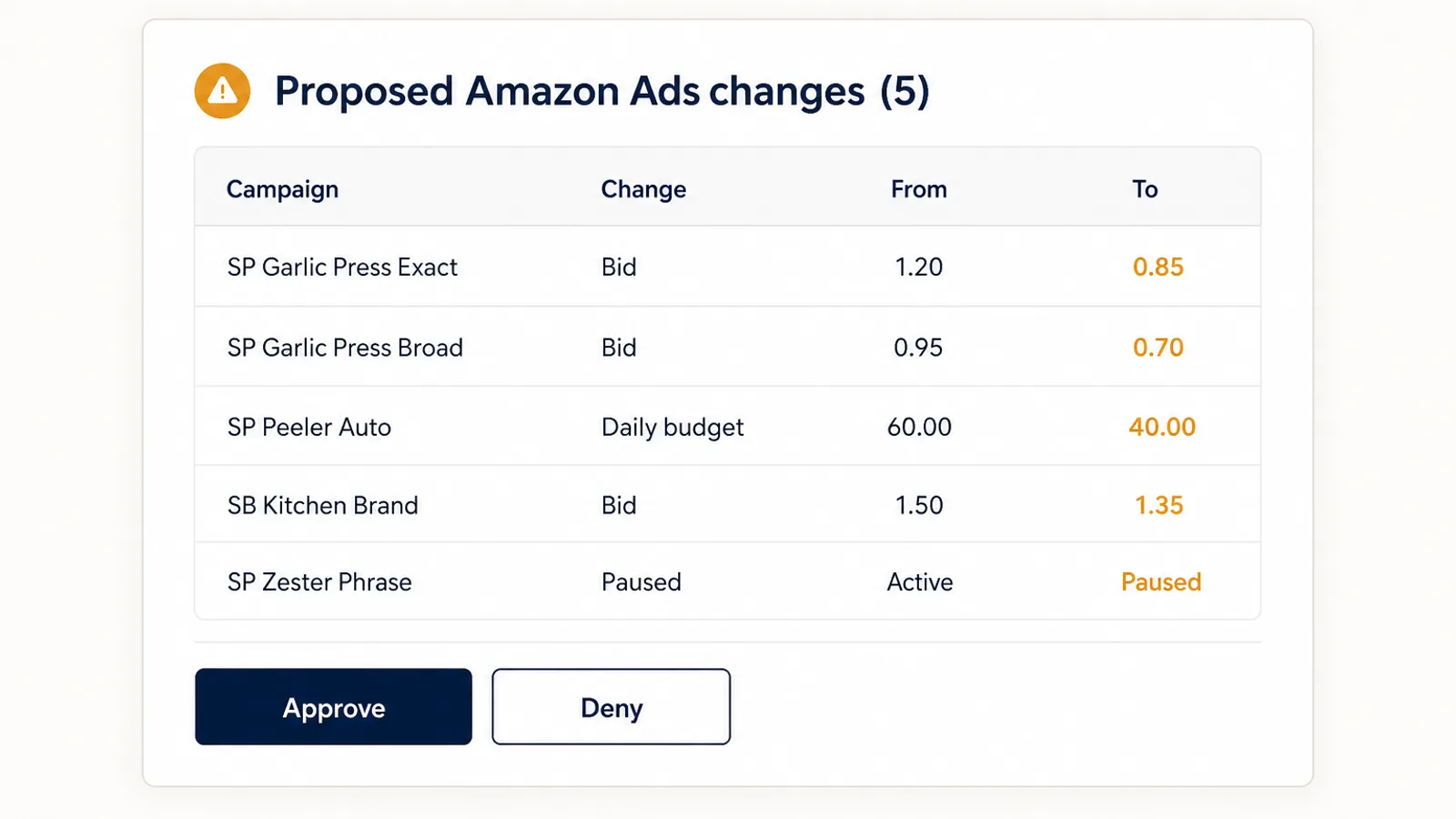
When you let an AI change your advertising, look for three things:
- See the whole batch first. You should see every bid, budget and campaign change in the batch before anything is sent to Amazon, not a summary that says "optimised 40 keywords."
- A log of what changed. When ACoS moves on Thursday, you need to know what was changed on Tuesday and by whom.
- Clear labelling of reads versus writes. Questions should run freely. Changes should never be a surprise.
Inside Claude, whether you are asked to confirm a tool call is controlled by Claude's own settings. Check them once, and keep confirmation on for any tool that changes an ad account.
What to do this week
- Try the plugin if you are a US seller. Seller Central inside Claude is useful for listing and inventory work, and it costs about a minute to connect.
- Claim the Quick Plus year before December 31 if your team will use it.
- Write down the questions you actually ask about your business for a week. Mark each one: Seller Central only, ads only, or both. The "both" column is where a single connector will quietly let you down.
- Add your ad data to the same conversation before you trust Claude's answers on anything involving spend, ACoS or TACoS.
- Keep approvals on for every write action, on both sides.
FAQ
What is the Amazon Selling Partner plugin for Claude? It is a connector Amazon announced at Accelerate on September 23, 2026 that links your Seller Central account to Anthropic's Claude and to Amazon Quick. Once connected, Claude can read your listings, inventory, sales analytics and performance metrics, use Seller Assistant's recommendations, and take actions such as price or listing changes after you approve them. It is in beta for sellers in Amazon's US stores.
Can the Seller Assistant plugin for Claude manage my Amazon ads? No. The plugin is built on Seller Central data and actions: listings, inventory, pricing, sales and customer messages. Launch coverage from GeekWire and others does not list any campaign, bid or budget management. Amazon's advertising data sits behind the separate Amazon Ads API, which has its own MCP server in open beta for Amazon Ads partners with API credentials.
Is the Amazon Selling Partner plugin free? Connecting it does not require coding and takes about a minute, according to Amazon. Separately, Amazon is offering primary account holders a free 12-month Amazon Quick Plus subscription, plus seats for two co-workers, for sellers who sign up by December 31, 2026. You still need your own Claude plan to use the plugin in Claude.
Can I use the Amazon plugin and an advertising connector in the same Claude conversation? Yes. Claude lets you enable more than one connector in a conversation, so you can turn on Amazon's Selling Partner plugin for Seller Central data and an advertising connector such as Autron for campaign data and changes. Claude can then answer questions that need both, like which ASINs are low on stock but still spending on ads.
Should I let Claude make changes to my Amazon account? Only with approvals you understand. Amazon's plugin asks you to approve each action before it runs. For advertising, look for a tool that shows you the exact batch of bid, budget or campaign changes before they apply and keeps a log of what changed, so a bad instruction is easy to spot and undo.
Put your ads in the conversation
Amazon just made Claude a real place to run the Seller Central side of an Amazon business. The advertising side, where most of the money moves, is still a separate connection.
Autron gives Claude that connection: your Sponsored Products, Sponsored Brands and Sponsored Display data alongside sales, SQP and inventory, with every tool that changes your account clearly labelled, so you can keep Claude asking before it acts. The free plan includes the Claude connector for questions, with no card required; making changes from Claude needs a paid plan. Start free with Autron, then connect it to Claude next to Amazon's plugin and ask the questions that need both.