
How to Connect Amazon Seller Central to Claude, and Your Ads Too
How to connect Amazon Seller Central to Claude with Amazon's Selling Partner plugin, add your Amazon Ads data, and set approvals before Black Friday.
TL;DR: To connect Amazon Seller Central to Claude, add Amazon's Selling Partner connector from Claude's directory, sign in to Seller Central and approve access. It takes a minute and is in beta for US sellers. It covers listings, inventory, pricing and sales, not ads, so add an Amazon Ads connector to the same chat and keep tools that change your account on Needs approval.


Amazon made Seller Central available inside Claude in September, and the queries we see from sellers have shifted from "what is it?" to "how do I set it up?". This guide answers that directly: how to connect Amazon Seller Central to Claude with Amazon's own plugin, how to check it is working, how to add the advertising data the plugin leaves out, and which approval settings to change before you let an AI near your account in the busiest month of the year.
If you want the background on what Amazon announced and why your campaigns are not part of it, start with our launch breakdown of the Seller Assistant plugin. This post is the setup manual.
What you need before you connect Amazon Seller Central to Claude
Five minutes of checking saves a confusing consent screen later.
- A Claude account. Anthropic says connectors are available to all users on Claude in the browser, the desktop app and the iOS and Android apps.
- A Seller Central account in a US store. Amazon's plugin is in beta for sellers in Amazon's US stores, with other marketplaces to follow.
- A login that can authorize apps. Use the primary account holder or a user with permission to grant third-party access. A restricted user login is the most common reason the authorization step fails.
- Owner approval on Team or Enterprise plans. Anthropic requires an Owner or Primary Owner to enable a connector for the organization before members can use it.
Step by step: connect Amazon Seller Central to Claude
Amazon says the connection takes about 60 seconds and no coding. In practice it is five steps.
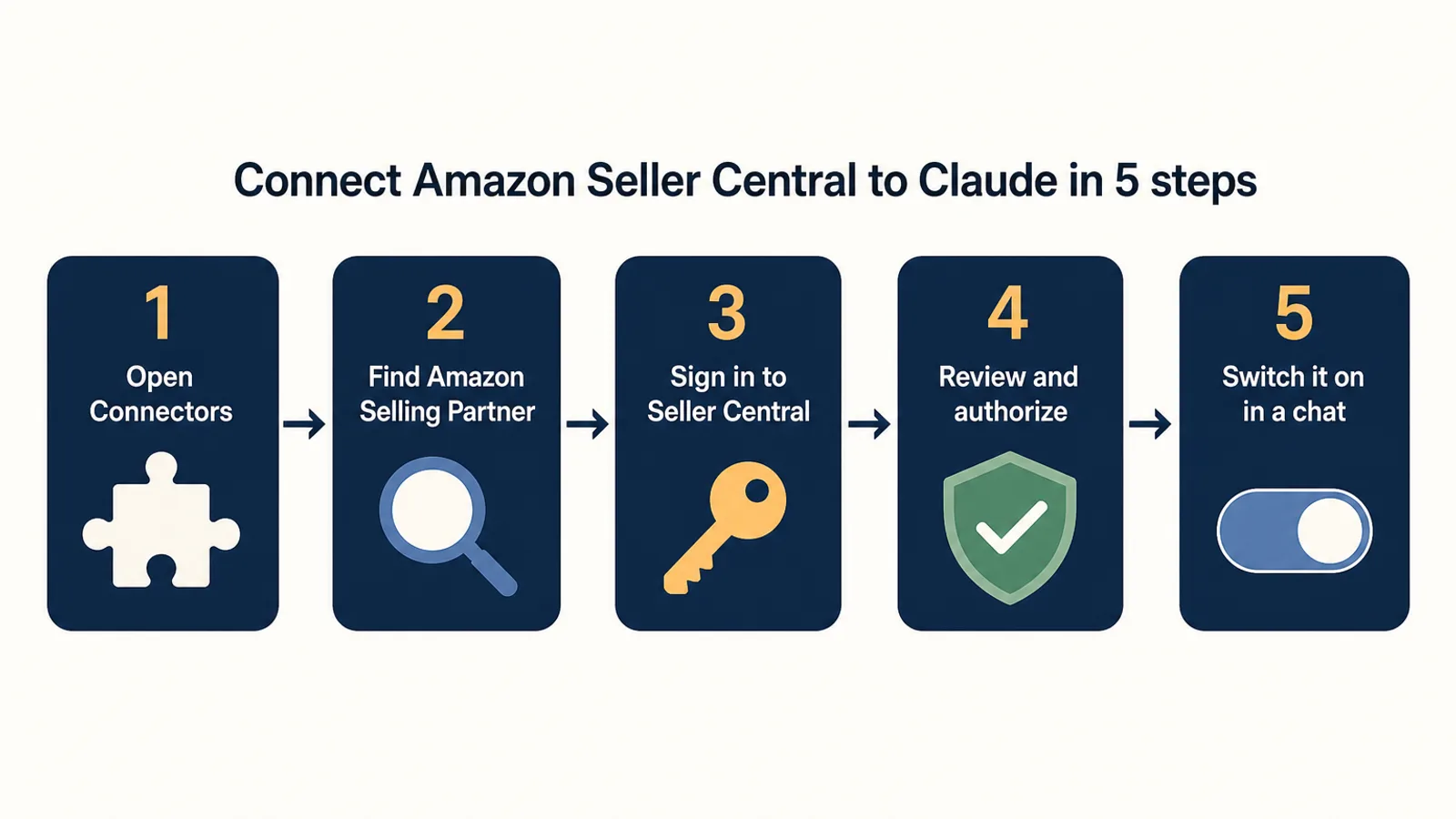
- Open Claude's connectors. In Claude, go to Customize → Connectors and click +. Older versions put this under Settings → Connectors. You can also start from a chat: click +, hover over Connectors and choose Manage connectors.
- Find Amazon's connector. Search the directory for Amazon Selling Partner. The listing is made by Amazon and describes itself as a way to "ask about sales, inventory, and listing performance and get recommendations grounded in your own data."
- Sign in to Seller Central. Click connect and sign in with the Amazon selling account you want Claude to read. Pick the right account if you manage more than one.
- Review and authorize. Amazon shows what the connector can access. Read it, then authorize. This is the step where a restricted login fails.
- Switch it on in a conversation. Start a new chat, click +, hover over Connectors and toggle Amazon Selling Partner on.
That's it. The connection follows your Claude account, so it works on desktop and mobile as well as in the browser.
Check the connection with three test questions
Before you rely on it, ask three questions you already know the answers to. If Claude gets them right, the connection is reading the right account.
- "What were my total sales yesterday?" Compare with the Seller Central dashboard.
- "Which of my ASINs have fewer than 14 days of FBA inventory?" Compare with your restock report.
- "Show me my three best-selling products this month and their current prices."
If the numbers are off, the usual cause is the wrong account or marketplace. Ask Claude which merchant account it is connected to. The connector has a tool for listing the accounts it can see, so the answer comes back quickly.
How to connect Amazon Ads to Claude
Here is the gap most setup guides skip. Amazon's plugin is built on Seller Central. It reads listings, inventory, pricing, sales and customer messages. It does not read or change your Sponsored Products, Sponsored Brands or Sponsored Display campaigns, because those live behind a separate system, the Amazon Ads API, with its own sign-in.
So if you ask Claude "which products are low on stock but still spending on ads?", the plugin can answer the first half and has to guess at the second. To answer it properly, the conversation needs an advertising connection too.
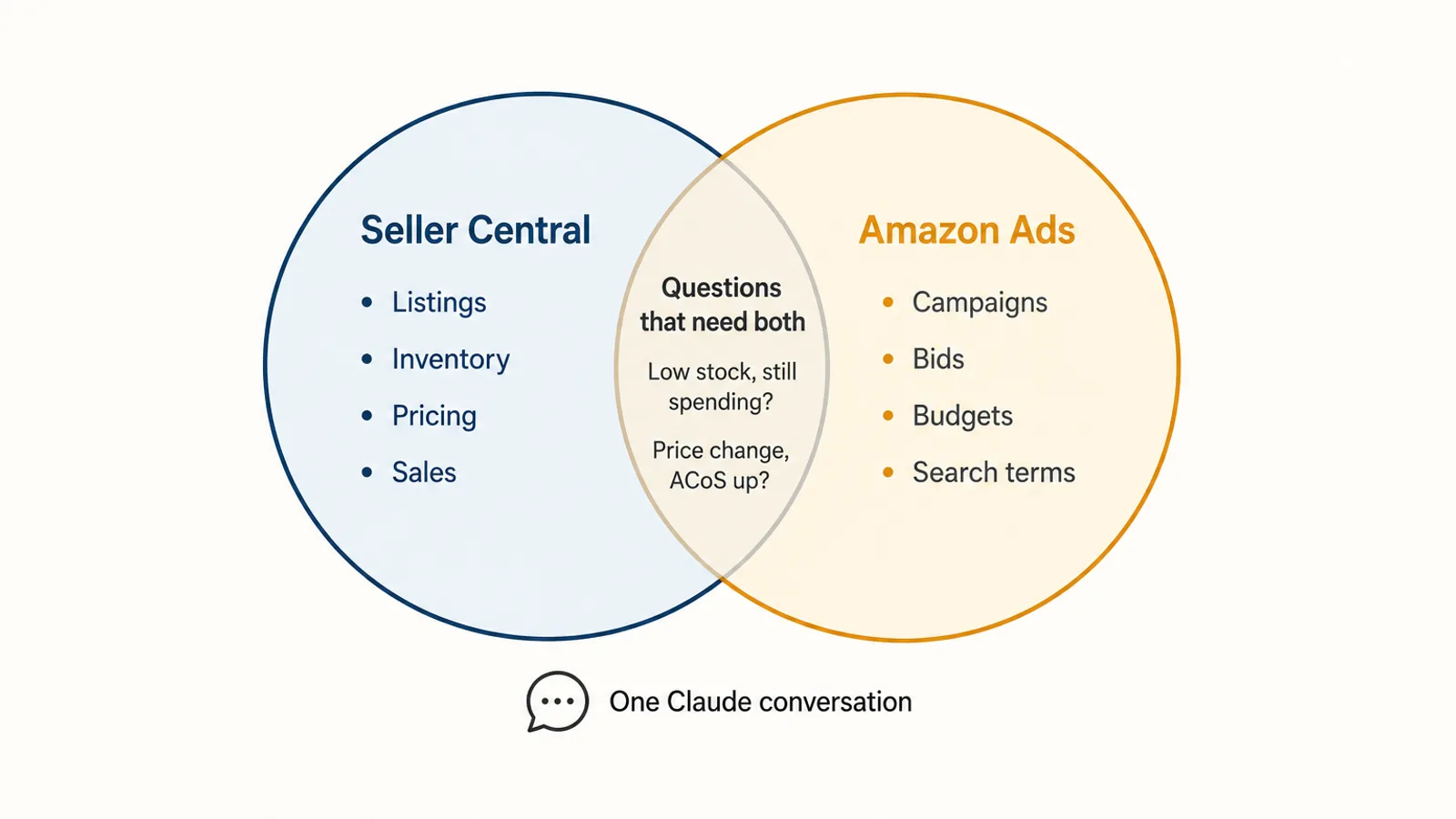
You have two realistic routes:
| Route | Who it suits | What you need |
|---|---|---|
| Amazon Ads MCP server | Agencies and developers building their own agent | Amazon Ads partner status with active API credentials; it has been in open beta since February 2026 |
| A third-party ads connector from Claude's directory | Sellers who want to sign in and start asking | An account with the provider, linked to your Amazon Ads profile |
Autron is one of the second kind. It is listed in Claude's directory, and once connected it gives Claude your Sponsored Products, Sponsored Brands and Sponsored Display data next to sales, Search Query Performance and inventory. The setup guide walks through it. On Autron's free plan the Claude connection is read-only. Making changes from Claude needs a paid plan.
Claude lets you turn on more than one connector in the same conversation, so you can run Amazon's plugin and an ads connector side by side. Claude picks the right one for each part of the question.
Set approvals before you let Claude change anything
Both sides of this setup can write to your account. Amazon's plugin can change prices and listings. An ads connector can change bids, budgets and campaigns. A single misread instruction, such as "lower prices on slow sellers" or "cut bids on everything over 40% ACoS", can touch hundreds of items.
Amazon designed its plugin with human approval on actions and complete audit trails. Claude adds its own layer. In each connector's settings you can set tools, or groups of tools, to Always allow, Needs approval or Blocked, and on Team and Enterprise plans an Owner can set those restrictions for everyone.
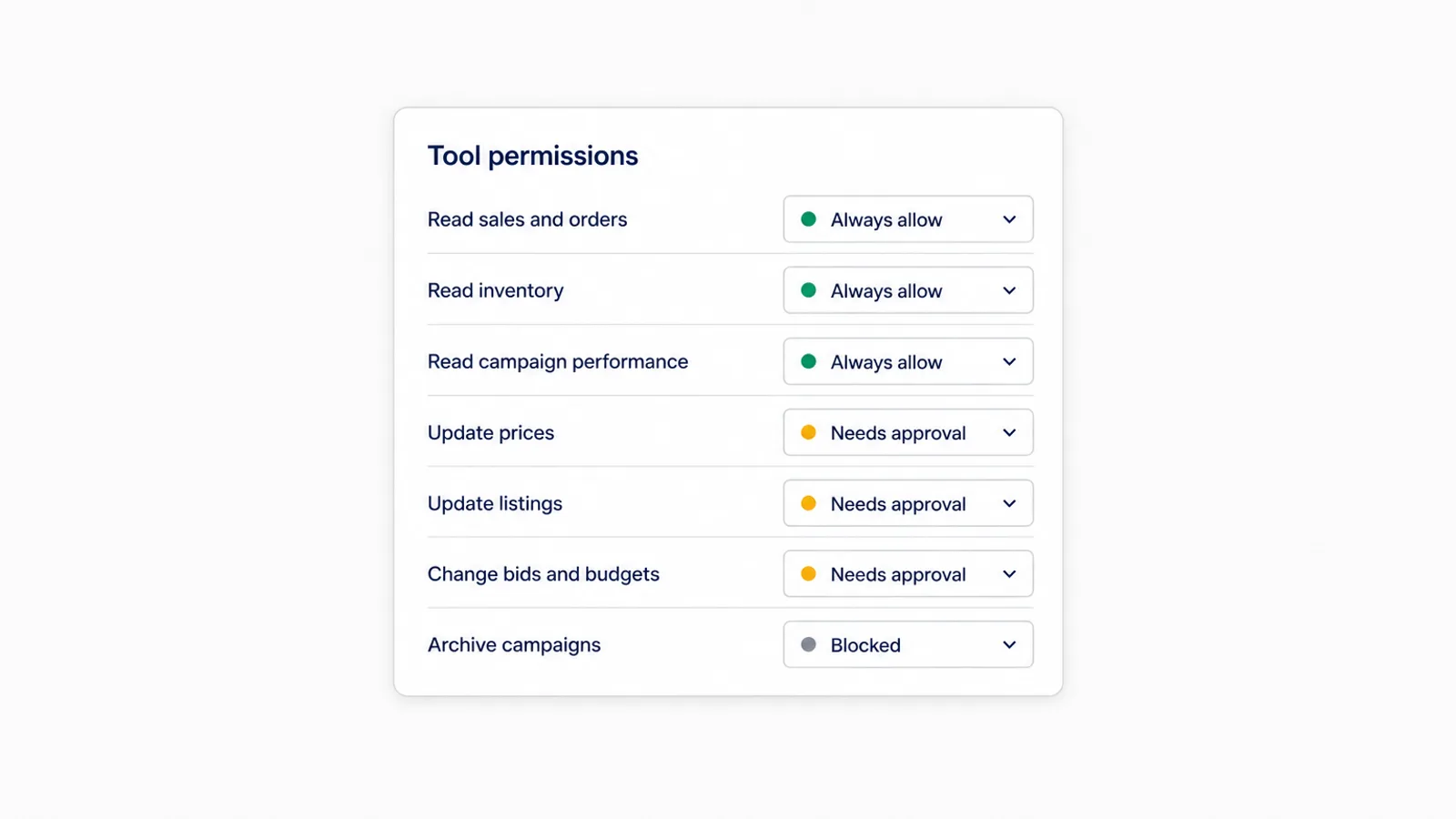
A sensible default for an Amazon account:
- Always allow: reading sales, inventory, listings, campaign performance and search terms. Questions should run without friction.
- Needs approval: anything that changes a price, a listing, a bid, a budget or a campaign's state.
- Blocked: anything you never want done from a chat, for example archiving campaigns, if your team handles that elsewhere.
When an approval comes up, read the whole batch, not the summary line. "Updated 38 bids" tells you nothing. The list of 38 keywords, old bids and new bids tells you whether the instruction was understood.
Questions worth asking before Black Friday
Black Friday is November 27 and Cyber Monday is November 30. That leaves under three weeks to fix the things that cost the most in peak. With both connectors on, these are the questions that pay off, because neither Seller Central nor the ads console answers them alone:
- Stock versus spend. "Which ASINs will run out of FBA stock before December 1 at the current sales rate, and how much are they spending on ads per day?" Ads on a product that is about to stock out buy clicks you can't convert.
- Price changes versus ACoS. "Did any product's ACoS jump in the last 14 days after a price change?" A higher price lowers conversion, which raises ACoS even when the bids haven't moved.
- Deal products and budgets. "Which of my Black Friday deal ASINs are in campaigns that ran out of budget before 6pm last week?" A deal with no ad visibility in the evening misses the peak hours.
- Margin at peak fees. "Using my current fees, what is the break-even ACoS for my top 10 products?" Our Q4 fee math post explains why that number moved this season.
Start with read-only questions for a few days. Once the answers match what you see in your own reports, start approving small changes.
Troubleshooting the connection
I can't find Amazon Selling Partner in the directory. The plugin is a US beta. Search the exact name, or open the directory listing directly. On a Team or Enterprise plan, ask your Owner to enable it first.
Authorization failed. Sign in with the primary account holder, or a user with permission to authorize apps, and make sure you chose a US marketplace account.
Claude answers without my data. Check the connector is switched on for this conversation: +, then Connectors, then the toggle.
Claude gives ad numbers that don't match my console. The Seller Central plugin doesn't carry campaign data, so Claude may be estimating from sales figures. Add an ads connector and ask again.
FAQ
How do I connect Amazon Seller Central to Claude? Open Claude, go to Customize, then Connectors, and add Amazon's Selling Partner connector from the directory. Sign in with your Seller Central account, review what it can access and authorize it. Then turn it on in a conversation from the + menu under Connectors. Amazon says it takes about a minute with no coding.
Can Claude see my Amazon ads through the Selling Partner plugin? No. The plugin covers Seller Central: listings, inventory, pricing, sales analytics and customer messages. Campaigns, bids, budgets and search terms live in the separate Amazon Ads API. To bring them into Claude you need an Amazon Ads connector, such as Amazon's own Ads MCP server for API partners or a third-party connector like Autron.
Is the Amazon Selling Partner plugin available outside the US? Not yet. Amazon launched it in beta for sellers in its US stores on September 23, 2026, with international expansion to follow. If you sell in the UK, EU or Japan, the connector may not let you authorize those accounts until Amazon extends it.
Do I need a paid Claude plan to connect Seller Central? Anthropic says connectors from the directory are available to all Claude users on the web, desktop and mobile apps. On Team and Enterprise plans an Owner has to enable a connector for the organization before members can connect it.
Can Claude change my listings or prices without asking? Amazon built the plugin so that you approve each action before it runs. Claude also lets you set every connector tool to Always allow, Needs approval or Blocked. Leave anything that changes prices, listings, bids or budgets on Needs approval.
Add your ads to the same conversation
Connecting Seller Central takes a minute. The questions that matter in Q4, about stock, price, spend and margin together, need your advertising data in the same chat.
Autron connects your Amazon Ads account to Claude alongside Amazon's plugin. The free plan lets Claude read your Sponsored Products, Sponsored Brands and Sponsored Display data with no card required, so you can check the answers against your own account first. Making changes from Claude, with every write tool clearly labelled, needs a paid plan, from $50 a month on Agent. Start free with Autron, then follow the Claude setup guide.