
Amazon Negative Keywords: The 2026 Guide to Cutting Wasted Ad Spend
Amazon negative keywords stop your ads showing on searches that spend but never sell. Here's how to find, place, and automate them in 2026 to cut wasted PPC spend.
TL;DR: Amazon negative keywords tell Amazon which search terms should not trigger your ads, so you stop paying for clicks that never convert. Work from your search term report: any term with 20+ clicks and no sales is a negative-exact candidate, and recurring irrelevant words become negative-phrase blocks. Then automate the loop so it stays clean as CPCs climb.

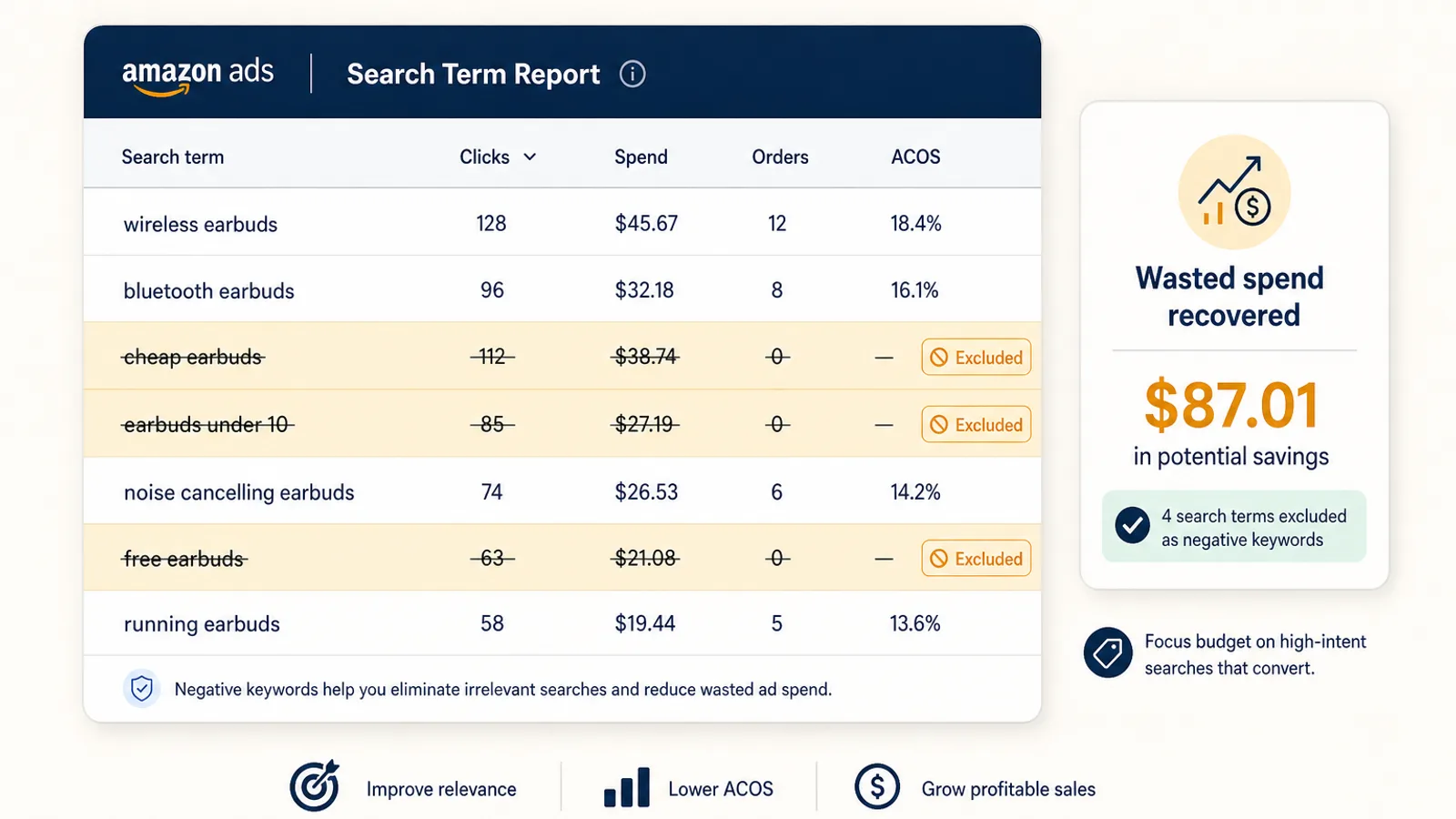
Amazon negative keywords are the cheapest lever in your entire PPC account, and the most neglected. Every seller obsesses over which keywords to bid on. Far fewer spend any time on the inverse question, which searches should never show your ad at all. That gap is where budget quietly leaks. With Sponsored Products cost-per-click still trending up across most categories in 2026 (see our Amazon advertising benchmarks for where costs actually sit this year), the searches that spend without ever converting are more expensive than they have ever been.
This guide covers what negative keywords actually do, how the two match types differ, the rules for deciding when a search term becomes a negative, where to place negatives so you cut waste without strangling discovery, and how to stop doing all of this by hand.
What Amazon Negative Keywords Actually Do
A regular keyword is a bid to appear. A negative keyword is an instruction to stay hidden. When you add a negative keyword to a campaign or ad group, Amazon will not serve that ad for any customer search that matches it, no matter how relevant the auction otherwise looks. You pay nothing, and just as importantly, you stop training the campaign on clicks that will never convert.
Negatives matter most on automatic campaigns and broad-match manual campaigns, because those are the ones casting the widest net. An auto campaign for a stainless steel water bottle will happily bid on "plastic water bottle," "water bottle for dogs," and "hydro flask" if you let it. Each of those is a click you pay for and a sale you almost never get. Amazon gives you two tools to shut them off: negative keyword targeting for search terms, and negative product and brand targeting for specific ASINs and brands you never want to appear next to.
Negative Exact vs Negative Phrase: Pick the Right Blade
Amazon offers two negative keyword match types, and using the wrong one is how sellers either fail to cut the waste or accidentally block real sales.
Negative exact blocks only the precise term you enter, along with close plurals and minor misspellings. A negative exact of "bath towel" stops your ad from showing on "bath towel" and "bath towels," but your ad still shows for "blue bath towel" or "luxury bath towel." Use negative exact when you have one specific search term that has proven it will not convert, and you want to remove it surgically without touching anything adjacent.
Negative phrase blocks any search query that contains your words in that order. A negative phrase of "for kids" stops "water bottle for kids," "lunch box for kids," and "backpack for kids" all at once. Use negative phrase when an entire family of searches is irrelevant to your product, for example when you sell an adult product and any "for kids" variant is wasted spend.
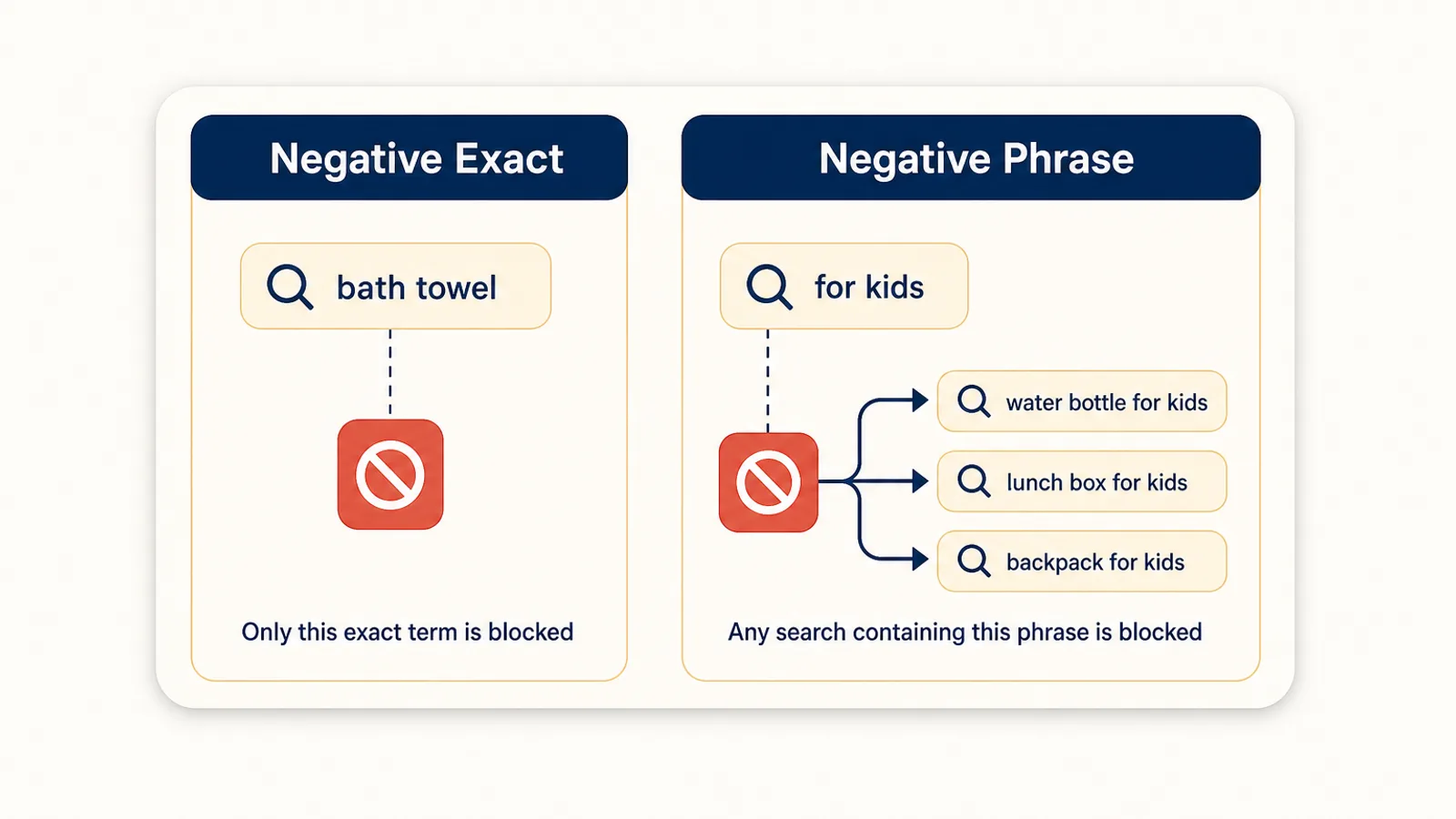
The practical rule: reach for negative phrase to cut a theme, and negative exact to cut a single proven loser. Most healthy accounts use far more negative phrase entries than they expect, because irrelevant traffic tends to cluster around a handful of recurring words.
Where the Waste Hides: The Search Term Report
Every negative-keyword decision starts in one place, the search term report. Found under Campaign Manager in the Amazon Ads console, it shows the actual customer search queries that triggered your ads, alongside spend, clicks, and orders for each. This is the ground truth. Your keyword list tells you what you bid on; the search term report tells you what shoppers actually typed to find you, and that is where the surprises live.
Pull the report for the last 30 to 60 days and sort by spend, descending. Then read down the list asking one question of each term: is this search relevant to my product, and is it converting? You will find three buckets:
- Irrelevant, any spend. Wrong product, wrong use-case, wrong audience. These become negatives immediately, usually negative phrase around the offending word. You do not need click volume to justify cutting "for dogs" from a human water bottle.
- Relevant but not converting. On-topic searches that have racked up clicks and spend with few or no orders. These need a threshold before you cut them, covered next.
- Relevant and converting. Leave them alone, and consider promoting the strongest ones into their own exact-match campaigns with dedicated bids.
The Rules That Decide When a Term Becomes a Negative
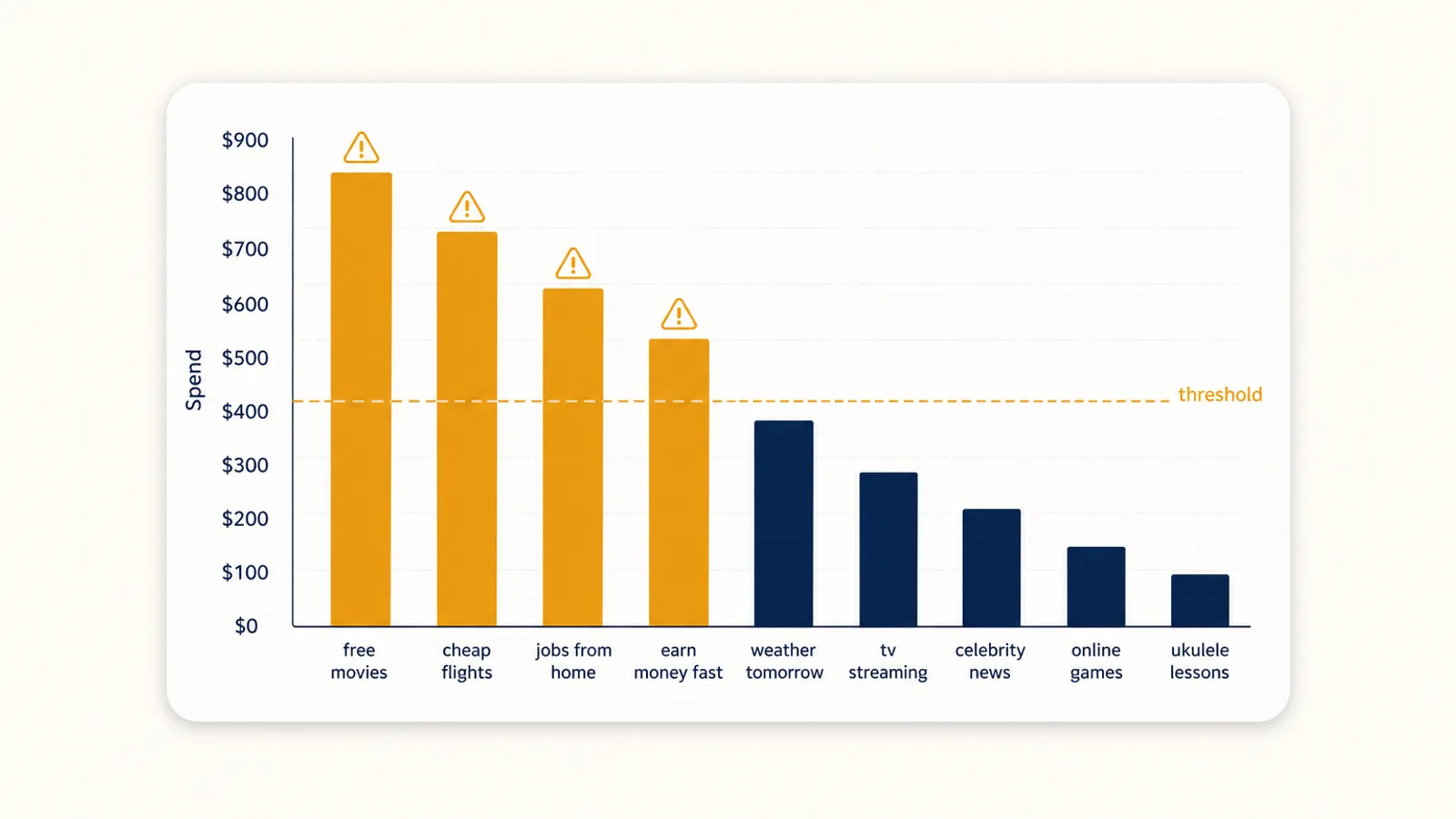
The number one mistake is cutting too early. A search term with three clicks and no sales has told you almost nothing, three clicks is well within the range of normal variance for a converting keyword. Kill it now and you may be blocking a winner.
Amazon's own guidance is to evaluate a target only after it has accumulated at least 20 clicks. That gives you a working framework:
- 20+ clicks and zero orders: strong negative-exact candidate. The term has had a fair shot and did not convert.
- 20+ clicks, some orders, ACoS far above target: a judgment call. If it is way over your target ACoS and shows no sign of improving, cut it or move it to a tightly-bid exact campaign. If it is close, lower the bid before you cut.
- Clearly irrelevant, any click count: negative phrase now. Relevance does not need statistical proof.
Your click threshold should scale with your margins and price point. A $9 product cannot absorb 20 clicks of wasted spend the way a $90 product can, so lower-margin sellers should be quicker to cut. Higher-margin products can afford more patience to let a marginal term prove itself.
Campaign Level vs Ad Group Level: Where to Place Them
Negatives can live at the campaign level or the ad group level, and the distinction is not cosmetic. It determines how much of your account each exclusion touches.
Campaign-level negatives apply to every ad group in the campaign. Use them for account-wide culls: competitor brand names in categories you can never win on, and use-cases that are always irrelevant to the product. These are the "never, anywhere" exclusions.
Ad-group-level negatives apply only within one ad group, which makes them the tool for shaping your funnel. The classic pattern: run a broad or auto campaign purely for discovery, and when a search term converts, add it as a keyword in your exact-match ad group AND as a negative in the broad ad group. Now the term runs at your controlled exact bid instead of the uncontrolled broad bid, and the two ad groups stop competing for the same search. This keyword-harvesting loop, discovery in broad, graduate winners to exact, negate them in broad, is the backbone of a clean campaign structure.
The trap is placing every negative at the campaign level out of convenience. Do that with your discovery negatives and you shut off search-term discovery across the whole campaign, which is the engine that finds you new profitable keywords in the first place.
Negatives at Scale: The N-Gram Approach
Reading a search term report line by line works for a handful of ASINs. It falls apart across a real catalog. When you have thousands of unique search terms across dozens of campaigns, the waste is not concentrated in a few obvious rows, it is smeared across a long tail of low-frequency queries that individually look harmless.
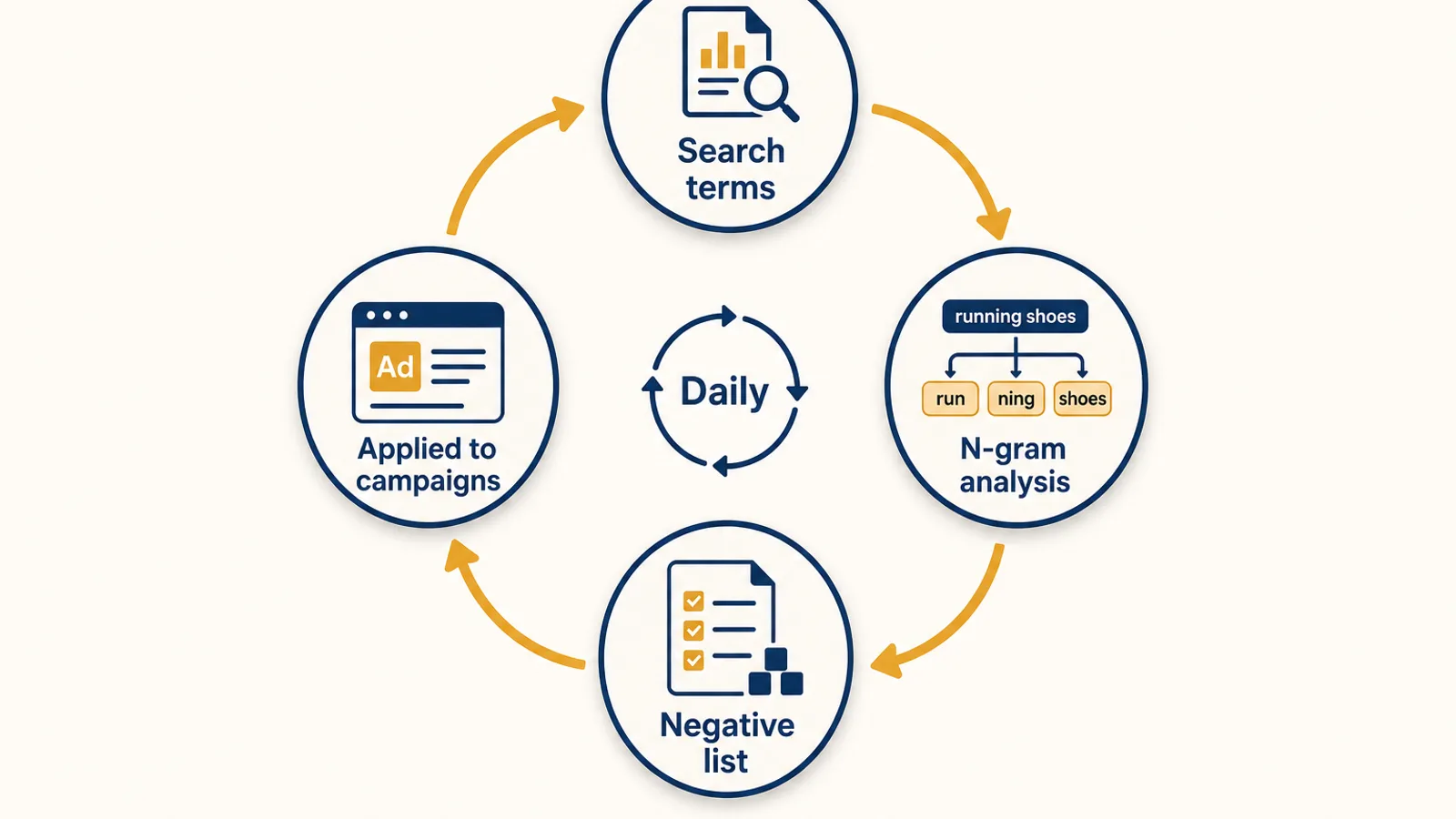
The fix is n-gram analysis. Instead of scoring whole search terms, you break every term into its component words and short word groups (an "n-gram" is just a sequence of n words), then aggregate spend and orders across every search term containing each fragment. Suddenly the pattern is visible: the word "refurbished" might appear in 80 different low-click search terms that never individually cross your threshold, but together they have burned real money with zero orders. One negative phrase on "refurbished" cleans all 80 at once. N-gram analysis finds the theme that per-term review misses, and it turns a thousand-row report into a short list of high-impact negative-phrase blocks.
Stop Doing This by Hand: Automating Negative Keywords
Here is the uncomfortable truth about negative keywords. The rules are simple, the payoff is real, and almost nobody keeps up with the work. It is repetitive, it is never finished, and it competes for attention with everything else on a seller's plate. The report you diligently ran in January is stale by March, and new wasted-spend terms have been accumulating the whole time.
This is exactly the kind of loop software should own. Autron reads your full Ads and SP-API search-term data and harvests negative keywords automatically, on a daily cadence, applying the same thresholds a careful analyst would but without the gaps. Non-converting terms get excluded continuously instead of whenever someone remembers to open the report, and the n-gram-level patterns get caught while they are small. Because Autron reads sales and conversion data alongside ad data, its cut decisions are informed by whether a term actually drives orders, not just whether it spent.
If you want to see how much is leaking before you commit to anything, the free Amazon PPC audit scans your account for wasted-spend patterns, including the non-converting search terms that should already be negatives. It is the fastest way to find out whether your negative-keyword hygiene is costing you.
FAQ
What are negative keywords on Amazon? Negative keywords are search terms you tell Amazon should never trigger your Sponsored Products, Sponsored Brands, or Sponsored Display ads. They are the inverse of a keyword: instead of bidding to appear, you pay nothing and choose to stay hidden. They come in two match types, negative exact and negative phrase, plus negative product and brand targeting for ASIN-level exclusions.
What is the difference between negative exact and negative phrase match? Negative exact blocks only the precise term you enter, plus close plurals and minor misspellings, so "bath towel" stops "bath towel" and "bath towels" but not "blue bath towel." Negative phrase blocks any search containing your words in that order, so "for kids" stops "water bottle for kids" and "lunch box for kids." Use exact to remove one proven non-converter and phrase to cut a whole family of irrelevant searches at once.
When should I add a search term as a negative keyword? Amazon recommends evaluating a target only after it has at least 20 clicks. A common working rule is that any search term with 20 or more clicks and zero orders is a negative-exact candidate. Terms that convert but sit far above your target ACoS are a judgment call, and clearly irrelevant terms can be cut immediately as negative phrase without waiting for click volume.
Should negative keywords go at the campaign or ad group level? Put broad, account-wide culls at the campaign level so they apply everywhere. Keep funnel-shaping negatives at the ad group level, for example blocking a discovered converter in your broad ad group so it only runs in your exact ad group. Placing everything at the campaign level can accidentally choke off search-term discovery.
Can Amazon negative keywords be automated? Yes. The manual loop of pulling the search term report, scoring each term, adding negatives, and repeating is exactly the kind of rules-based work software does better and more consistently than a person. Autron harvests negative keywords automatically from your search-term data on a daily cadence, so non-converting terms are excluded continuously rather than whenever someone remembers to run the report.
Cut the Waste, Then Keep It Cut
Negative keywords will not win you new customers. What they do is stop you paying for the ones who were never going to buy, which frees budget to bid harder where you actually convert. Start with one clean pass: pull your last 60 days of search terms, cut the irrelevant themes as negative phrase, negate the 20-plus-click zero-order terms as negative exact, and move your discovered winners into exact campaigns. Then put the loop on autopilot so it stays clean. Sign up for Autron to automate negative-keyword harvesting, or run the free PPC audit to see where your spend is leaking today.