A prospect audit is a free audit of a brand's Amazon ads that you send in your own name. You send the brand a link. They connect Amazon Advertising once, and get their first findings and then a full audit, in your brand. You see where each one stands on Prospects in the sidebar.
It is built for agencies opening a conversation with a brand they want to win. A prospect audit uses none of your credits.
Who can use it
Prospect audits come with the Agent and Pro plans, for agencies. Company admins see Prospects in the sidebar once your company has said it is an agency. See Agency tools for the three places to say so.
On the Free plan, Prospects offers the upgrade instead. See Plans.
Send a brand a link
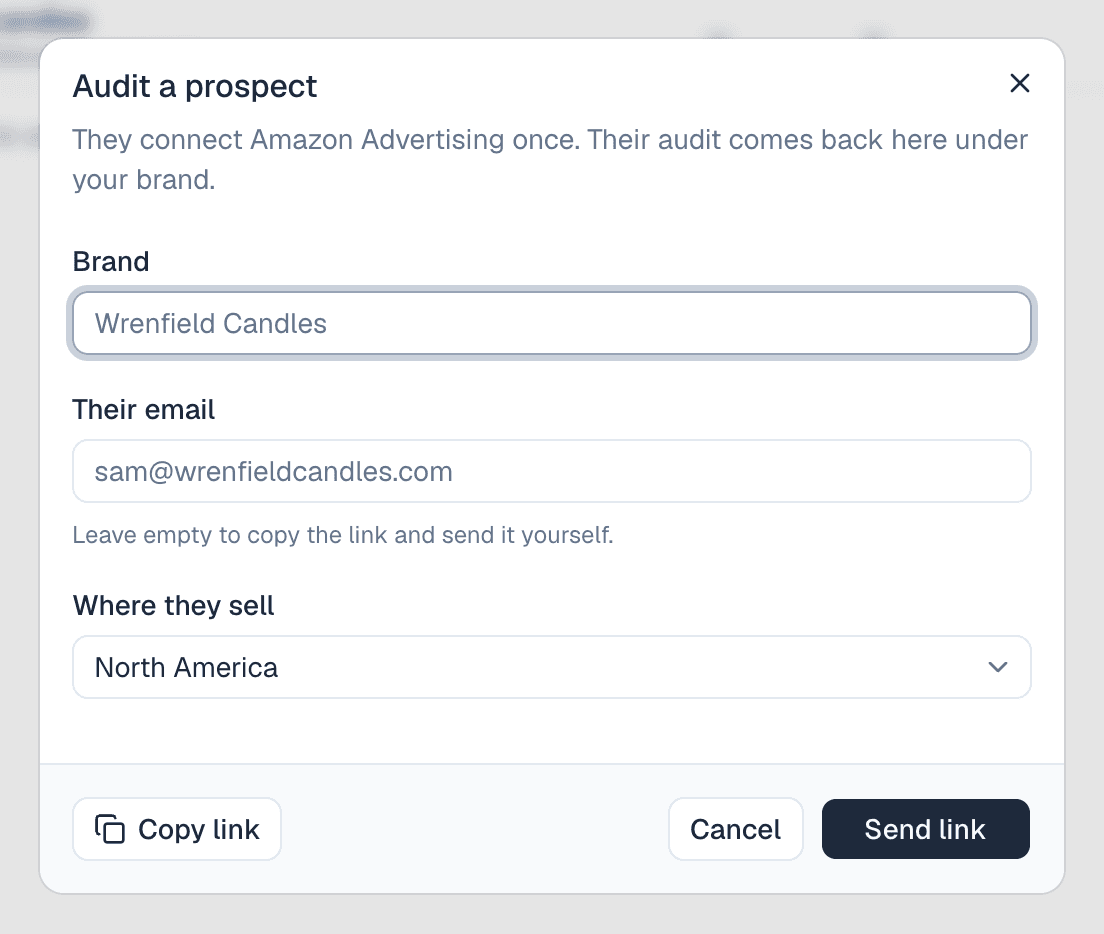
- Open Prospects in the sidebar and press Audit a prospect.
- Type the Brand, the name the brand goes by.
- Type Their email if you want Autron to send the link. Leave it empty to copy the link and send it yourself.
- Pick Where they sell: North America, Europe or Far East. Amazon has a different sign-in for each region.
- Press Send link, or Copy link to copy it.
Send link emails the brand an invitation in your brand: your name, logo and colours, a short note that you would like to audit their Amazon advertising, and a Start your audit button. It names the person who sent it, and a reply goes to that person. See Branding.
What the brand sees
The link opens a page in your brand, titled A free audit of your Amazon ads. It says you will read the last 90 days of their advertising and send them what you find, and that nothing in their account is changed.
The brand presses Connect Amazon Advertising, signs in to Amazon and approves.
- Amazon's screen asks to let Autron manage their campaigns. Amazon offers no read-only choice. The page tells the brand this before they connect, and that the audit only reads.
- A login that reaches several advertising accounts is asked which one to audit. One audit covers one account.
- A login with no seller advertising account is asked to sign in with the login that runs the brand's ads.
Once they have connected, the page says the audit is on its way. They can keep the link: the audit is shown there too.
What comes back
- First findings, within a few minutes: how the account is built, before the numbers.
- The full audit, within a day, once Amazon has sent 90 days of history: ad spend and sales, where the money goes, and what to fix first.
Each is emailed to the brand if you gave their address, and shown on their page. The email comes in your brand, and a reply reaches the person who made the link.
The audit itself is in your brand and says it was prepared by you. It ends with Want this fixed, not just found? and a Talk to button with your brand name, which opens an email to you. Nothing on it names Autron.
Whoever made the link is emailed from Autron at each stage: "Brand connected" when the first findings are ready, and "Brand: the full audit is ready". Each says whether the brand was sent the same page, and opens the audit.
Your Prospects page
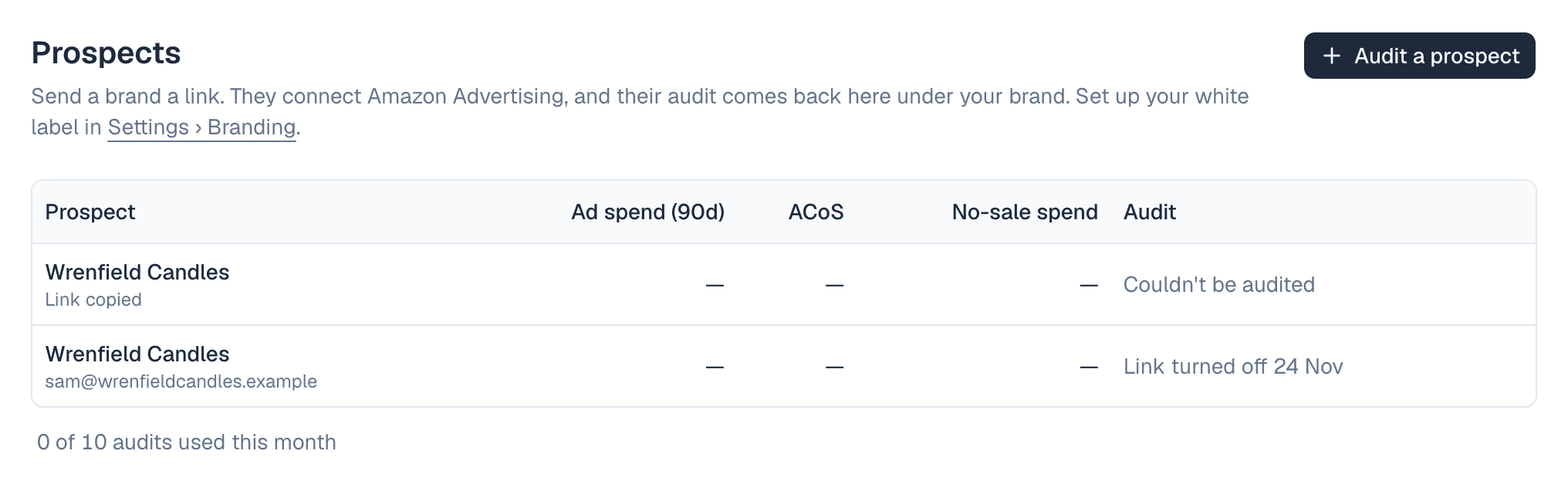
Each link is a row, with where it stands.
| Audit | What it means |
|---|---|
| Link sent 24 Nov, not connected yet | The brand has the link and has not connected. Link made means you copied it. |
| Approved on Amazon, choosing an account | Their login reaches several accounts, and they have not picked one yet. |
| Connected 25 Nov. Reading the account | The first findings are on their way. |
| First findings ready. Full audit within a day | Opens the first findings. |
| Ready, 26 Nov | Opens the full audit. |
| Couldn't be audited | The account can't be audited from a link. See below. |
| Link turned off or Link expired | Nothing was connected. Make a new link if you still want to. |
Ad spend (90d), ACoS and No-sale spend are filled in from the full audit once it has been sent. No-sale spend is the ad spend that went on keywords and targets that never produced a sale.
Under the table, a count says how many of this month's audits you have used.
The menu at the end of a waiting row has:
- Copy link, to send it yourself.
- Send again, which emails the invitation again. Once a day for each link.
- Turn off link, which closes it. A link that was turned off can't be turned back on.
Limits
- Ten audits a calendar month for your company. An audit counts when a brand connects. Links that are never used count for nothing. More open up on the 1st.
- A link works for 14 days. After that it says it is no longer active.
- 30 links waiting at once. Turn off one you no longer need to make another.
- 20 invitations a day that Autron emails for your company. Copy the link to send more yourself.
- One account a link. A brand that sells in several regions needs a link for each.
After the audit
Nothing is deleted when an audit is done. Autron keeps the brand's access and the data the audit read, as it does for its own free audit. The brand can remove Autron's access in their Amazon Advertising account whenever they like.
If you win the brand, email hello@autron.ai with its name before you connect it as your client. The brand's Amazon account stays tied to its audit, so connecting it yourself is refused as already connected.
On your own web and sending address
Once your own web address is connected, the link, the brand's page and the audit open on it, such as reports.yourcompany.com. Once your own sending address is connected, the invitation and the audit emails come from it, under your brand name alone. Your own notices still come from Autron. See Your own web and sending address.
When this does not work
- The row says Couldn't be audited. The brand's Amazon account is already connected to Autron, so it can't be audited from a link. You are not emailed about it: the row is how you find out.
- The brand's login has no advertising account. Their page asks them to sign in with the login that runs the ads. If they sell in another region, make a new link for that region.
- The brand says the link doesn't open. It expired after 14 days, or it was turned off. Make a new one.
- The brand never got the email. Ask them to look in junk and promotions. You can Send again the next day, or Copy link and send it yourself.
- Audit a prospect says you have used this month's audits. More open up on the 1st.
- You don't see Prospects. Only company admins of an agency see it. See Agency tools.
For anything else, email hello@autron.ai.