
Amazon Sponsored Products Creator Placements Are Live: What to Check This Week
Amazon Sponsored Products creator placements went live on August 10, 2026, and every campaign is enrolled by default. Here is what changed and what to audit now.
TL;DR: On August 10, 2026, Amazon began serving Sponsored Products ads inside Amazon Influencer Program creator content. Existing campaigns were enrolled by default at their current bids and budgets. You cannot remove creator inventory entirely, but you can set each campaign to Limit off-Amazon spend, exclude specific creators, and negate the system-generated search terms they produce.

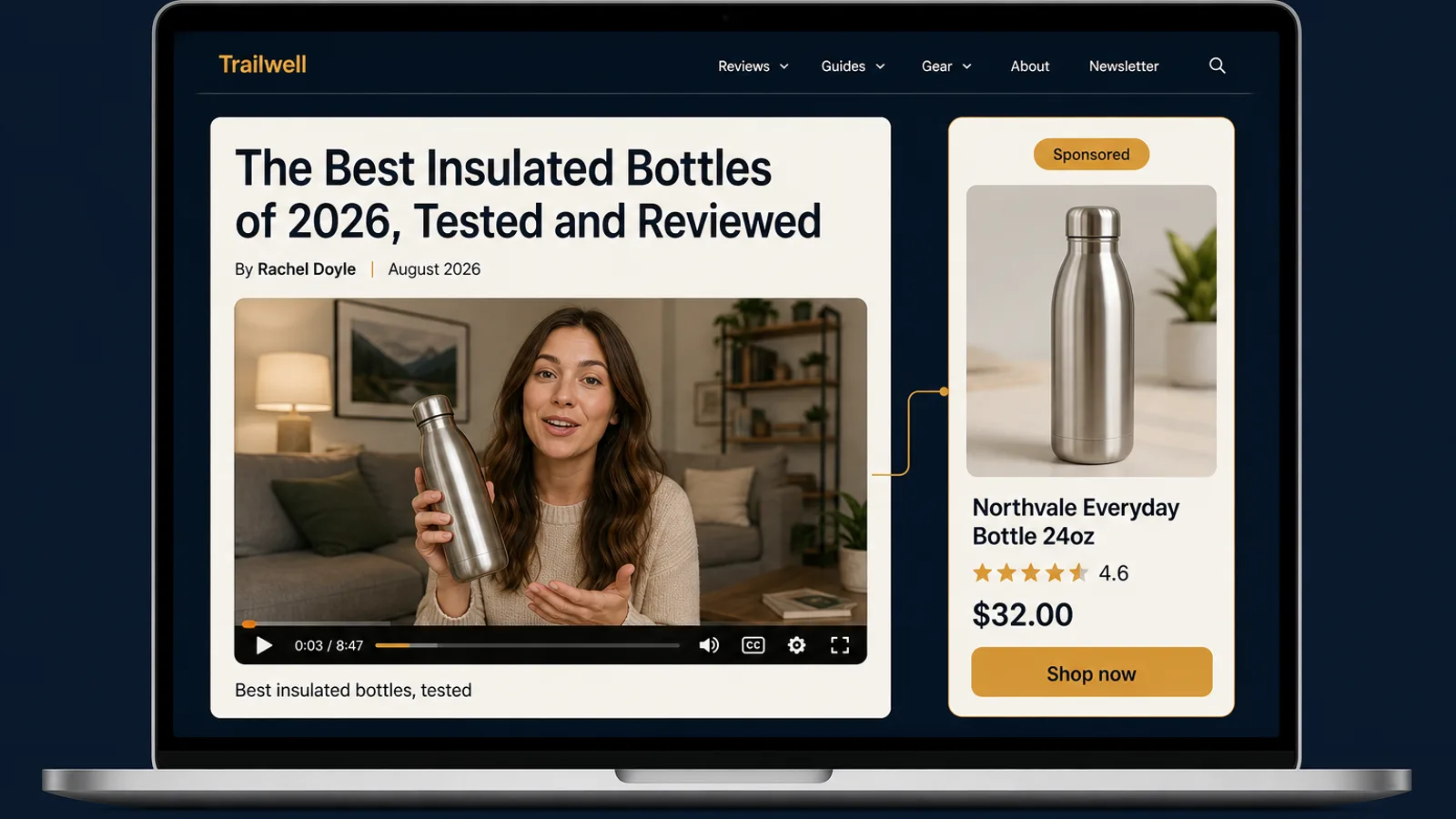
If your Sponsored Products ACoS moves this week and nothing in your account changed, this is probably why. On August 10, 2026, Amazon started serving Sponsored Products ads inside content published by creators in the Amazon Influencer Program. Your campaigns were enrolled by default, at their existing bids and budgets, and the advertiser notice stated that no action was required. Amazon updated its off-Amazon advertising documentation on August 4, six days before the switch flipped.
That is the whole problem in one sentence. A new inventory type started spending your budget, and the default was on.
What actually changed on August 10
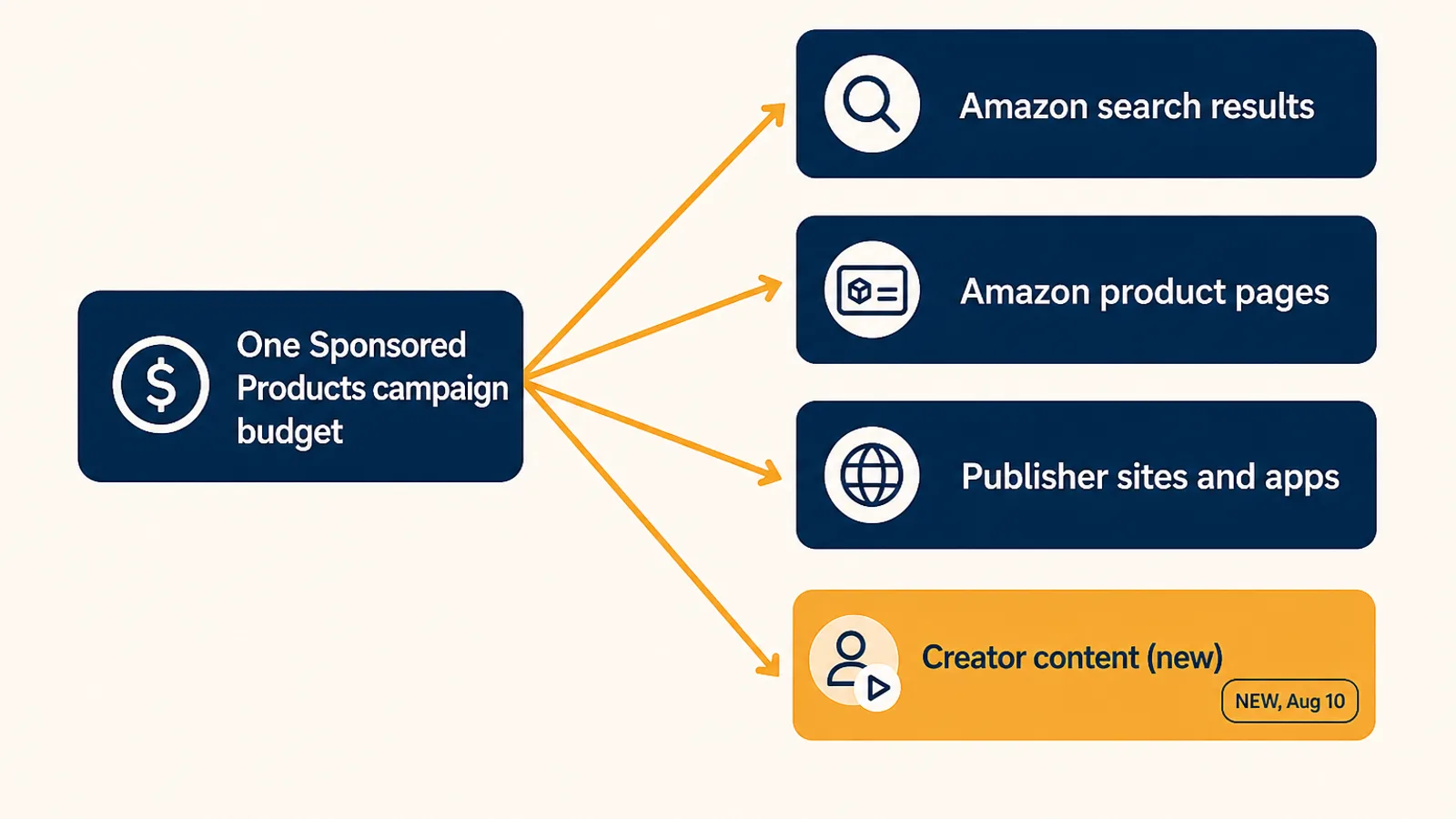
Sponsored Products has been running off Amazon for a while. What is new is the kind of surface. Until now, off-Amazon meant premium publisher sites and apps. Now it also means creator content: product reviews, editorial posts, and buying guides published by creators with verified engagement and Amazon sales history who are enrolled in the Amazon Influencer Program.
The mechanics matter more than the headline:
- Creators self-select which advertised products to feature. You do not build a creator campaign, pitch a creator, or approve a placement. Creators choose from eligible advertised products, and your ad can appear in their content.
- No new campaign, no new budget. Placements use your existing targeting, bids, and campaign budget. Every offsite click bills against the same budget as your on-Amazon clicks.
- Geography is uneven. It covers Brazil, Canada, India, Mexico, the United States, the Middle East, North Africa, Turkey, and select EU countries. The United Kingdom is notably absent, so UK-only sellers can stop reading and come back when it lands.
Why this is not just more of the same off-Amazon inventory
We wrote about the off-Amazon Sponsored Products controls when Amazon shipped the bulksheets column in June. The controls are the same. The traffic is not.
A shopper who clicks your ad on a publisher site was reading an article. A shopper who clicks your ad inside a creator's product review was already in a buying mindset, but a mindset the creator shaped, not one your keyword captured. That cuts both ways. The intent can be better than generic display traffic. The match between the creator's context and your keyword can also be much worse, because the creator chose your product for their audience, not for your targeting.
The second difference is the one that quietly breaks reporting. Creator content has no search box. There is no query to attribute a click to. So Amazon infers one: the system generates search terms from the customer context and populates them into your search term reports. Those terms appear in your data as if a shopper typed them. They did not.
This is not a scandal, and the terms are useful, because they are eligible for negative targeting. But if you harvest search terms into new campaigns based on volume, you now have a category of term in your reports that behaves differently from every other row. Worth knowing before your next harvest run.
The controls you actually have
There is no account-level switch that removes creator inventory. Anyone telling you to "just turn it off" has not looked. Here is the real surface:
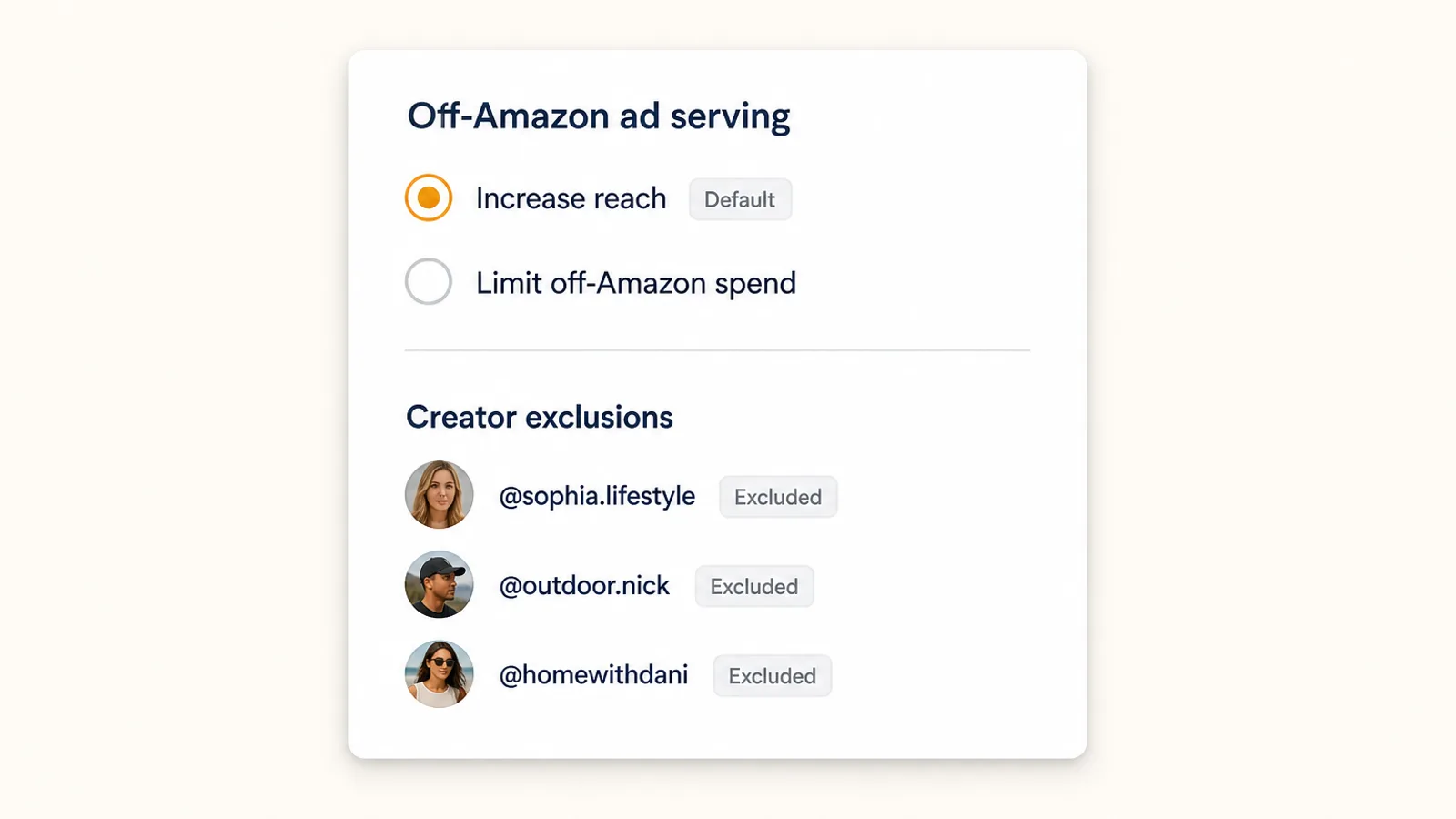
Campaign-level off-Amazon ad serving. Two settings. Increase reach is the default, and per Amazon's own documentation it uses a campaign's targeting settings to increase impressions and sales opportunities off Amazon. Limit off-Amazon spend deprioritizes offsite delivery. It is a dial, not a kill switch, and you set it per campaign.
Creator exclusions. You can exclude specific creators. This is reactive by nature. You find a creator whose placements convert badly, then you exclude them. Useful, but it only works after the spend has happened.
Negative targeting on system-generated terms. The inferred search terms are eligible for negatives, which is the sharpest tool in the set. If creator placements are pulling you into an adjacent product category, the terms will show it, and a negative will cut it. Our negative keywords guide covers the workflow if you need the longer version.
One control you do not have, and this is the detail most sellers will miss: your Top of Search and Product Pages bid adjustments do not apply to offsite placements. If you run a plus-100% Top of Search modifier and lean on it to shape delivery, that lever does nothing here. Your base bid is what serves. Dynamic bidding strategies do still apply, so a down-only campaign still gets Amazon's downward adjustment, but the placement multipliers you tuned are simply absent from this inventory.
The 30-minute audit to run this week
Do this before you change anything. The failure mode right now is panic-minimizing every campaign and giving up incremental sales that were converting fine.
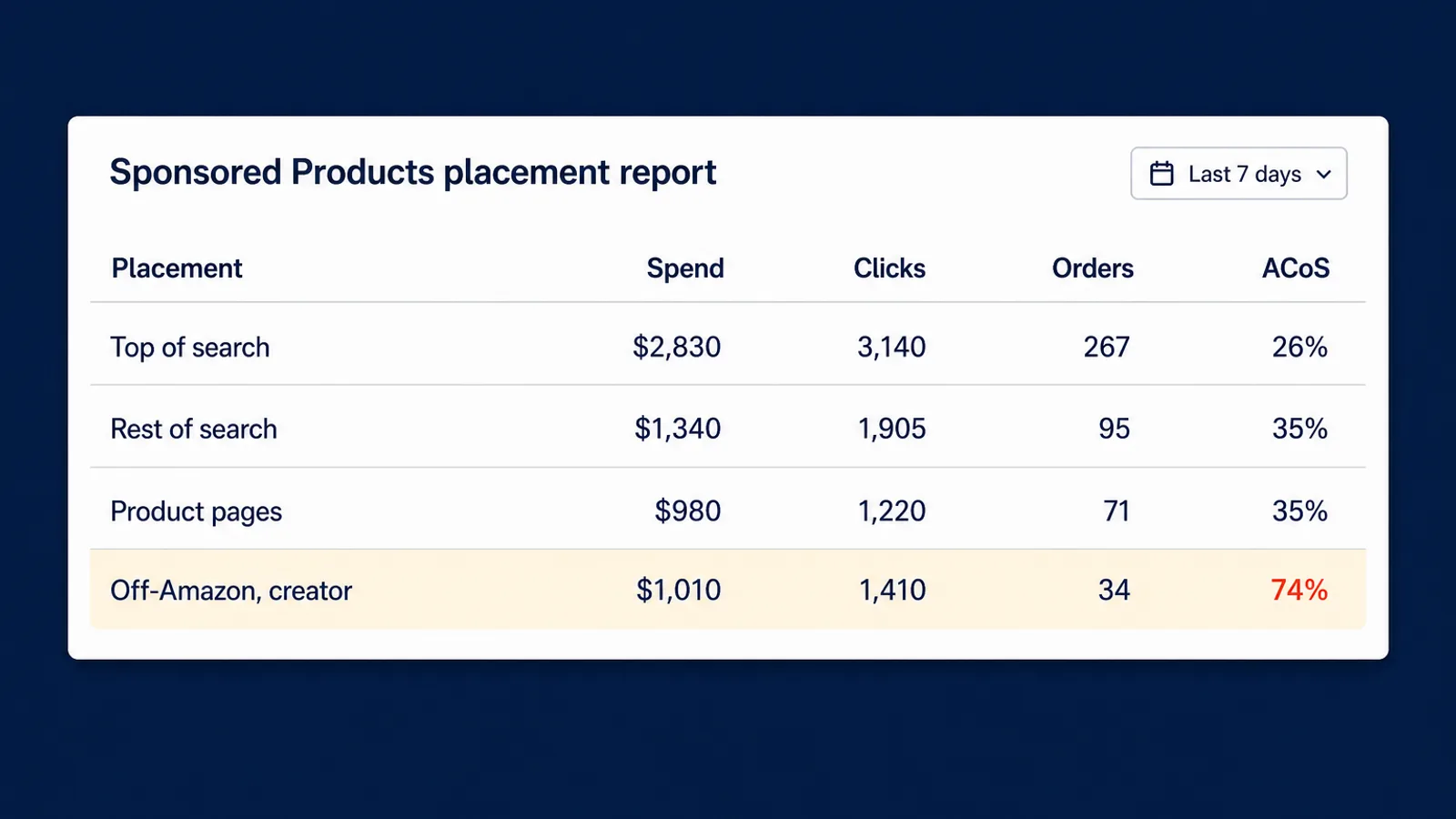
- Pull the Sponsored Products Placement Report in Campaign Manager for the last 7 days, or pull the Placement Classification metric from the Amazon Ads API reporting endpoint if you work in bulk. You need a baseline from before August 10 to compare against.
- Split on-Amazon from off-Amazon and compare ACoS separately. Never judge this on blended campaign ACoS. A blended number averages the two together and will hide an offsite problem until it is big enough to distort the whole campaign.
- Rank campaigns by off-Amazon spend, not off-Amazon ACoS. A campaign with a terrible offsite ACoS and $12 of offsite spend is not your problem. Sort by dollars and fix the top of that list.
- Read the new system-generated search terms. Filter your search term report for terms that appeared after August 10 and that you do not recognize. Negate the ones that are clearly off-intent for your ASIN.
- Set the off-Amazon mode deliberately, campaign by campaign. Thin-margin and defensive campaigns go to Limit off-Amazon spend. Discovery and awareness campaigns can stay on Increase reach if the numbers support it.
What to watch over the next 30 days
Give it two full weeks before you draw conclusions. New inventory is noisy at launch, and Amazon will be tuning delivery on their side while you tune yours.
Three things worth tracking:
- Offsite share of spend, weekly. If it grows steadily and offsite ACoS holds, that is incremental reach and you should let it run. If share grows and ACoS degrades, you have a budget leak, not a growth channel.
- Your budget-capped campaigns. Campaigns that already hit their daily cap are the ones most exposed. Offsite clicks compete with on-Amazon clicks for the same dollars, so a capped campaign can quietly trade converting on-Amazon traffic for unproven creator traffic without the total spend moving at all. That is the version of this change that costs money invisibly.
- TACoS, not just ACoS. Creator content can drive halo sales that never touch your ad's attribution window. If ACoS looks slightly worse while total sales rise, look at the total picture before you cut.
Why this keeps happening, and what actually keeps up
This is the third default-on Amazon Ads change in about a year. Off-Amazon serving arrived on by default. The unified Campaign Manager moved budget allocation toward Amazon's own optimizer. Now creator placements. The pattern is consistent: Amazon expands where your budget can go, sets the default to on, and gives you a control that deprioritizes rather than blocks.
None of that is unreasonable from Amazon's side. It just means that a PPC process built on monthly reviews is structurally too slow. A change that starts spending on a Monday will not get looked at until the following month, and by then the money is gone and the data is polluted.
The counter is not more vigilance. It is pricing every campaign against a goal continuously, so that when a new inventory type starts converting worse than your target, bids come down on their own. Autron reads Sponsored Ads placement data alongside Seller Central sales, traffic, and Search Query Performance, and sets bids against your actual target ACoS or TACoS on a daily loop. When creator placements spend without converting at your margin, the bid loop pulls back that week rather than after your next review. The off-Amazon setting becomes one more input the system manages, not one more thing on your checklist.
FAQ
What changed for Sponsored Products on August 10, 2026? Amazon began serving Sponsored Products ads inside content published by creators in the Amazon Influencer Program, alongside the publisher inventory that off-Amazon serving already covered. Existing campaigns were enrolled by default at their existing bids and budgets, and the advertiser notice stated that no action was required. The change applies to advertisers in Brazil, Canada, India, Mexico, the United States, the Middle East, North Africa, Turkey, and select EU countries. The United Kingdom was not included.
Can I opt out of Amazon creator placements entirely? Not entirely. There is no account-level switch that removes creator inventory. What you have is the campaign-level off-Amazon ad serving setting, which is either Increase reach, the default, or Limit off-Amazon spend. You can also exclude specific creators. Limit off-Amazon spend deprioritizes offsite impressions rather than blocking them, so treat it as a dial, not an off switch.
Do creator placements use a separate bid or budget? No. They draw on your existing campaign targeting, bids, and budget, which is why the spend shows up without anything appearing to change in your setup. One important detail: your Top of Search and Product Pages bid adjustments do not apply to offsite placements, so the multipliers you rely on to shape on-Amazon delivery have no effect here. Dynamic bidding strategies do still apply.
How do I see how creator placements are performing? Use the Sponsored Products Placement Report in Campaign Manager, or pull the Placement Classification metric from the Amazon Ads API reporting endpoint. Do not judge the change on blended campaign ACoS. Split on-Amazon from off-Amazon performance and compare them against each other, because a blended number will average away an offsite problem until it is large enough to hurt.
Can I add negative keywords for creator placements? Yes, indirectly. Creator content has no search box, so Amazon infers search terms from the customer context and populates them in your search term reports. Those system-generated terms are eligible for negative targeting even though no shopper ever typed them. Review them the way you review any search term report, and negate the ones that are clearly off-intent.
The takeaway
Creator placements are not a crisis, and they may well earn their spend for some catalogs. The problem is that you were enrolled without asking, the default is the aggressive setting, and the reporting that would tell you whether it is working sits in a report most sellers never open. Run the audit, split your placement data, set the mode deliberately, and check again in two weeks.
If you would rather not add another weekly manual check to the list, sign up for Autron Pro and let the bid loop price this inventory against your goal for you. If you just want to know how much of your spend is currently going offsite, the free PPC audit will show you.