
Amazon's 75-Character Title Limit Is Live: What It Does to Your PPC
Amazon's 75-character title limit took effect July 27, 2026, and AI rewrites roll out through the rest of the year. Here's what Amazon has clarified and what it means for your PPC.
TL;DR: Amazon's 75-character title limit took effect July 27, 2026, but AI rewrites roll out through the rest of 2026, so it is not a one-day event you already survived. Amazon says search and discoverability are unchanged, with item name and Item Highlights both search inputs. That covers search, not how auto and broad campaigns match after a title changes. Baseline your search-term reports.

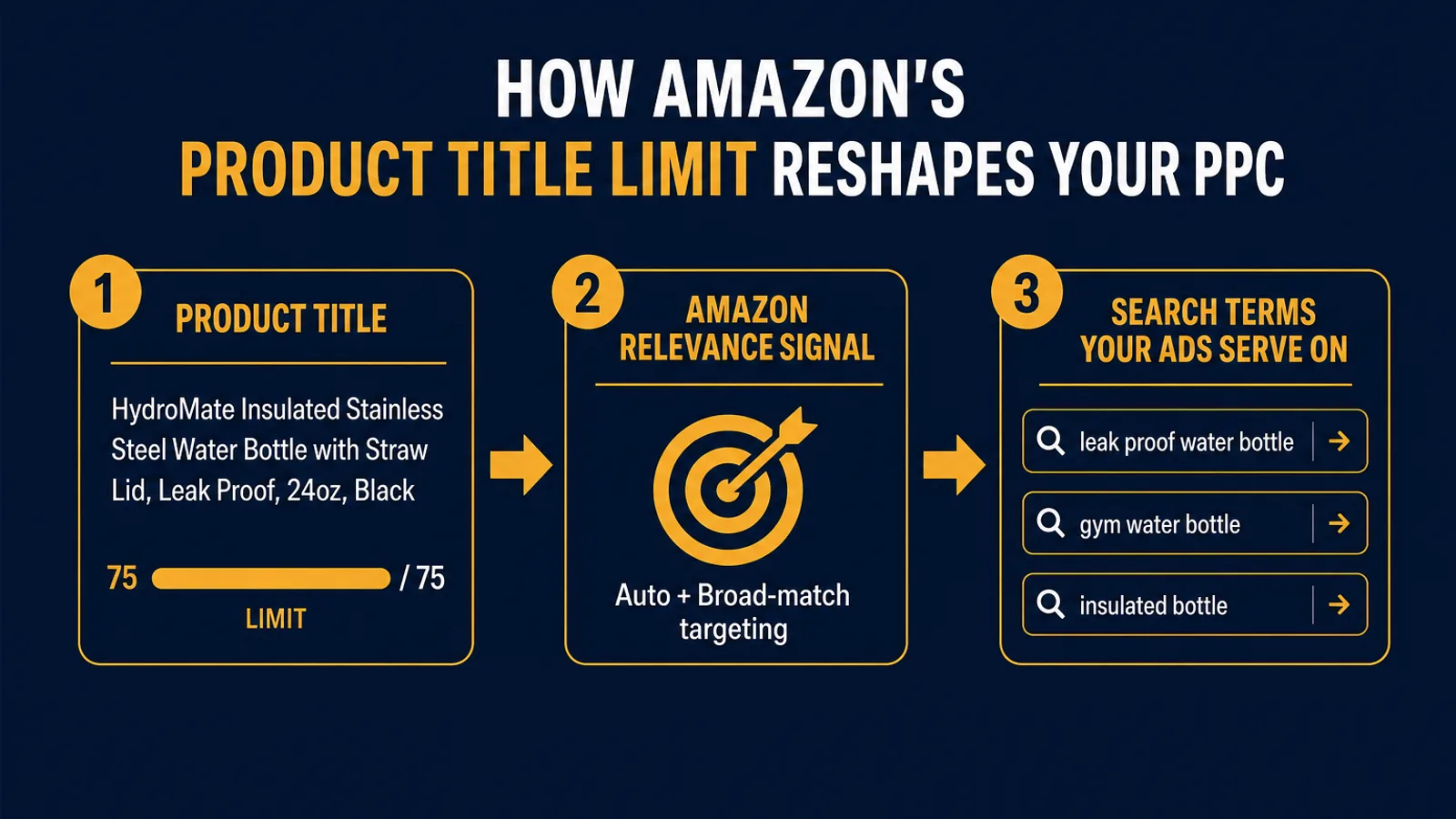
Amazon's 75-character title limit took effect on July 27, 2026. If you are reading this and your titles look untouched, the useful thing to know is that the deadline was the start of the rollout, not the end of it: Amazon's AI rewrites of non-compliant listings are landing gradually across the rest of 2026. Most of the coverage framed this as a listing and SEO story, fix your titles or Amazon's AI will fix them for you. That is true, but it buries the part PPC operators have to think about. Your product title is not just a display string. It is part of the listing text Amazon reads when deciding which searches your Sponsored Products ads are relevant to.
This post is the PPC read on the title change. We will cover what changed on July 27, what Amazon has since clarified (including its explicit claim that search and discoverability are unchanged), what that claim does and does not cover, and the concrete sequence for getting through the rollout window with your campaigns measured rather than guessed at.
What Actually Changed on July 27
The facts are simple and worth stating plainly. As of July 27, 2026, Amazon requires titles in all categories except media to be 75 characters or less, including spaces. For a lot of sellers that is a steep cut. Keyword-stuffed titles running 150 to 200 characters have been the norm in many categories for years, and half of that text is no longer eligible to live in the title.
To soften the loss, Amazon is introducing Item Highlights, a new field giving you an additional 125 characters for materials, recommended use cases, and attributes that help shoppers compare options. Amazon says this content is searchable and shows alongside the title in search results and on the product page. That matters, and we will come back to it, because it is the cleanest place to relocate keywords you have to evict from the title.
The enforcement mechanism is what makes it real. Any title still over the limit gets updated to an AI recommendation. Amazon generates the new title from your existing title, your bullets, and its own relevance signals. Your listing stays active the whole time, and you can still edit titles and Item Highlights yourself at any point. The catch is that once Amazon's version is live, changing it back is closer to a support case than a quick flat-file edit. The default outcome, if you do nothing, is that a model picks which of your keywords survives in the most prominent text field on your listing.
What Amazon Has Since Clarified
Amazon published a follow-up FAQ at the end of July answering the questions sellers were actually asking. Four things in it change how you should be thinking about the next few months.
The rewrites are gradual, not a single cutover. Amazon began generating recommendations on non-compliant listings on July 27, and says those changes roll out gradually across the rest of 2026. Listings stay active, editable, and searchable throughout. So if your titles were untouched on July 28, that is not the all-clear, it means your ASINs are still in the queue. Amazon also says more than 984 million product titles have been updated since the rollout began in June, so the machinery is running at real volume. Practically, this means the monitoring window is months long, not a weekend.
Sellers without Brand Registry get no review window at all. This is the part the earlier coverage, including the first version of this post, understated. Brand-registered owners get 14 days to review, modify, or approve an AI-generated change in Review Listing Changes before it goes live. If you are not brand registered, there is no buffer and no protection against an automatic rewrite. It lands, and you find out by looking. If that is you, checking your own listings on a schedule is the entire early-warning system.
The allocation is 75 plus 125, for 200 total. Item name gets 75 characters, Item Highlights gets 125. From August 10, Item Highlights displays beneath the item name consistently on desktop and mobile, though how much of it survives truncation still varies by screen size. If you need to move a large catalog at once, bulk edits submitted through the Category Listings report typically process within about eight hours.
Amazon says search and discoverability are unchanged. This is the headline claim, and it deserves to be stated straight rather than argued with. Amazon's position is that search and discoverability are not affected by the change, that item name and Item Highlights are both inputs to search, and that neither is prioritized over the other.
Take that at face value. It is a specific, checkable statement about how Amazon's search system treats the two fields, and it has a direct practical consequence: moving a keyword out of the title and into Item Highlights is, by Amazon's own account, not a demotion. That makes relocation the obvious play rather than a consolation prize.
It is also worth being precise about what the statement does not cover. It is a claim about the search and discoverability system. It is not a commitment about how automatic targeting and broad-match relevance behave for any individual ASIN once its title text actually changes, and Amazon's title guidance does not mention advertising or keyword targeting at all. Those are different systems answering different questions, and this FAQ was not written about the second one.
So the honest operator position is neither "nothing changes" nor "your campaigns are about to break." It is that this is measurable, so measure it. The rest of this post is about the mechanism and how to watch it.
Why This Is a PPC Problem, Not Just an SEO One
Here is the connection most of the title-limit coverage skips. On Amazon, organic relevance and ad eligibility draw from the same well. The text on your listing is what Amazon uses to decide both how you rank organically and which searches your ads can compete in.
Think about how Sponsored Products automatic targeting actually works. You do not hand it a keyword list. Amazon reads your product information and matches your ad to searches it judges closely related to your listing. Broad match keywords behave similarly, expanding around the terms Amazon associates with your product. In both cases your listing text is the input. So the question that matters for PPC is not "is Item Highlights searchable," which Amazon has answered, but "does the text still exist somewhere on the listing at all." A keyword you relocate is still there. A keyword you delete to make the character count work is not.
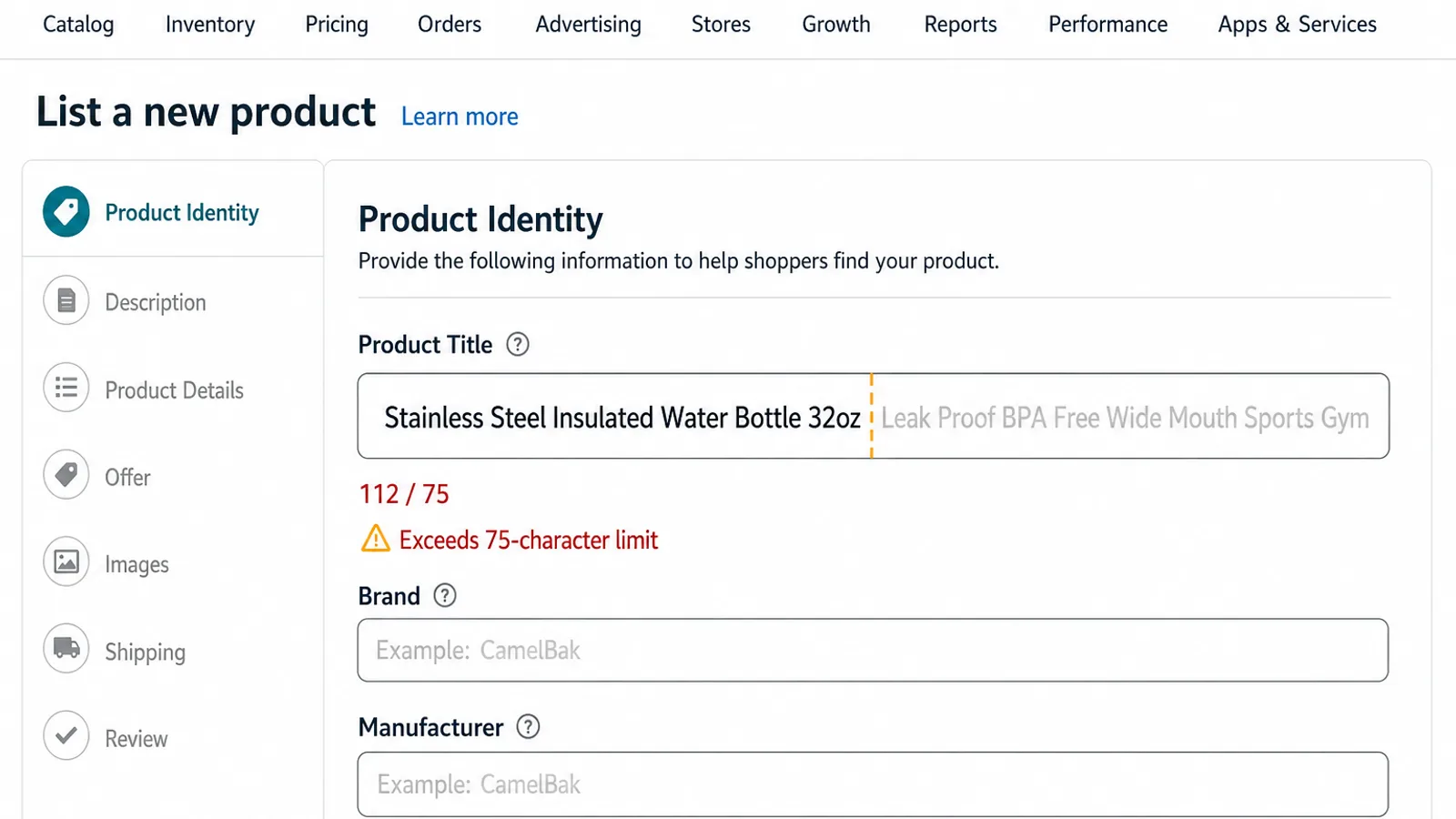
So picture a title that read, in part, "Stainless Steel Insulated Water Bottle 32oz Leak Proof BPA Free Wide Mouth Sports Gym." After the cut, "Leak Proof," "Wide Mouth," and "Gym" might not make it into the 75. If they land in Item Highlights, Amazon's position is that search treats them the same as before. If they fall off the listing entirely, which is what happens when you or a model trims to fit and nothing catches the overflow, then the terms your auto and broad campaigns were leaning on to judge "leak proof water bottle" and "gym water bottle" relevant are gone. That is the version of this worth watching for, and it is a difference you control, not one Amazon decides for you.
What Happens to Your Auto and Broad Campaigns
The campaigns most exposed to this are exactly the ones built to run with minimal intervention: automatic-targeting campaigns and broad-match keyword campaigns. They are designed to follow Amazon's read of your product, so when that read changes, they move with it.
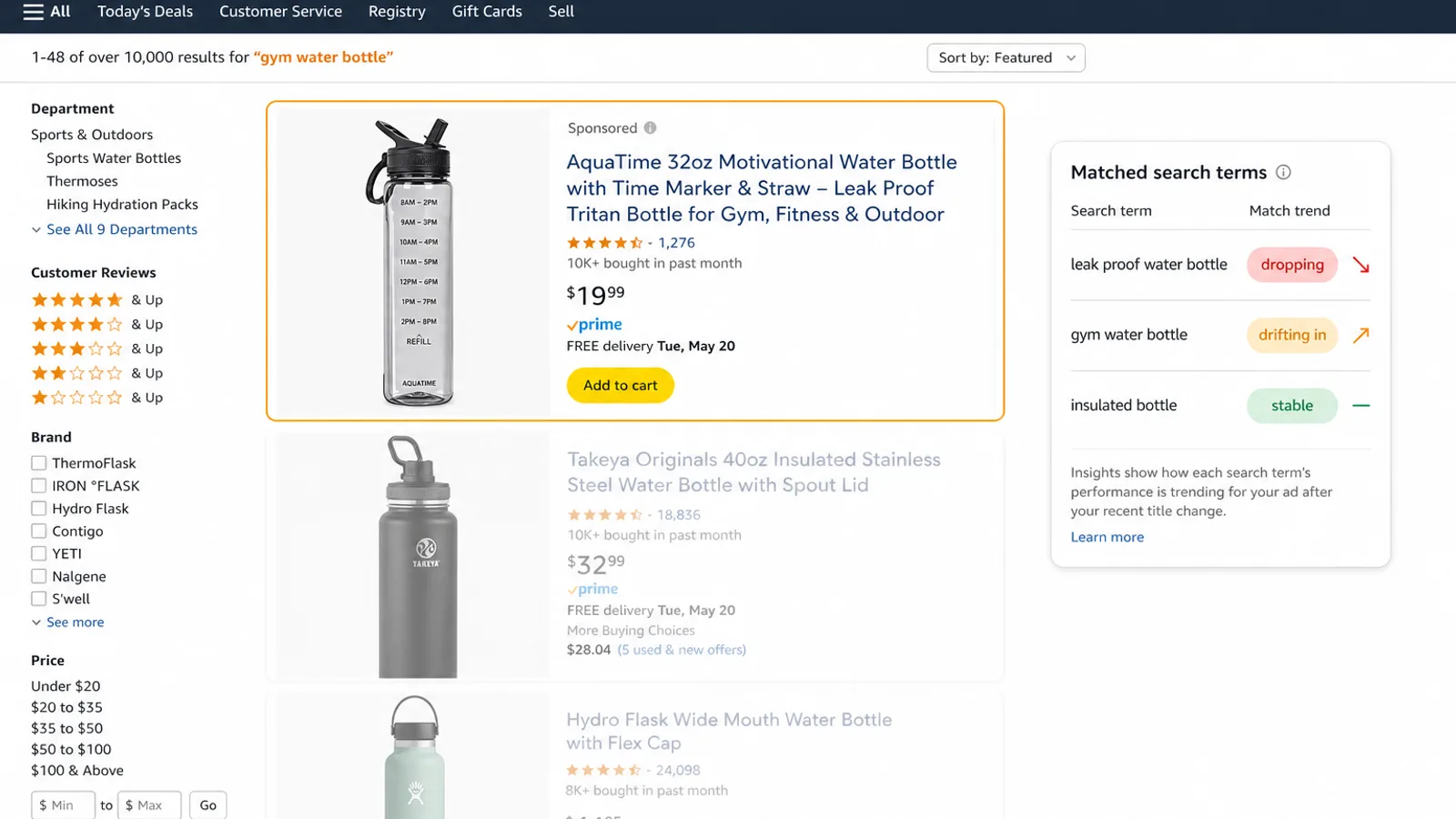
Two things are worth watching for after a title rewrite, and both are easy to miss because nothing in the Ads console announces a listing change as the cause. First, search-term drift: whether the set of customer queries your ads match against shifts over the days following the change. Terms you used to win quietly falling off, or new and looser terms appearing, is the signal. Second, harvested structure going stale. Every negative keyword you added and every exact-match keyword you graduated out of an auto campaign was a decision made against the old listing text. If the matched set does move, some of those negatives may now be blocking terms you want, and some exact-match winners may go quiet because the auto campaign feeding them is matching differently.
Whether either actually shows up on your ASINs is an empirical question, not a foregone conclusion, and the answer will vary by how much text you cut and where it went. The point is that it is cheap to check and expensive to assume. The danger is not that the effect is large, it is that it is invisible. ACoS moves a little, impressions on a few terms fade, a couple of new search terms show up in the report, and unless you are looking for it, you attribute the wobble to normal auction noise rather than to a listing change you made three weeks ago. For context, Sponsored Products CPCs sit around $1.18 on average across categories in 2026, so a campaign that drifts onto a handful of weaker, lower-converting terms is not a rounding error. It is steady margin leaking through a door you did not realize you opened.
Your Checklist for the Rollout Window
The gradual rollout is a gift in one respect: for most catalogs the rewrite has not landed yet, so you can still act on your terms instead of reacting to a title you did not author. The sequence below is the same one that applied before July 27, and it still works, because the deciding factor was never the date. It is whether you get to the ASIN before the model does.
Rewrite your own titles first, and keep your strongest ranking term in the item name. This is the single highest-leverage move, and it is still available on every ASIN Amazon has not reached. If you trim the title yourself, you decide what stays and, just as importantly, that nothing gets dropped off the listing entirely. If you let the model do it, you are trusting its relevance signals to make that call for you. Lead with the keyword you most want to defend.
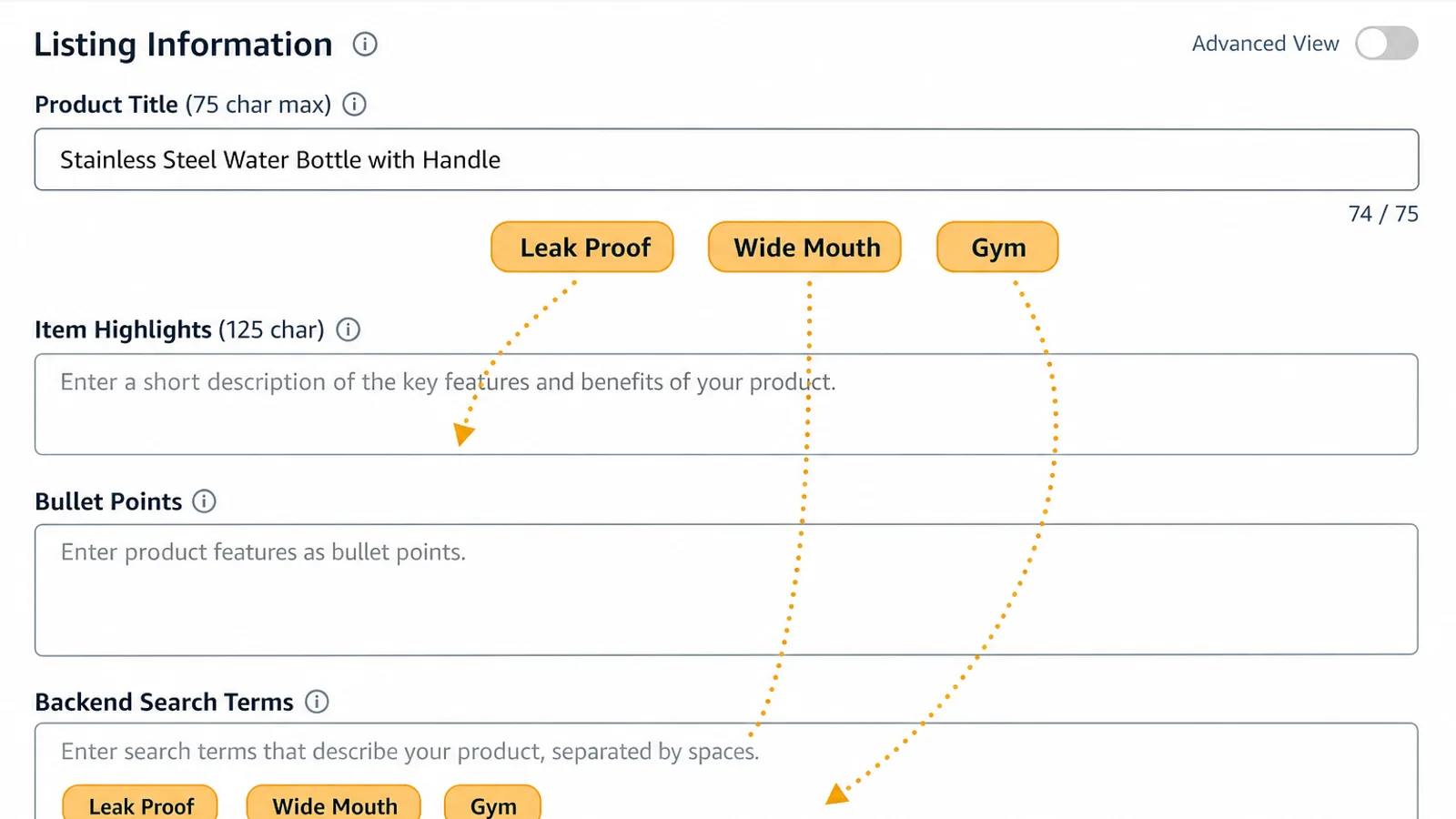
Relocate dropped keywords, do not delete them. This is the step Amazon's own clarification makes more attractive, not less. A term you move into Item Highlights sits in a field Amazon says is a search input on equal footing with the item name, and terms moved to bullets, A+ content, or backend search terms stay on the listing too. The 125-character Item Highlights field is the best new home for comparison keywords and use cases you cut from the title. Treat the trim as a redistribution, not a purge, and audit for overflow: the failure mode is text that fits nowhere and quietly disappears.
Baseline your search-term reports before each ASIN gets touched. This is the step PPC operators skip and later regret, and the gradual rollout means it is still actionable for anything not yet rewritten. Pull your Sponsored Products search-term report and your Search Query Performance data for your key ASINs while the current titles are live. That snapshot is your before picture. Without it you cannot tell, three weeks from now, whether a term fell off because of the listing change or for some unrelated reason.
Watch the two weeks after each rewrite, and know which ASINs were rewritten. If the matched-query set moves at all, it will resettle over roughly a couple of weeks. Compare the new search-term report against your baseline and look for winners that lost impressions, new terms that need a bid or a negative, and harvested exact-match keywords that went quiet. The prerequisite is knowing when a title actually changed, which is straightforward with Brand Registry and Review Listing Changes, and manual monitoring without it.
If you are not brand registered, check your listings on a cadence. With no 14-day review window, an automatic rewrite is something you discover rather than approve. A weekly pass over your top ASINs, comparing current item name against what you last set, is enough to catch it while the search-term data is still fresh enough to interpret.
Where Autron Fits
The hard part of this change is not the title edit. It is the months of watching afterward, across every ASIN that gets rewritten on a schedule you do not set, to find out whether the queries your ads match actually moved and whether your old negatives and harvested keywords still line up. That is continuous monitoring work, spread thin over a long rollout, and it is exactly the kind of thing that gets done once in August and forgotten by October.
Autron runs your bid loop against your goal while reading more than the Ads API alone. It pulls your Sponsored Products search-term data together with your Search Query Performance, sales, and traffic, so it can see when the terms your ads are matching start to move, whatever the cause. If a rewritten title does pull a campaign onto weaker, lower-converting queries, Autron re-prices those bids against your actual target ACoS or TACoS instead of leaving them where they were tuned for the old listing, and the negative-keyword harvesting picks up the new waste on its normal cadence rather than waiting for you to notice. If nothing moves, which is what Amazon says you should expect, you get that answer from the data instead of from a press release. You make the title decision; the system watches what follows.
FAQ
When does Amazon's 75-character title limit start? It took effect on July 27, 2026 for all categories except media. Amazon began generating AI recommendations for non-compliant listings that day, but the rewrites roll out gradually across the rest of 2026 rather than all at once. Your listings stay active, editable, and searchable throughout, and you can still update titles yourself at any point.
Does the title change affect my PPC campaigns? Amazon says search and discoverability are unchanged, and that item name and Item Highlights are both search inputs with neither prioritized over the other. That statement is about Amazon's search system, not a commitment about how automatic targeting and broad match behave for a given ASIN after its title text changes, and Amazon's title guidance does not address advertising. Treat it as something to verify: baseline your search-term reports before a rewrite lands and compare the matched-query set afterwards.
What is the Item Highlights field and is it searchable? Item Highlights gives you an additional 125 characters for materials, use cases, and attributes that help shoppers compare options, so the full allocation is 75 for the item name plus 125 for Item Highlights, 200 in total. Amazon says it is a search input on equal footing with the item name, which makes it the natural home for strong keywords you have to cut from the title. From August 10 it displays beneath the item name consistently on desktop and mobile, though truncation still varies by screen size.
Will Amazon rewrite my titles automatically? Yes, if a title is still over 75 characters. Brand-registered owners get 14 days to review, modify, or approve the AI recommendation in Review Listing Changes before it goes live. Sellers who are not brand registered get no review window and no protection against an automatic rewrite, so their only early warning is watching their own listings. Rewriting the title yourself is still the safer path, because you decide which keyword keeps the item-name slot.
How does Autron help after a title rewrite? Autron reads your Search Query Performance and Sponsored Products search-term reports alongside your sales and traffic data, so it can see when the queries your ads match start to drift after a listing change. When a rewritten title pulls your ads onto weaker terms, the bid loop re-prices against your goal and the negative-keyword harvesting catches the new waste automatically, instead of waiting for a manual review.
The 75-character title limit is being sold as a tidiness update, and on the surface it is. Amazon says search and discoverability are unchanged, and there is no good reason to doubt that. What the change does do is rewrite the listing text your automatic and broad-match campaigns read, across your catalog, on a schedule you do not control, for the rest of 2026. The sellers who treated July 27 as a one-day SEO chore have already moved on. The ones treating it as a PPC event are baselining their search terms, rewriting titles deliberately while they still can, and checking whether the matched-query set actually moved instead of assuming either way.
If you would rather have your bids and negatives respond to that automatically instead of on a manual audit, see how Autron manages it, or start with a free PPC audit to see where your ads are matching today.