
Amazon Ads Campaign Manager: A Working Guide for 2026
What Amazon Ads Campaign Manager is, how the unified console is laid out in 2026, which reports to trust, and the point where the interface stops doing the work for you.
TL;DR: Amazon Ads Campaign Manager is the console where you create, fund, and report on every Amazon ad type. Since the 2025 console merge it also holds Amazon DSP, an All view across ad products, smart search, and guidance cards. It is a good place to set strategy and read results, and a poor place to run the daily bid and search-term loop by hand: it shows what happened, not what to change.

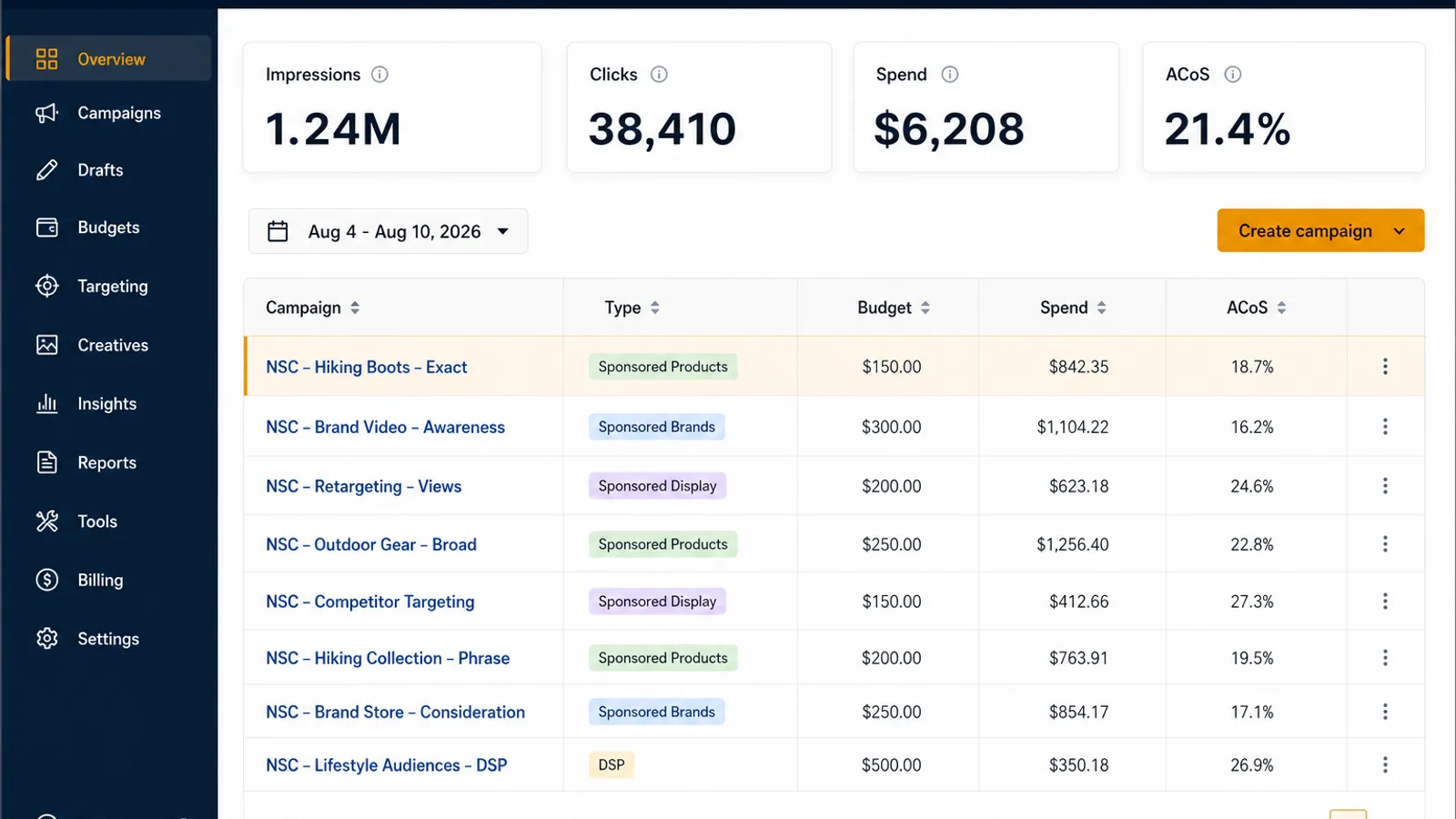
If you sell on Amazon, Amazon Ads Campaign Manager is where your advertising actually lives. It is the console behind the Advertising menu in Seller Central, and it is where campaigns get created, budgets get set, bids get changed, negatives get added, and reports get pulled. Most guides to it are screenshot tours that go stale the moment Amazon moves a button. This one is about the parts that stay true: how the console is organised, which numbers in it are trustworthy, and the specific point where clicking around inside it stops being a good use of your week.
That last part matters more in 2026 than it did two years ago, because the console got significantly bigger.
What Amazon Ads Campaign Manager actually is
Campaign Manager is not a product you buy. It is the management surface for an Amazon advertising account, and every seller running Sponsored Products already has it. Inside it you work down a fixed hierarchy:
- Account (a marketplace, in a country, under a manager account if you have one)
- Portfolio (an optional grouping, useful for budgets and for keeping brands or margin tiers separate)
- Campaign (carries the budget, the bidding strategy, and the placement multipliers)
- Ad group (carries the default bid and groups products with the targets that should reach them)
- Target (a keyword, a product, a category, or an audience) and ad (the ASIN being advertised)
Almost every structural mistake in an Amazon ad account comes from putting something at the wrong level of that list. Budgets belong to campaigns, so anything you want to fund separately needs its own campaign. Bids belong to targets, so anything you want to bid differently on needs to be its own target, not a variant buried in an ad group with twenty others. And a keyword should live in exactly one ad group, which is the reason we wrote separately about duplicate keywords across ad groups.
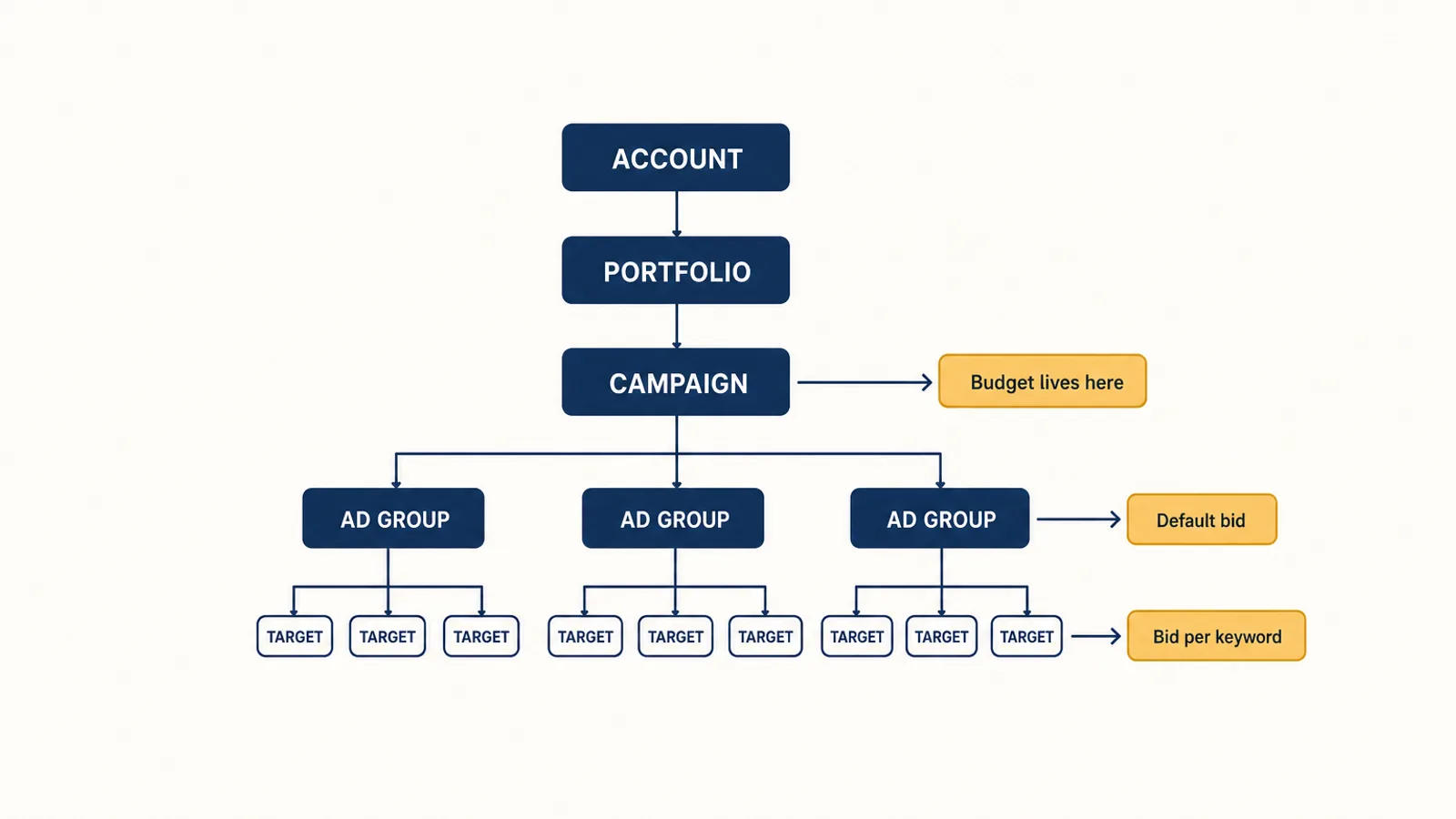
Get the hierarchy right and most of the console becomes navigation. Get it wrong and you spend the next year fighting your own structure.
What the 2026 console looks like
Amazon rebuilt Campaign Manager into a single workspace covering sponsored ads, multimedia formats, and Amazon DSP, announced at unBoxed in late 2025 and rolled out through 2026. If you have only ever used the older sponsored-ads-only view, four things are genuinely new:
The All view and a shared KPI bar. Sponsored Products, Sponsored Brands, Sponsored Display, and DSP campaigns appear in one list with one set of impressions, clicks, and conversion totals across the top. This is useful for reading the account and dangerous for judging it, because a blended KPI bar averages a healthy format together with a failing one.
Smart search. A natural-language filter across your campaign data, so you can ask for something like Sponsored Products campaigns above a thousand impressions with zero purchases and get that list rather than building the filter by hand. Amazon reports that advertisers using smart search cut bid optimisation workflow time by 26% in early testing. Treat that as what it is: a faster way to find the campaigns worth looking at, not a decision about what to do with them.
Guidance cards. Recommendations surfaced in the interface, typically products you are not advertising or conversion paths you are not covering. They are worth reading and worth checking. A recommendation to advertise an unadvertised ASIN is only good advice if that ASIN has the margin and the inventory to support it, and the card does not know either.
A universal campaign button and account switching. One creation flow for every ad product, and the ability to move between client accounts without logging out. If you manage several brands, this is the single biggest time saving in the release.
We covered the strategic consequences of the merge, including what shared budget pools do to margin control, in our post on what the console merge means for sellers. The short version: one workspace is convenient, one budget across ad types is a decision you should make deliberately rather than inherit.
The reports worth your time, and the deadline attached to them
Reporting is the half of Campaign Manager that earns its keep. Three reports carry most of the value:
The search term report shows the actual queries that triggered your ads, alongside spend and conversions per query. This is the raw material for both halves of keyword work: promoting converting terms into their own targets, and negating the ones burning budget. If you only open one report a week, open this one. Our negative keywords guide covers how to work it properly.
The placement report splits performance across top of search, rest of search, product pages, and off-Amazon. Without it, your placement multipliers are guesses. With it, you can see whether paying a premium for top of search is actually returning anything. This report also matters more since Sponsored Products began serving inside creator content in August 2026, because off-Amazon spend now needs watching separately rather than blending into a campaign average.
The advertised and purchased product reports tell you whether the ASIN you paid to advertise is the ASIN that sold. Frequently it is not, and a campaign that looks unprofitable on advertised-product revenue can be quietly funding sales of a variant or a bundle.
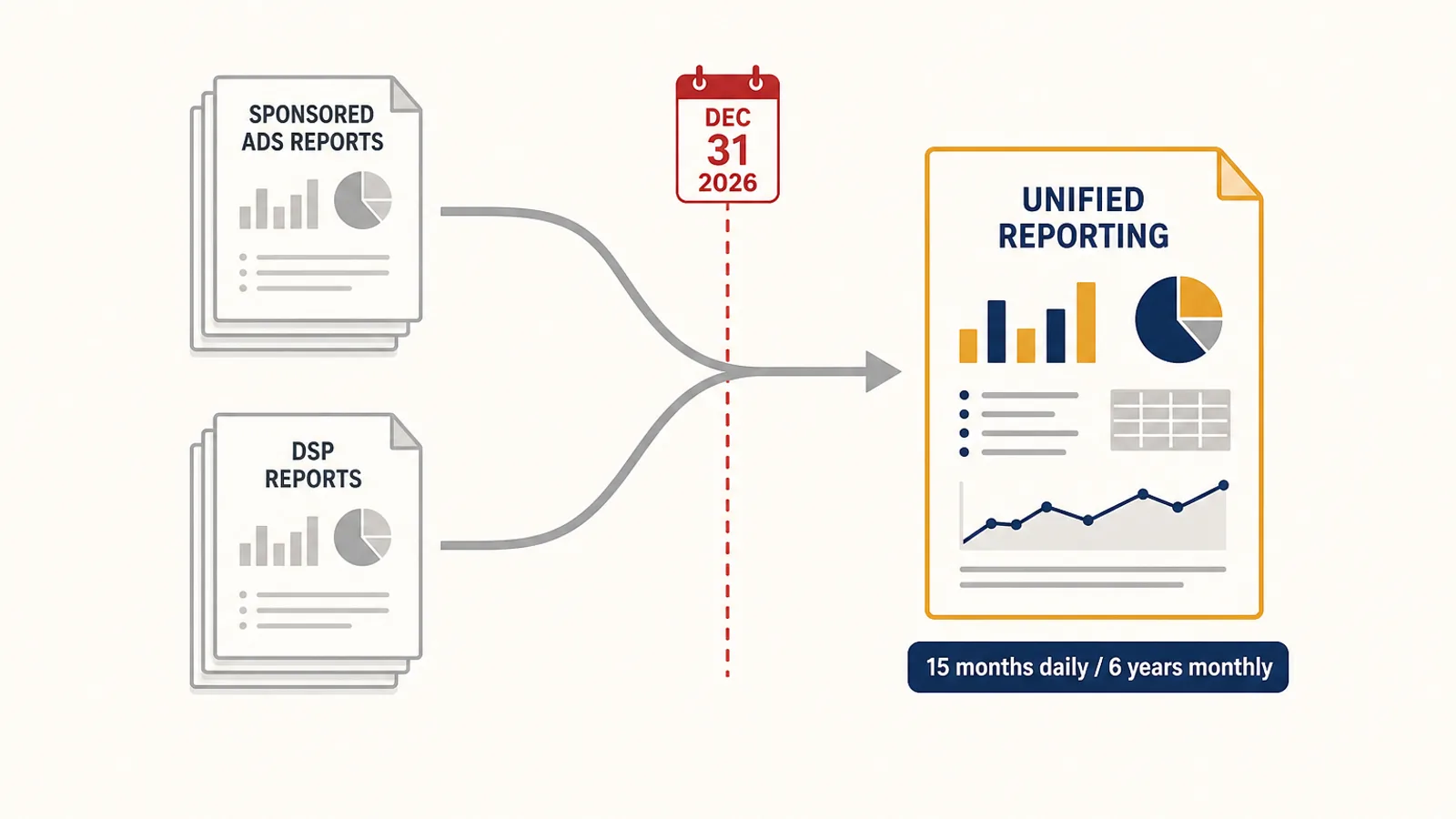
There is a date on the calendar here. Unified reporting reached general availability on June 8, 2026, pulling sponsored ads and DSP data into one report across accounts, countries, and ad products, with up to 15 months of daily data and six years of monthly data. The same announcement sets out that the legacy Sponsored Ads and Amazon DSP report sets are being sunset by December 31, 2026.
If you have a saved report, a spreadsheet, a dashboard, or an agency deliverable built on the legacy report shapes, it has a shelf life measured in months. Rebuild it on unified reporting now, while you can still run both side by side and reconcile the differences. Doing that reconciliation in January, with no legacy report to compare against, is a much worse job. Note also that unified reporting standardises attribution across ad products, so some of your historical numbers will not tie out exactly against the old reports. Better to discover that on your own schedule.
Where Campaign Manager stops doing the work
Everything above is the case for the console. Here is the honest limit.
Campaign Manager is a reporting and configuration surface. It tells you, accurately and in growing detail, what already happened. It does not decide what your bid on a specific keyword should be tomorrow given that keyword's own conversion history, your product's margin, your current inventory position, and the fact that its ACoS over fourteen days is noise rather than signal.
That decision is not hard for any single keyword. It is hard because there are hundreds of them, every week, forever.
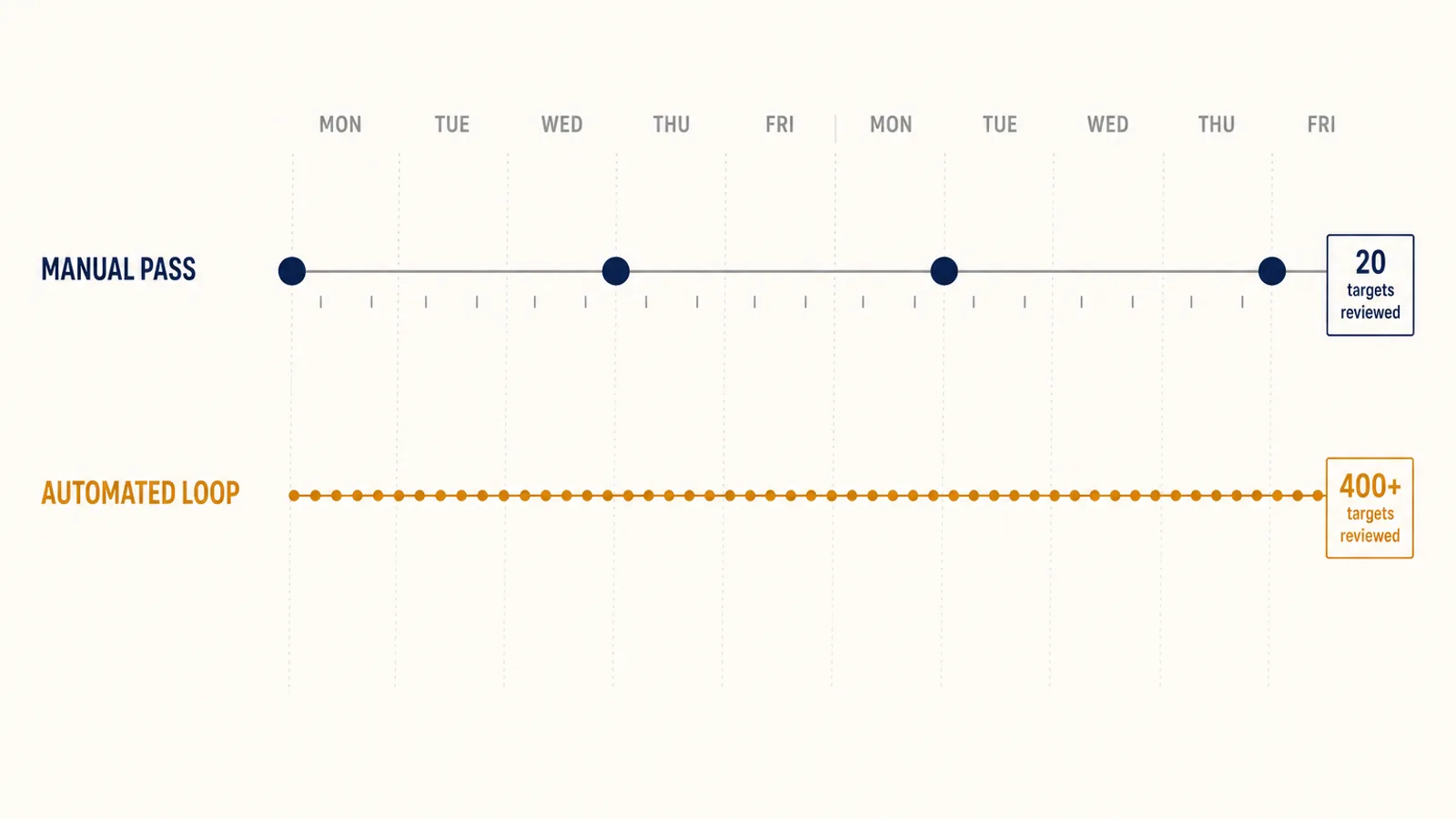
The realistic failure mode is not that a seller makes bad decisions in Campaign Manager. It is that they make good decisions on the twenty targets they had time to look at, and no decision at all on the other four hundred. Bids drift. Search term reports go unread for three weeks. A converting term never gets promoted. A wasteful one never gets negated. None of that shows up as a dramatic problem. It shows up as an ACoS that is two points worse than it should be, permanently.
This is the gap Autron is built for. Autron Pro reads your Ads API and SP-API data together, then runs the daily loop the console expects you to run by hand: bid optimisation against a target ACoS or TACoS you set, placement adjustments, negative-keyword harvesting, and campaign creation from the search terms that are actually converting. You keep the strategy in Campaign Manager, which is where strategy belongs. The tactics run on a cadence a person cannot sustain.
A practical way to use the console
If you take nothing else from this guide:
- Fix the hierarchy first. Separate budgets by what you want to control and separate bids by what you want to differentiate. Most optimisation problems are structure problems wearing a costume.
- Never judge on the blended KPI bar. Split by ad product and by placement before you conclude anything.
- Read the search term report weekly. It is the highest-value ten minutes in the console.
- Migrate off the legacy reports before December 31, 2026. Rebuild now while both exist.
- Automate the repetitive half. The console is good at showing you the account. It was never designed to work the account for you.
FAQ
What is Amazon Ads Campaign Manager? Campaign Manager is the section of the Amazon Ads console where you create and manage campaigns, set budgets and bids, add targets and negatives, and pull reports. It covers Sponsored Products, Sponsored Brands, and Sponsored Display, and since the 2025 console merge it also covers Amazon DSP and multimedia formats in the same workspace. It is the operating surface for your ad account, not a separate tool you buy.
How do I find Campaign Manager in Seller Central? From Seller Central, open the Advertising menu and choose Campaign Manager. That drops you into the Amazon Ads console for the marketplace you are currently signed into. If you sell in several marketplaces, check the account and country switcher at the top before you read any number, because the console opens on one marketplace at a time and it is easy to optimize the wrong one.
What changed in Campaign Manager in 2026? Two things matter. The console merge folded Amazon DSP and sponsored ads into one workspace with an All view, a shared KPI bar, natural-language smart search, guidance cards, and a universal campaign-creation button. Separately, unified reporting reached general availability on June 8, 2026, and the legacy Sponsored Ads and DSP report sets are scheduled to be retired by December 31, 2026, so any saved report or internal process built on them needs rebuilding this year.
Which Campaign Manager reports actually matter? Three carry most of the weight. The search term report tells you what shoppers actually typed, which is where negatives and new targets come from. The placement report splits performance by top of search, product pages, rest of search, and off-Amazon, which is the only way to see whether a placement multiplier is earning its keep. The advertised and purchased product reports show whether your ad spend is selling the ASIN you targeted or a neighbour.
Is Campaign Manager enough to run Amazon PPC on its own? For a small account, yes. The interface handles campaign creation, budgets, bids, and reporting perfectly well. It stops scaling when the number of decisions per week exceeds what a person can make carefully: a few hundred targets each need a bid judged against its own conversion history, and search term reports need reading before the waste compounds. Campaign Manager reports the past accurately. It does not act on it.
Next step
If you want to know how much of your current spend is sitting in the gap described above, the fastest way to find out is to measure it. Our free PPC audit reads your account and reports where budget is going that should not be, no commitment attached. If you already know and just want the loop running, sign up for Autron Pro and set a target instead of a bid.