
Amazon needs to be reconnected
Why Autron's access to an Amazon account lapses, how to tell, the one-minute fix, and what to do when reconnecting does not stick.
TL;DR: Amazon authorisations expire and can be revoked from Amazon's side. When that happens Today shows Reconnect Amazon. Press it, press Connect or Reconnect on the Amazon Advertising row, and approve on Amazon; everything resumes on its own in about a minute. You can also reconnect any seller from Settings → Connections.

AutronHelp Center · October 2, 2026
How you will notice
- Before it lapses: from 30 days ahead, a banner across the top of the app says when your Amazon Ads connection expires, with Reconnect.
- Today leads with Autron can't see or change your ads right now and a Reconnect Amazon button. Until you reconnect there is no bidding, no sync and no reports; your campaigns keep running on Amazon as they were. Reconnecting takes about a minute and everything resumes automatically.
- The sidebar shows Amazon Ads needs reconnecting.
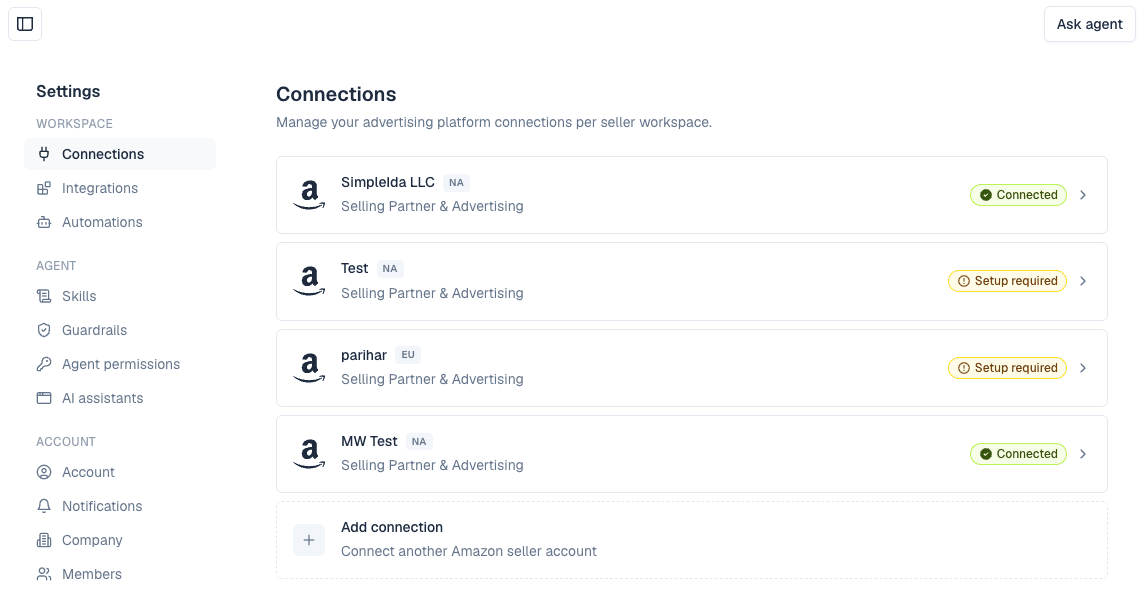
- Settings → Connections shows the seller as Setup required instead of Connected. A seller that has never connected Selling Partner also reads Setup required, which is harmless; open the seller to see which row needs connecting.
- The agent tells you it cannot read the account rather than returning empty numbers as though nothing were wrong.
Why it happens
- Amazon expires the permission. Advertising authorisations lapse periodically and have to be granted again. Nothing you did.
- Someone revoked it — in Seller Central (Apps and Services → Manage your apps) or in the Ads console's account access.
- The Amazon user who authorised Autron lost their own access. They left the business, or their role on the Ads account changed. Autron only ever has what that user had.
- The wrong Amazon account was used. Amazon signs you in wherever the browser already is. Approving on a personal or a different client's account gives Autron access to that one, and the seller you meant stays unconnected.
Reconnecting
- Press Reconnect Amazon on Today, or open Settings → Connections and the seller.
- Press Connect or Reconnect on the Amazon Advertising row — and on the Selling Partner row if that is the one that lapsed.
- Check the account name on Amazon's approval screen before approving. Sign out of Amazon in that browser first if it shows the wrong one.
The row shows as connected, the engine picks up on its next run, and the syncs catch up the days that were missed.
If it will not stick
- The Amazon Advertising row goes back to Connect within minutes. The Amazon user lacks the advertising permission. Access has to be granted by someone with admin rights on the Amazon Ads account — ask the account owner.
- Amazon shows an error page instead of the approval screen. Usually a browser signed into two Amazon accounts at once. Use a private window.
- Repeated lapses on the same seller. Ask the agent to pass it to the team, or email hello@autron.ai with the seller name; the team can see why the authorisation keeps failing.