Rankings shows where your products stand on the Amazon searches that bring you the most sales, every day. Autron reads those searches for you and works out what moved: a product slipping down a search that matters, a rival arriving at the top, a rival in the top 5 cutting its price. The price cuts that need you go at the top of the page. You stop checking Amazon by hand, and you find out about a fall the week it starts, not the month after.
What you get:
- Every product's place on each search that sells it, with a square for each day.
- What moved this week, told apart from the ordinary day-to-day wobble.
- Who is ahead of you on each search: their price, rating, reviews, badges and whether they are advertising.
- Needs you: the rival price cuts worth your attention, and nothing else.
- An agent that reads the same pages, so you can ask what changed and what to do about it.
There is nothing to set up. Autron chooses your searches from where your sales come from and starts reading them on its own.
Where to find it
Open Goals › Rankings. On the Agent plan, Goals opens on Rankings. On Pro it sits beside Ads, the ad engine's view.
Rankings is for Amazon, on the marketplace you sell most in. Autron needs your Seller Central account connected to know which results are yours.
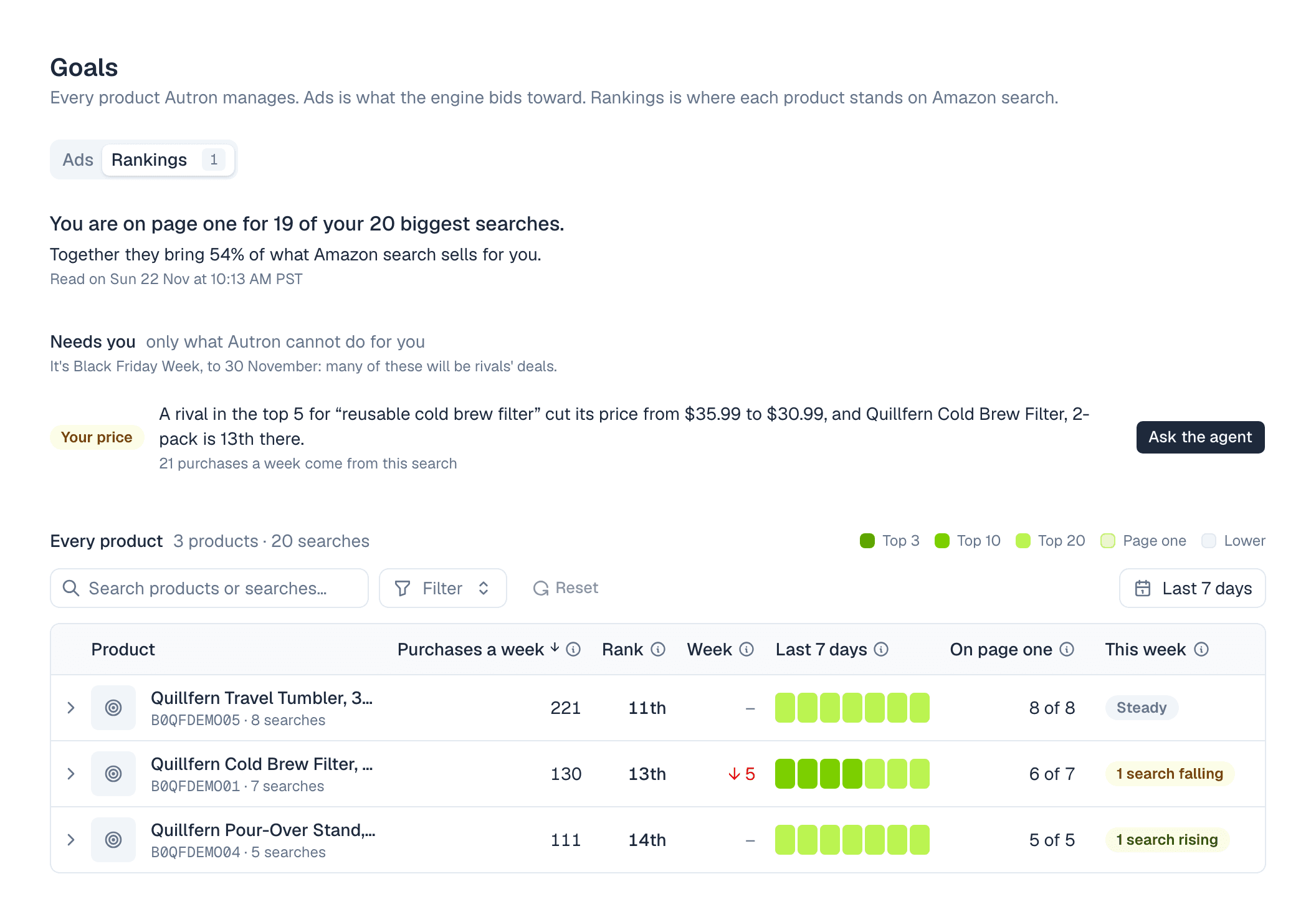
- The number on the Rankings tab: how many products are waiting under Needs you, so you can see at a glance whether anything needs you.
- The key: what each square's colour means, from Top 3 to Lower. Every square on the page uses it.
Which searches Autron reads
Autron takes the searches that brought you the most purchases over the last 13 weeks, from Amazon's Search Query Performance. Pro tracks up to 100 searches and Agent up to 50. The list is chosen again each week, so it follows your sales. A search you already track keeps its place unless it falls well behind, so its history stays unbroken.
Each search is read once a day: about the first 96 results, two pages of 48, as a shopper in that marketplace sees them. Your first readings arrive within a day of tracking starting.
The summary at the top
Three lines tell you how you stand before you read any table:
- You are on page one for 19 of your 20 biggest searches. Page one is Amazon's first 48 results.
- Together they bring 54% of what Amazon search sells for you. That is how much of your search-driven sales these searches cover, so you know how much of the picture you are looking at.
- Read today at 10:13 AM: when the newest reading was taken, in the marketplace's own time.
Needs you
Needs you lists only what Autron can't do for you. Today that is your price.
A product appears when a rival in the top 5 for one of its searches has cut its price at least 10% below its usual price, across its latest readings rather than for one day, on a search where your product is in the top 20. Those are the cuts that can move your sales, and a one-day blip never makes the list.
Each row names the search, the rival's price before and after the cut, where your product stands there, and how many purchases a week the search brings you, so you can judge how much it matters. Each product appears once, however many of its searches changed. The three products whose searches bring you the most purchases show first; N more opens the rest.
During an Amazon event such as Black Friday Week, a line under the heading says many of these will be rivals' deals.
Press Ask the agent on a row to talk it through. It opens the agent with the question "Should I match the rival's price on …?", and the agent answers from the same readings and your own sales.
Every product
The table lists your products, biggest first by Purchases a week. A product here is a listing family: its sizes and colours count together. Point at any column's ⓘ for what it means.
| Column | What it tells you |
|---|---|
| Purchases a week | What the product sells a week through the searches listed under it, from Search Query Performance, averaged over 13 weeks. Point at the number for its share of everything the product sells through Amazon search. |
| Rank | On a product, half its purchases come from searches where it ranks this high or better. On one of its searches, it is the product's place there. Sponsored places are not counted. Point at a rank for its place among the ads that day. |
| Week | Places gained or lost against the week before. A dash means it stayed within its usual day-to-day movement, so a dash is good news, not missing data. |
| The squares | One a day, oldest on the left, coloured by the key above the table (on a product, its typical place across its searches that day): Top 3, Top 10, Top 20, Page one and Lower. Point at a square for its day and its place, and on the last 7 days its place among the ads. |
| On page one | How many of its searches it is on page one for at the newest reading. |
| This week | On a product: how many of its searches are falling or rising, Rival moved, Steady, or First week. On one of its searches: Falling, Rising, Rival cut its price or New rival. |
Autron needs a week of readings to tell a real change from a day's wobble, which is why a new product says First week until then.
The table shows ten products first; Show all lists the rest.
Open a product to see its searches
Press the arrow beside a product to see every search that sells it, each with its own purchases, rank, move and squares. This is where you see which search a fall came from.
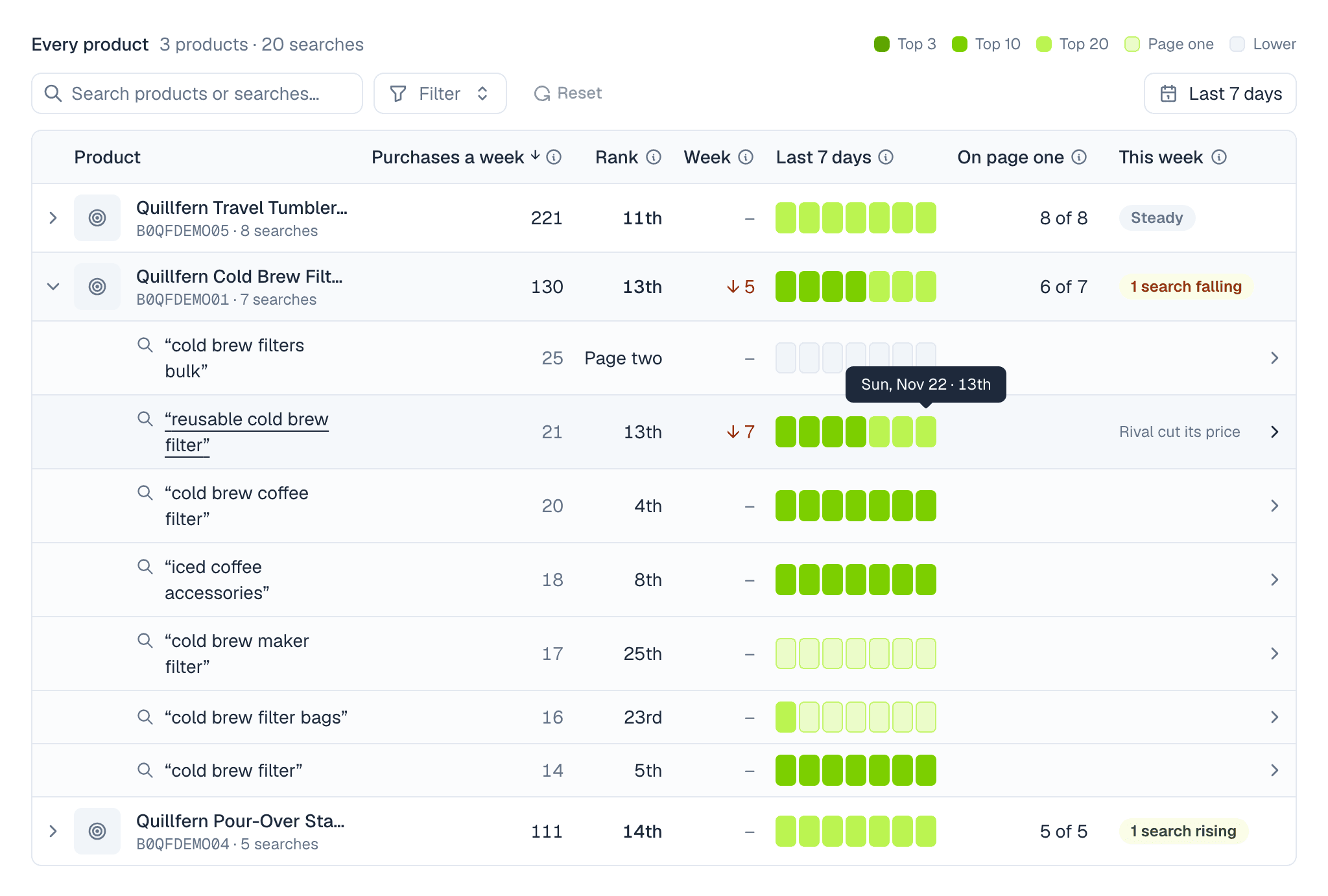
A rank of Page two means the product was in results 49 to 96. Not found means it wasn't in the results Autron read that day. A grey square means the product was below page one that day; a dashed one means that day wasn't read.
Open a search to see the page as Autron read it
Press a search to open it. The panel shows the first ten results as a shopper saw them that day:
- Today: each result's place, coloured by the same key.
- Ad: its place among the ads, when it was advertising. Ads change with every load: when the newest page had none, the column shows the latest page that did, and says which day.
- Product: the title, with Yours on your own listings, New to the top 5 on a rival that has just arrived and stayed, and Amazon's own Amazon's Choice and Best Seller badges.
- Price, Rating, Reviews and Bought last month, as Amazon showed them.
The line under the search sums it up: how many purchases a week it brings you, where your product is, and whether a rival in the top 5 cut its price or arrived this week.
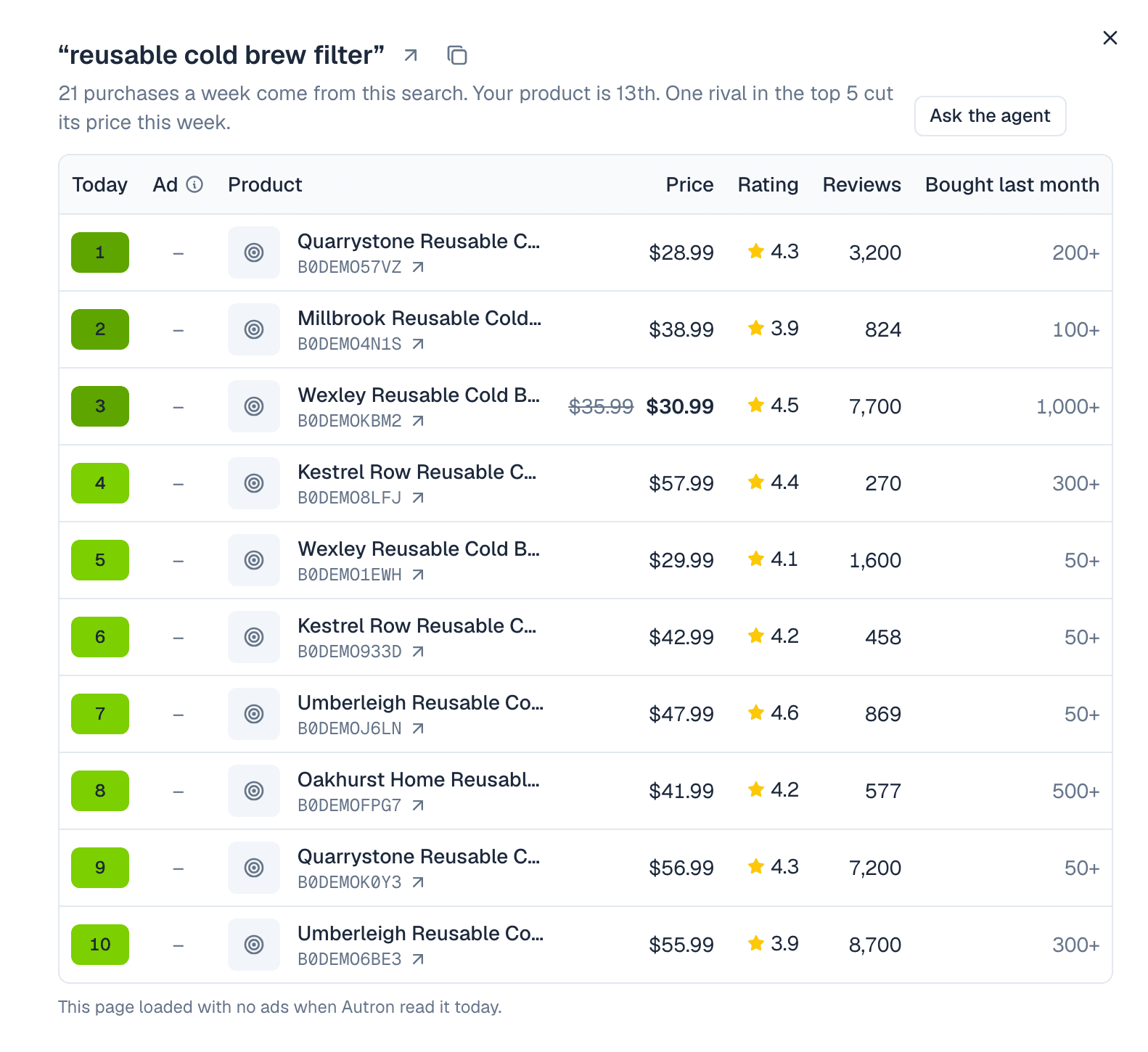
- ↗ and copy: run the same search on Amazon, or copy its words, ready to paste into Amazon or a campaign.
- An ASIN: copy it, or press ↗ to open the product on Amazon.
- A price cut: a rival that cut its price shows the old price struck through beside the new one.
Ask the agent in the panel asks "Who am I up against on …?" The agent can read the whole first page Autron read, not only these ten, so it can compare prices, ratings, review counts and who is advertising.
Find, filter and sort
With many products, three tools get you to what matters:
- Search matches a product by its name or ASIN, or by one of its searches. Type "pour over" and it finds the Pour-Over Stand, and any product whose searches include those words, opened on those searches.
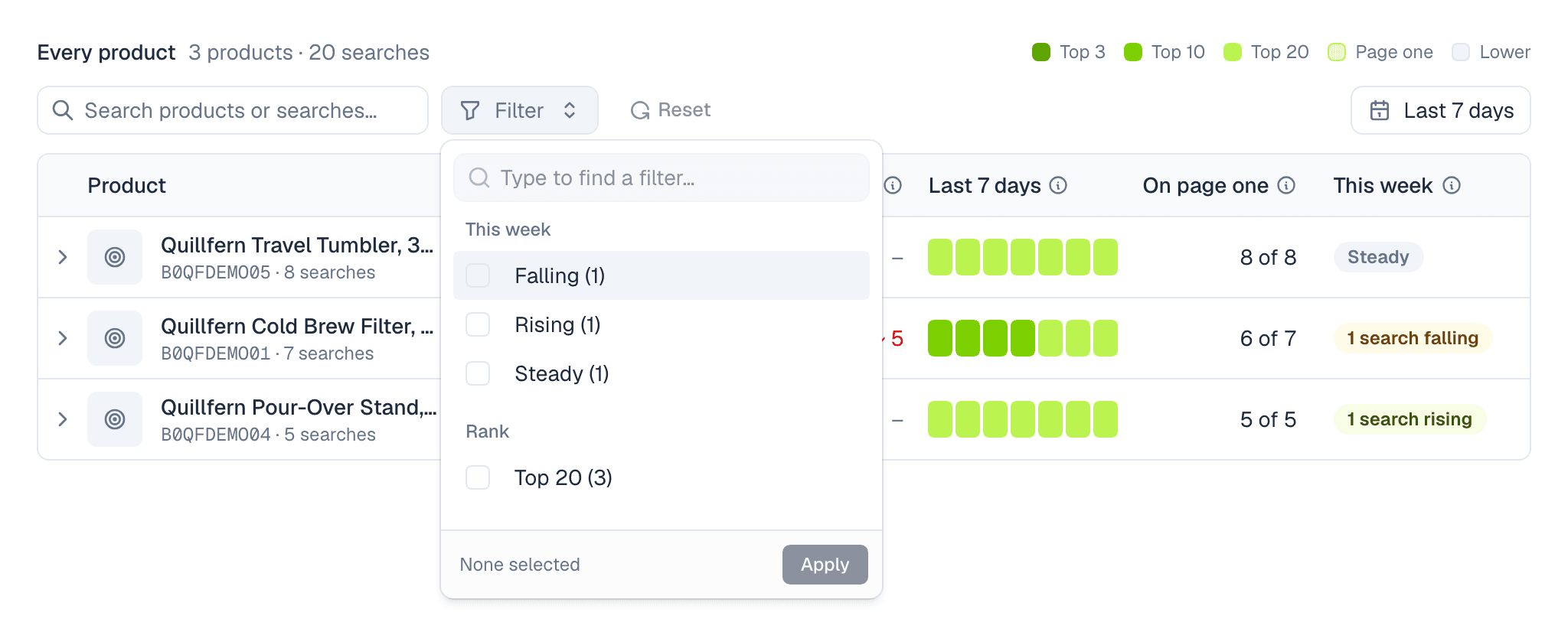
- Filter narrows the table by This week (Falling, Rival moved, Rising, Steady, First week) and by Rank (Top 3, Top 10, Top 20, Page one, Lower). Each option shows how many products it holds. Reset clears both.
- Sort: press a column's name to sort by it, and again to turn the order round. The first press always gives the useful order: Week shows the biggest falls first, On page one the fewest first, This week falling first.
Look further back
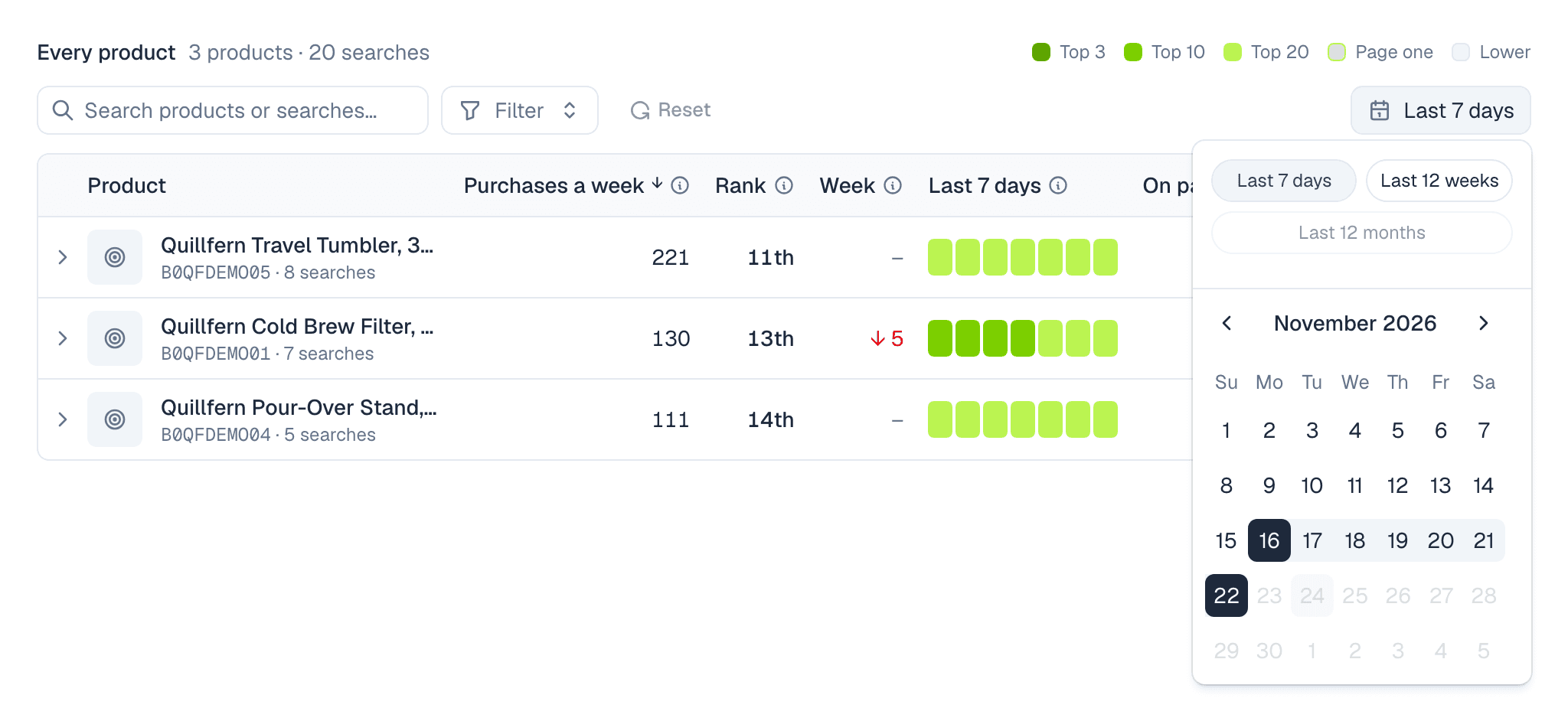
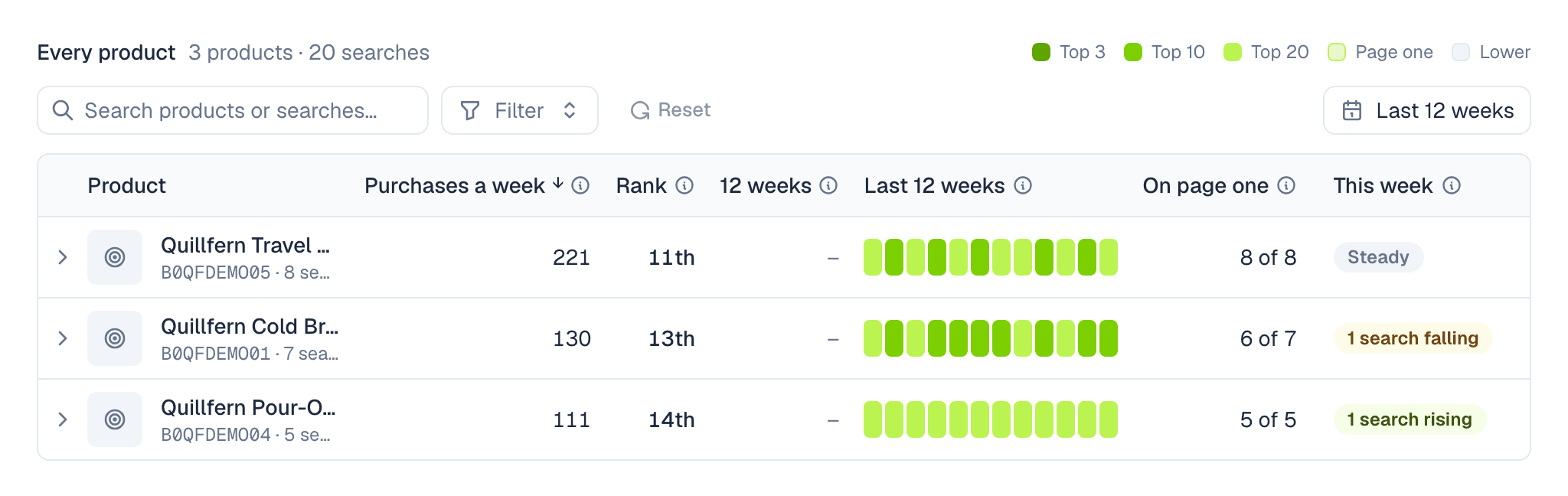
The squares cover the last 7 days. Press Last 7 days to pick a longer period:
- Last 12 weeks opens after three weeks of readings.
- Last 12 months opens after a year.
- Or pick any days on the calendar between your first reading and the newest, up to 14 months.
A square stays a day for up to two weeks. Over a longer period each square is a week, then 30 days, showing the middle of its readings, so a single odd day never colours a whole week. The Week column becomes the move across the whole period, so you can tell a new fall from a long, slow slide.
Send a view to someone
The page's address keeps what you are looking at: the period, the order and the search you opened. Copy it from your browser and a teammate opens the same view. For example:
On a product's own page
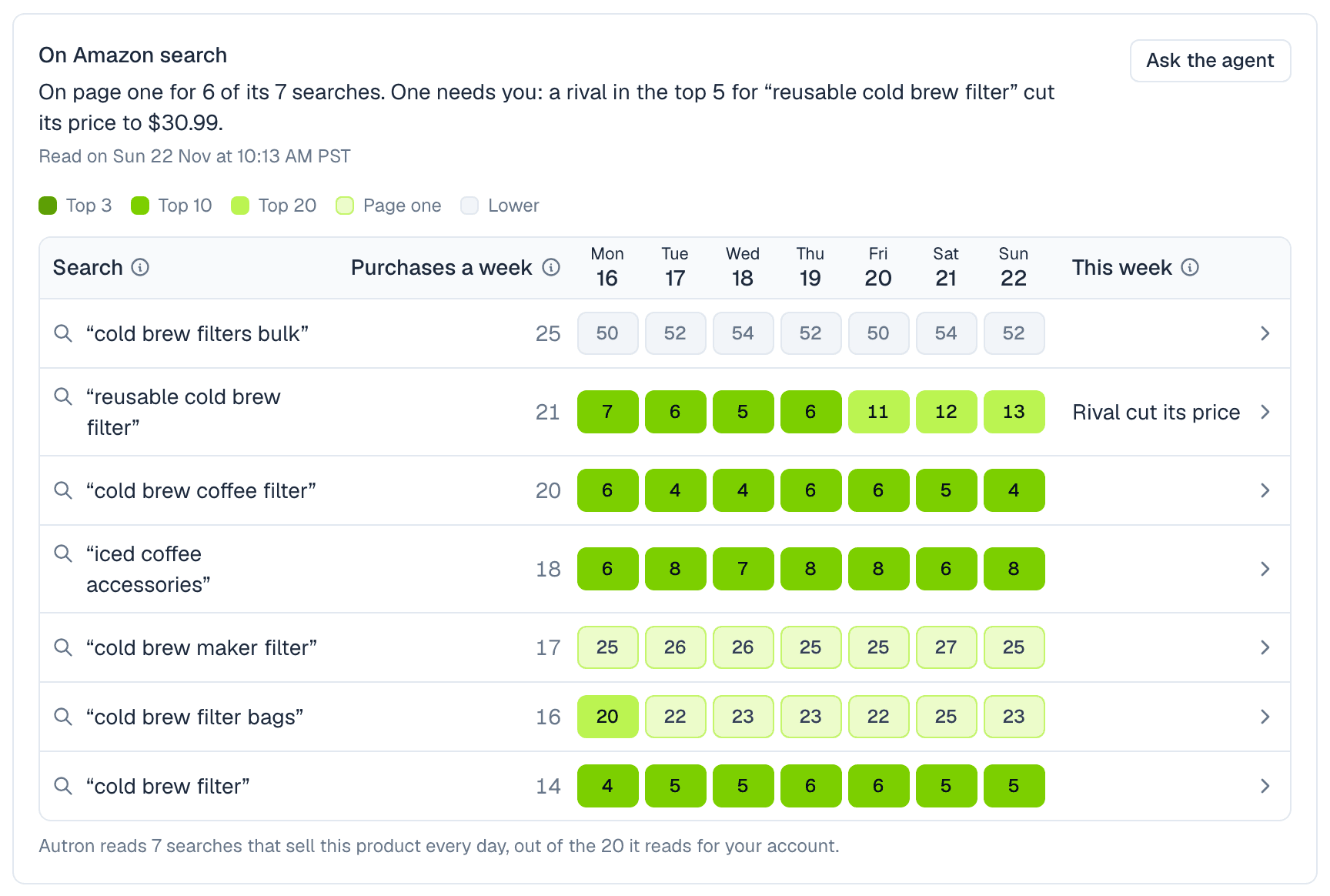
On Pro, each product's page on Goals carries an On Amazon search card under the ad engine's, so ads and search read as one story about the product. It lists the product's searches with a square a day, the rank written in each, and the one thing that needs you, if there is one. A search opens to the same panel as on Rankings.
On Today
When something on Rankings needs you, Today carries one Suggestion row about it: the product, the search and the rival's new price, with Ask the agent beside it. It is only ever the biggest one, so Today stays a short list; the rest wait under Needs you.

Ask the agent
The agent reads the same readings as the page: your places, who holds the top of each search, their prices, ratings, badges and offers, and who is advertising. Ask it in the app, or through Autron in Claude or ChatGPT. Things to try:
- "Which products dropped off page one this week, and on which searches?"
- "Who ranks above me for my biggest search, and at what price?"
- "Which of my searches have a rival running a deal right now?"
- "Is my cold brew filter's fall on 'reusable cold brew filter' a one-off, or has it been sliding?"
- "Which searches am I on page two for that bring me real sales?"
Because it also reads your sales and your ads, it can tell you whether a search is worth fighting for, not just where you stand on it.
Get the most out of Rankings
- Start the week on the biggest falls. Sort by Week, or filter This week to Falling and Rival moved. That is your short list.
- Weigh a fall by what the search sells. A drop on a search bringing 20 purchases a week matters more than one bringing 2. Purchases a week sits next to every rank for this reason.
- Open the search before you act. The panel shows who passed you and why it might be: a lower price, more reviews, a new badge, or ads above you.
- Check the longer view. Switch to the last 12 weeks to see whether a fall is new or part of a slide.
- Read Not found everywhere at once as a warning. If a product that usually ranks is Not found on every search on the same day, check its stock and its listing first.
- Expect more price cuts during events. In Black Friday Week or Prime Day, many rivals run deals. Needs you says so; whether to match is your call.
- Hand the thinking to the agent. Press Ask the agent on anything that worries you, and it starts from the same readings you are looking at.
When this does not work
If Rankings says Rankings are on their way or No readings yet, Autron is still choosing your searches or waiting for the first daily reading. That takes up to a day once tracking starts. If it lasts longer, email hello@autron.ai and the team will look.
If a longer period says it could not be read just now, the table shows the last 7 days instead; try again in a minute.